Select to view content in your preferred language

How can I process Mavic 3 thermal images?

1584
5
Jump to solution
06-18-2024 04:30 PM
cdanielvarons
Occasional Contributor

Hello Site Scan community.

I'm trying to process a set of images captured with the Mavic 3 Thermal drone. These images load and appear in the mission, but when I process them I get the following error:
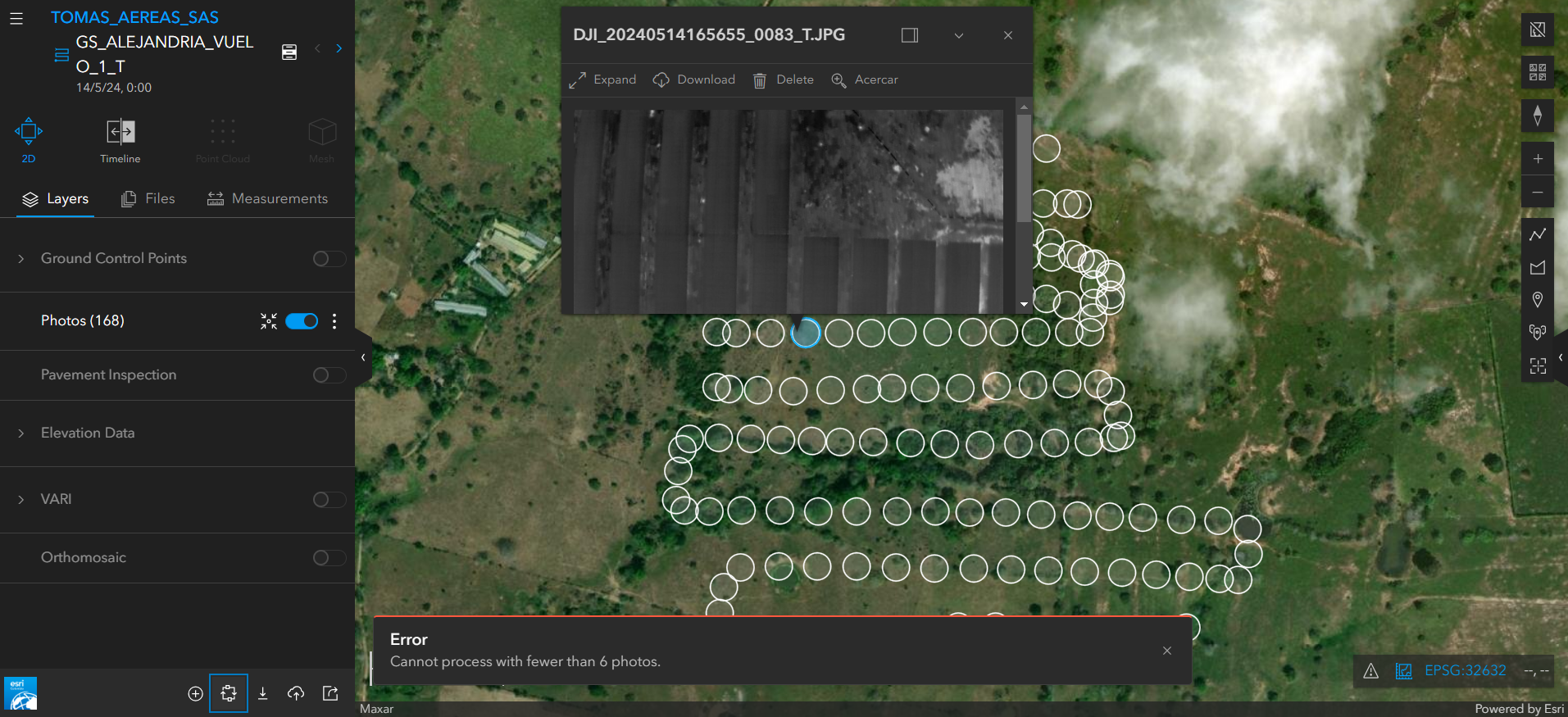
cdanielvarons_0-1718753230187.png

I would like to know if there is a special configuration for these images or if they are not supported.

 

0 Kudos
1 Solution

Accepted Solutions
JavierPablos_EsriEspaña
Occasional Contributor

As Nico mentioned in the comments of this blog:

the ability to use the radiometric data in DJI's proprietary thermal image format is currently only available in the desktop offerings of our ArcGIS Reality product family, but not on the cloud with Site Scan. Some organizations cannot use the DJI Thermal SDK for legal or security reasons, which is why we offer it as an optional installation on desktop.


View solution in original post

0 Kudos
5 Replies
JavierPablos_EsriEspaña
Occasional Contributor

As Nico mentioned in the comments of this blog:

the ability to use the radiometric data in DJI's proprietary thermal image format is currently only available in the desktop offerings of our ArcGIS Reality product family, but not on the cloud with Site Scan. Some organizations cannot use the DJI Thermal SDK for legal or security reasons, which is why we offer it as an optional installation on desktop.


0 Kudos
cdanielvarons
Occasional Contributor

Thanks for the information.

0 Kudos
dozer
by Esri Contributor
Esri Contributor

Thanks for your answer @JavierPablos_EsriEspaña and that is correct. However I can see how the error message is unclear. We will work on improving this @cdanielvarons .

0 Kudos
Will
by
Frequent Contributor

Hi, any update if newer DJI thermal imagery (such as from Mavic 3T) can be processed in Site Scan Manager (cloud) yet, or is Drone2Map still the only Esri option with it's DJI add-on?  I see ArcGIS Pro has the same add-on, does that mean you can use ArcGIS Pro's Orthomapping option with DJI thermal imagery also?

0 Kudos
NicoBonnafoux
Esri Contributor

Hi Will,
With the DJI Thermal SDK add-on installed, thermal imagery from recent DJI drones like the M3T can be processed in ArcGIS Drone2Map or ArcGIS Reality for ArcGIS Pro for True Ortho generation, or ArcGIS Pro ortho mapping workspace for traditional orthomosaic generation. 
As described above, these images cannot be supported in Site Scan at this time because we cannot install DJI software on our cloud for legal and security reasons. 


0 Kudos

