- Mark as New
- Bookmark
- Subscribe
- Mute
- Subscribe to RSS Feed
- Permalink
Administrative Reset doesn't works.


- Mark as New
- Bookmark
- Subscribe
- Mute
- Subscribe to RSS Feed
- Permalink
ORIGINAL POST ON 12/14/2018:
I am having these exact issues as described above by the OP and the other folks on this thread. Today I opened a ticket with Esri to try and get to the bottom of this but so far no luck. I know this issue has been going on since at least 10.5.1 so this is not that new of a problem.
Esri could provide some guidance on how to resolve this issue. The administrative reset procedure does not solve the problem.
UPDATE AS OF 12/15/2018:
I was able to resolve this issue today. It may be different for others, but in my case I had initially applied all of the relevant patches to ArcGIS Server directly after installing the product. After multiple attempts of clean uninstalls and reinstalls, I decided to try without applying any patches. This worked for me, oddly enough. After a non-patched installation of ArcGIS Server, I then installed GeoEvent Server and was able to successfully configure the site thereafter along with all of the Esri patches. I was also able to replace the self signed certificate in ArcGIS Server with my custom certificate, which successfully propagated to GeoEvent Server as expected.
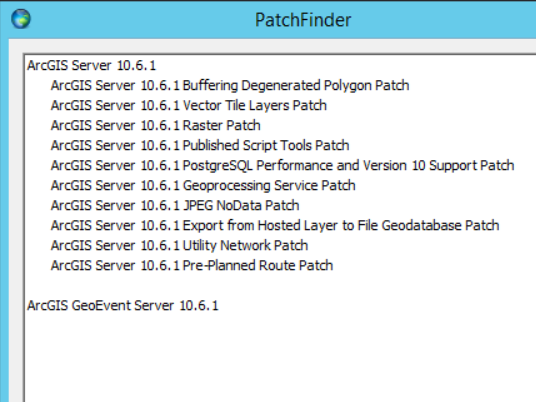
Below are the patches I had initially applied to ArcGIS Server before moving on to installing GeoEvent Server. One or more of these patches may have been preventing proper SSL/TLS communication between ArcGIS Server and GeoEvent Server (at least upon initial installation and configuration). Everything is still working for me after applying these patches, but the takeaway here is that you need to avoid patching ArcGIS Server before installing and configuring GeoEvent Server and likely before configuring any custom SSL certificates for that site.