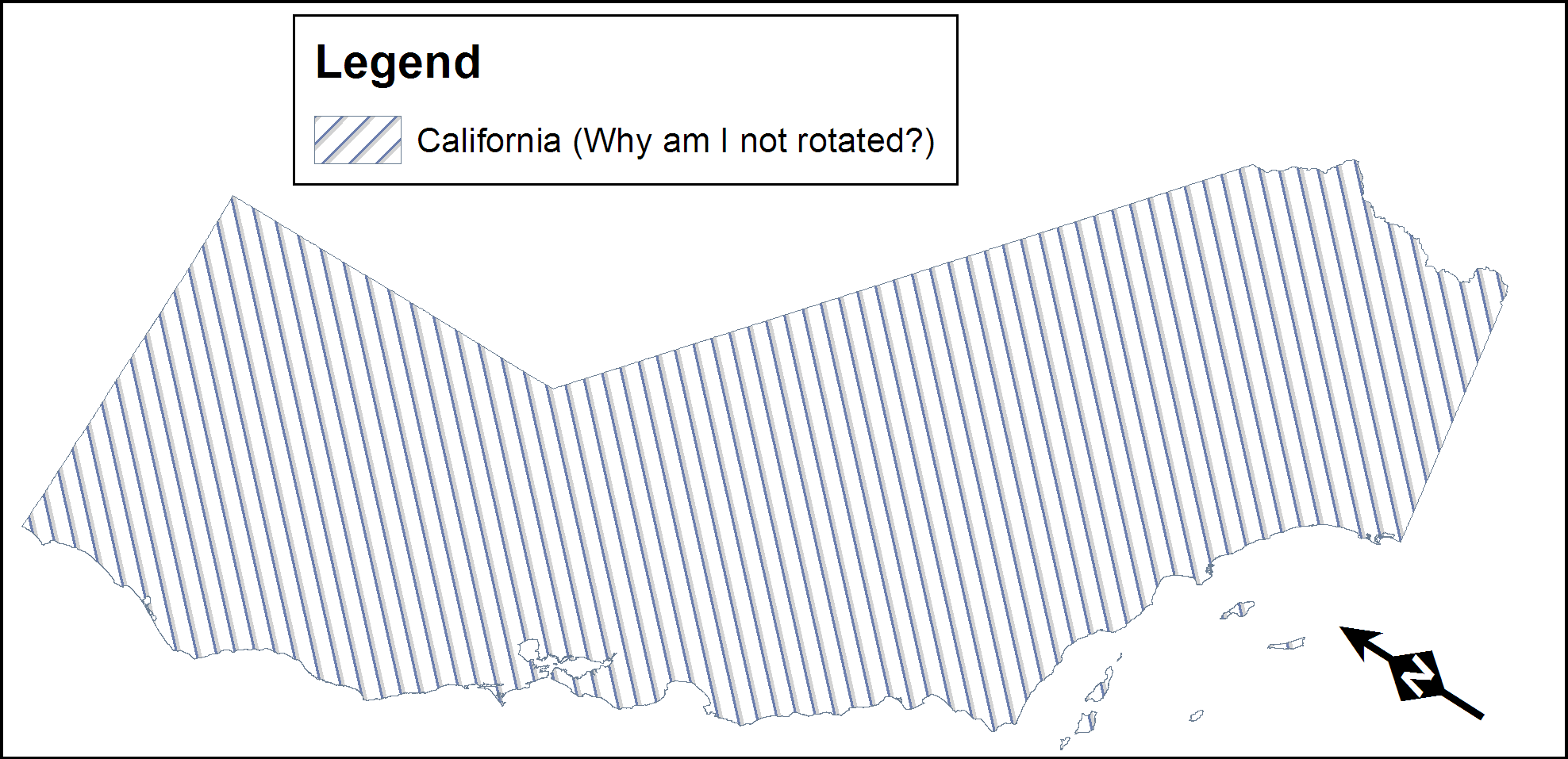
If you have a data frame that is rotated, the symbols in the legend for polygons with line and pattern fills don't rotate in the Legend. The solution ESRI suggests is to convert the legend to graphics and individually convert each polygon symbol. Thanks for the time saving suggestion ESRI.
Tried converting to multipart for my stlabels - no luck
When you go to edit vertices, though, it works fine.
Ok, here's something interesting - after converting to multiple parts and then clicking off and back on again, the angle value in the attributes pane goes to 0 while appearing the same, and the boxes change to their expected orientation. Still looks a little off, but they're at least not angling.
Originally, the angle value was around 307-degrees while appearing in the same orientation.
When inserting a graphic, it'll appear straight up-and-down like you drew it, but then the bounding box shows up crooked, making it quite difficult to adjust its size and position.
Had a different experience today: when I added the rectangle text box graphic, it appeared angled.
When I added the inverse rotation as the map, it appeared straight up and down, but shifted line to line.
At this point, I'm wondering if this is more of a bug? @KoryKramer can you weigh in on whether this is expected behavior or not, or what we need to do to get this resolved? The performance issues with angled map frames are unacceptable. I'm not even sure how to work around this.
I got it looking half-decent by manually modifying each individual vertex and keeping the rotation value -- in general, the issue seems to be that the rotation value is out of sync with the map orientation. Now, though, I'm having leader line issues -- it's nowhere near where the vertex is placed.
Yeah that might be a one-off solution - but imagine doing that on a 48-page mapbook with different page orientations and 500 different filled polygons, quickly becomes a problem, they just need to fix this, ArcMap can do this so it can't be that hard.
Has this been addressed yet? Having the same issue, but with point features. Symbol in legend should match what is on the map. Currently, we have been creating a separate layer, just to display in the layer, that is rotated to match the map.
For the use cases where you want a polygon fill (like hatching) to align with the display, I just wanted to note that an Angle Alignment property was added in Pro 3.1 https://pro.arcgis.com/en/pro-app/3.1/get-started/whats-new-in-arcgis-pro.htm.
So if you choose for the polygon fill to align with the display rather than the map, then if the map is rotated (common in map series), the hatching will always orient to the display and will thus match the legend patch hatching.
https://pro.arcgis.com/en/pro-app/latest/help/mapping/layer-properties/polygon-symbols.htm
I understand that this does not solve all cases, but wanted to add it to this conversation as it should solve this common use case.
This is an extremely problematic design flaw that can lead to a very misleading map. ESRI please fix this!!! This is important.
Hi @LeahCharash I just wanted to confirm that the Angle Alignment property in Pro 3.1 doesn't help. Are you able to share a sreenshot of the symbology you're using where the legend becomes very misleading? Thank you
You must be a registered user to add a comment. If you've already registered, sign in. Otherwise, register and sign in.