This is a minor issue, but one that happens often enough, and is quite irritating. It goes like this:
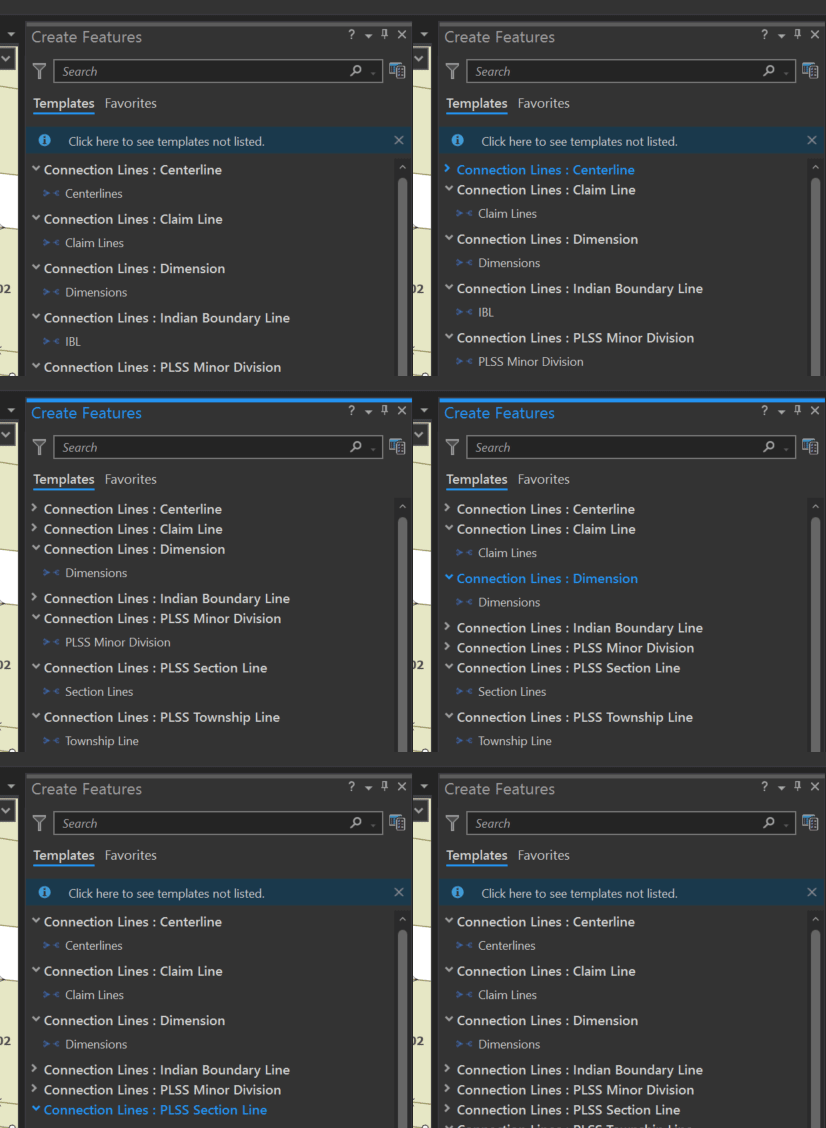
- I open the Create Features pane.
- I think that I click on the template I need.
- The "Click here to see templates not listed" notice shows up, pushing the entire templates gallery down
- My click is at this point registered, so what I thought was a click on a template invariably ends up being a click on the layer header, not the template
- The layer header collapses the template group
- After the list of templates changes, that notice goes away, shifting everything up
- I think click on the layer header to expand it again
- The "Click here to see templates not listed" notice shows up again, once more shifting everything down
- My click is registered on the template above the layer heading I wanted
The main problem here seems to be that this message goes away and comes back any time the gallery changes, causing the items in the pane to jump around. And for whatever reason, your click only "counts" after the message appears, so if you're a little quick on the draw, you end up clicking the wrong things all the time. And I don't like it when the solution is, essentially, "work slower".
As I said, minor, but seriously annoying.
Suggested solutions:
- Let me check a box that says "don't show this again", or else give me the ability to turn the message off entirely.
- Put the message at the bottom of the pane so that my contents aren't constantly jumping around
- Leave a static space for this message, similarly preventing the contents form shifting
Perhaps this is fixed in Pro 3.x already, but I'm stuck on 2.9.x at the moment. I'd love to hear that this issue is already addressed!