Select to view content in your preferred language

Contents Pane — Use symbology class/toggles to select features

591
4
03-21-2025 11:55 AM
Status: Implemented
Labels (1)
Bud
by
Esteemed Contributor

ArcGIS Pro 3.4.2; file geodatabase

It would be handy if we could right-click a symbology class in the Contents layer and choose an option that would select those features (the features would be selected in the attribute table/map).
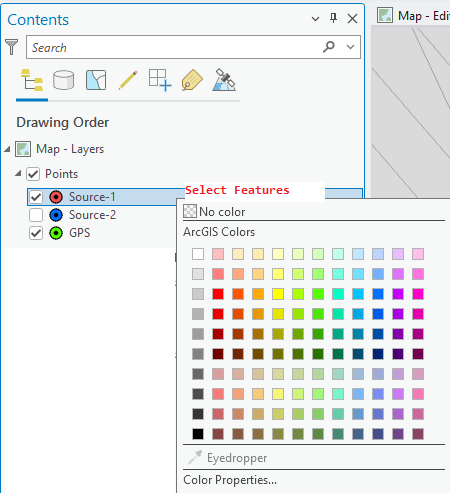
Bud_0-1742583090115.png

Use case: Easily select features without creating an expression (definition query or Select By Attributes) for the purpose of quickly using the selected features in geoprocessing tools.

Alternatively, honor multiple symbology toggles by right-clicking the root layer and choosing an option to select all the features that are toggled.
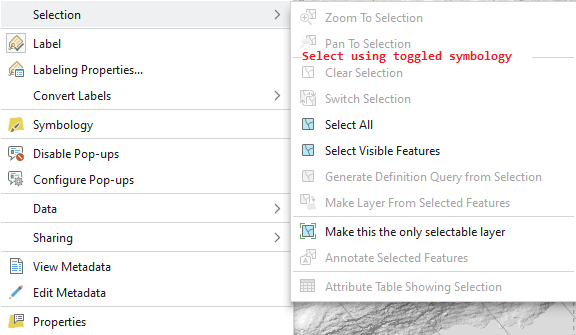
Bud_0-1742584091606.png


Implemented idea: Toggle visibility for individual Categories on Symbology tab

4 Comments
AlfredBaldenweck

Related: Select by Symbology - Esri Community

I'd like to see this, particularly if you've symbolized by Arcade expression.

NathanShephard
Status changed to: Under Consideration

Thanks for submitting the idea. We've been thinking about this one for a while, so am linking this to our backlog item for consideration in a near-future release.

The focus will be on using clearly labeled items in the Contents pane for quick selections of entire classes of features, with the potential supported renderers including Unique Value, Class Breaks, Graduated Color, Graduated Symbols, and Single Symbol.

-Nathan.

NathanShephard
Status changed to: In Product Plan

Thanks for the input and discussion.

We're working on this for inclusion in Pro 3.6, for the following renderer types - Unique Values, Graduated Colors, Graduated Symbols, and Proportional Symbols (plus the special case of Single Symbol > select all). We build a SQL query from the renderer definition to apply the selection to the layer (which means it is unavailable for cases where expressions are used as the renderer value). We will have separate command for create-new-selection, add-to-selection, and remove-from-selection.

Hope this helps you get your work done faster!

-Nathan.

NathanShephard
Status changed to: Implemented

Included in the ArcGIS Pro 3.6 release!

The selection options are shown as part of the right-click context menu for a symbol class in the Contents pane (for supported renderer types).

NathanShephard_0-1764732637466.png

Learn more here: 

Hope this helps!

-Nathan.