Returned offline licence greyed out for user, 24hr countdown issued.

185
3
09-30-2025 09:12 AM
David_Brooks
MVP Regular Contributor

When patching our 11.3 Enterprise Portal, we ask users to take their ArcGIS Pro licences offline for the duration, and then check them back in following a successful patch update.

On some rare occasions, a select few users report that either a), they're unable to check their licence back in, or b) they successfully check the licence in, but later on, they're informed that they cannot connect to the licence portal and will be logged out in 24 hours.

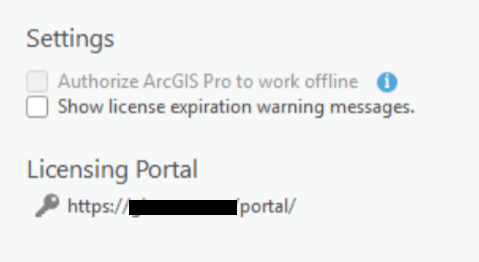
David_Brooks_0-1759248439488.png     David_Brooks_1-1759248505242.png

In the past we have resolved this issue by force deleting the Borrow key(s) from the registry:
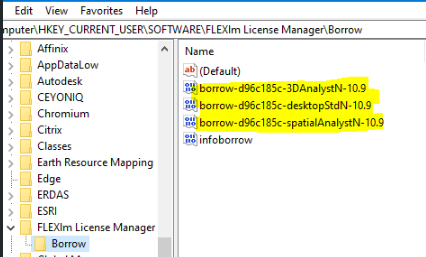
David_Brooks_3-1759248617933.png

But this is not a solution, simply a dirty workaround. 

Has anyone else dealt with this sort of issue and can provide some kind of steer on a longer term fix? My guess is something to do with a corrupt user profile on the users azure VDI they access the software from.



David
..Maps with no limits..
0 Kudos
3 Replies
CodyPatterson
MVP Regular Contributor

Hey @David_Brooks 

This is kind of a weird question, I have an 11.3 Enterprise setup as well, starting at 11.1, then 11.2, finally 11.3. I've installed many patches, but have never followed your workflow of taking user licenses offline, I manage around 200 users, I was curious why you did that, more curious because I don't know if I'm missing something very important by not doing that!

Cody

0 Kudos
David_Brooks
MVP Regular Contributor

@CodyPatterson our licencing is through the portal itself, not the licence server, so if a portal machine is being patched (which can take 2-3 hours sometimes), then users cannot open Pro. Also, if they are working in pro when the portal goes down, they are notified that they'll be booted off pro if a connection to the portal cant be re-established.

We patch during working hours (although that's irrelevant because our users are global, so there's no good out-of-hours time for patching anyway) so taking offline before patching always seemed like the correct procedure.

I'd be interested to hear what the ESRI best practise is for this workflow though, as we may be doing the wrong thing here.


David
..Maps with no limits..
0 Kudos
CodyPatterson
MVP Regular Contributor

Hey @David_Brooks 

Now you've got me second-guessing what I have! I have my License Manager installed on my Portal environment, so I would think we're under the same circumstance, maybe, this is what I see:

CodyPatterson_0-1759406363401.png

I tend to patch outside of work hours but we're regional so it's typically the same hours worked, that could also be a difference!

I'm also interested to hear what Esri has to say, even though our setups may be different, best practices are always good!

Cody

0 Kudos