Select to view content in your preferred language

ERROR Creating new site - Portal 11.5

1168
5
11-26-2025 02:27 AM
AlessandroValra
Frequent Contributor

Hi All, 

I'm installing Enterprise 11.5 on a Win server 2022.

Installation of ArcGIS Server was fine. Portal Not.

This is the error during creation of a new site
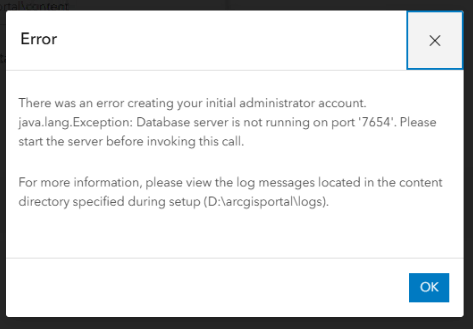
AlessandroValra_0-1764151673535.png

Observing "D:\arcgisportal" folder, "db" folder is created and then deleted when error appears.

"arcgis" user is local and has full control.

This is Portal Log

AlessandroValra_1-1764152086409.png

Any ideas?

This is the third installation I've done from scratch, deleting the installation directory and the "arcgisportal" directory.

Thanks!!!


0 Kudos
5 Replies
AlessandroValra
Frequent Contributor

There's also this....

AlessandroValra_0-1764155444747.png


0 Kudos
JakeSkinner
Esri Esteemed Contributor

Hi @AlessandroValra,

I'm thinking it's a permissions issue.  Can you temporarily grant Administrator privileges to the local arcgis account.  Then, try logging into the server as this account and executing the Portal post-installation.

0 Kudos
AlessandroValra
Frequent Contributor

Thanks for the reply.

But local arcgis account was already in Administrators Group.

I tried to execute Portal post-installation logging with arcgis account but with same result.

Can I try to delete local user "arcgis" and re create it?

It's strange because has worked for ArcGIS Server install...

Thanks!

0 Kudos
Priya_Das
Esri Contributor

Hi @AlessandroValra ,

Could you also check if all the required ports for Portal for ArcGIS is enabled in firewall: https://enterprise.arcgis.com/en/portal/11.5/install/windows/ports-used-by-portal-for-arcgis.htm

0 Kudos
AlessandroValra
Frequent Contributor

Hi all,

I want to update this post with our solution.

Problem occurs also with another machine with Windows Server 2022 and in both case disappear after installation of last windows updates!

This is very strange.

I hope this is useful for someone...


0 Kudos
