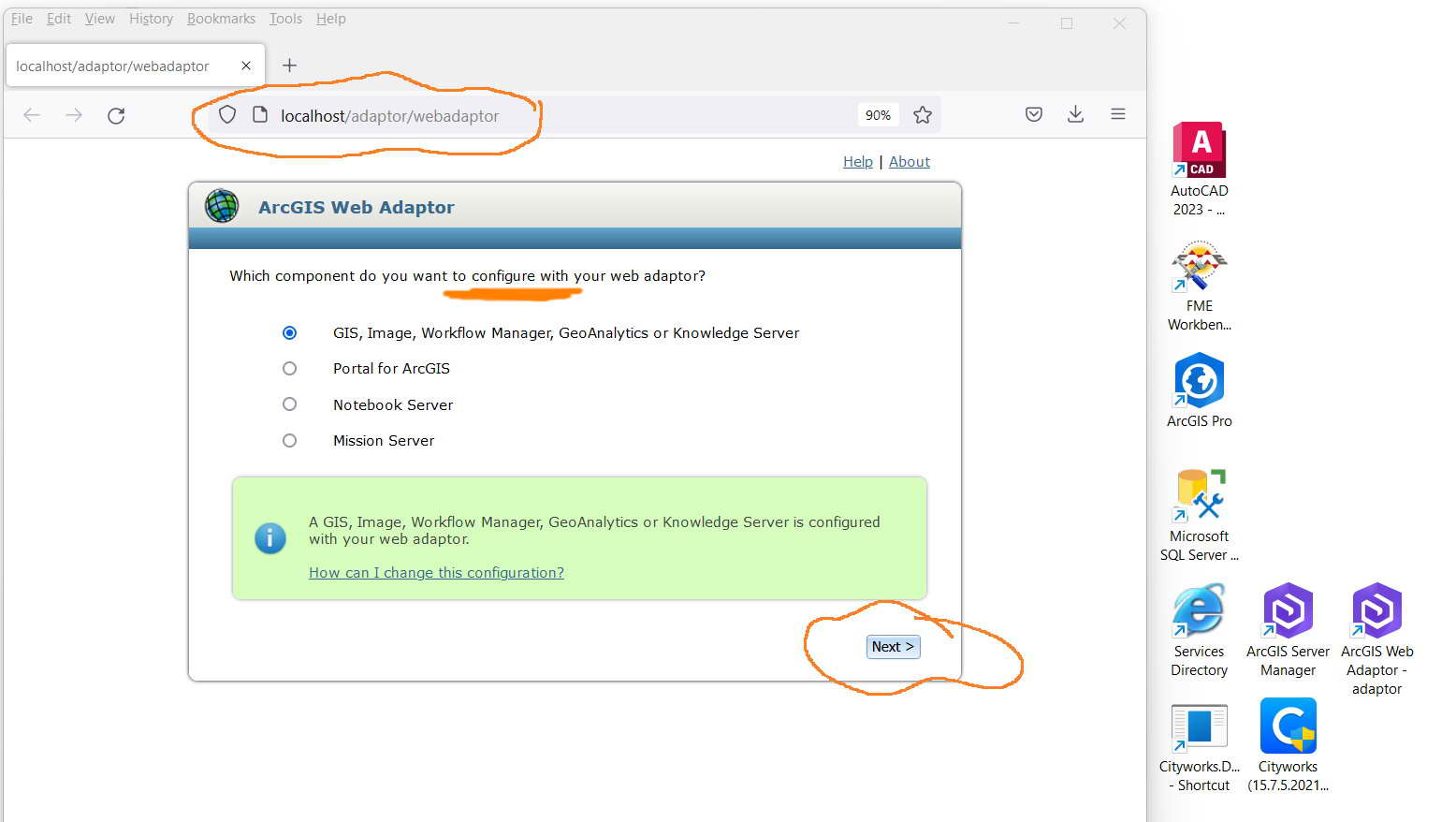
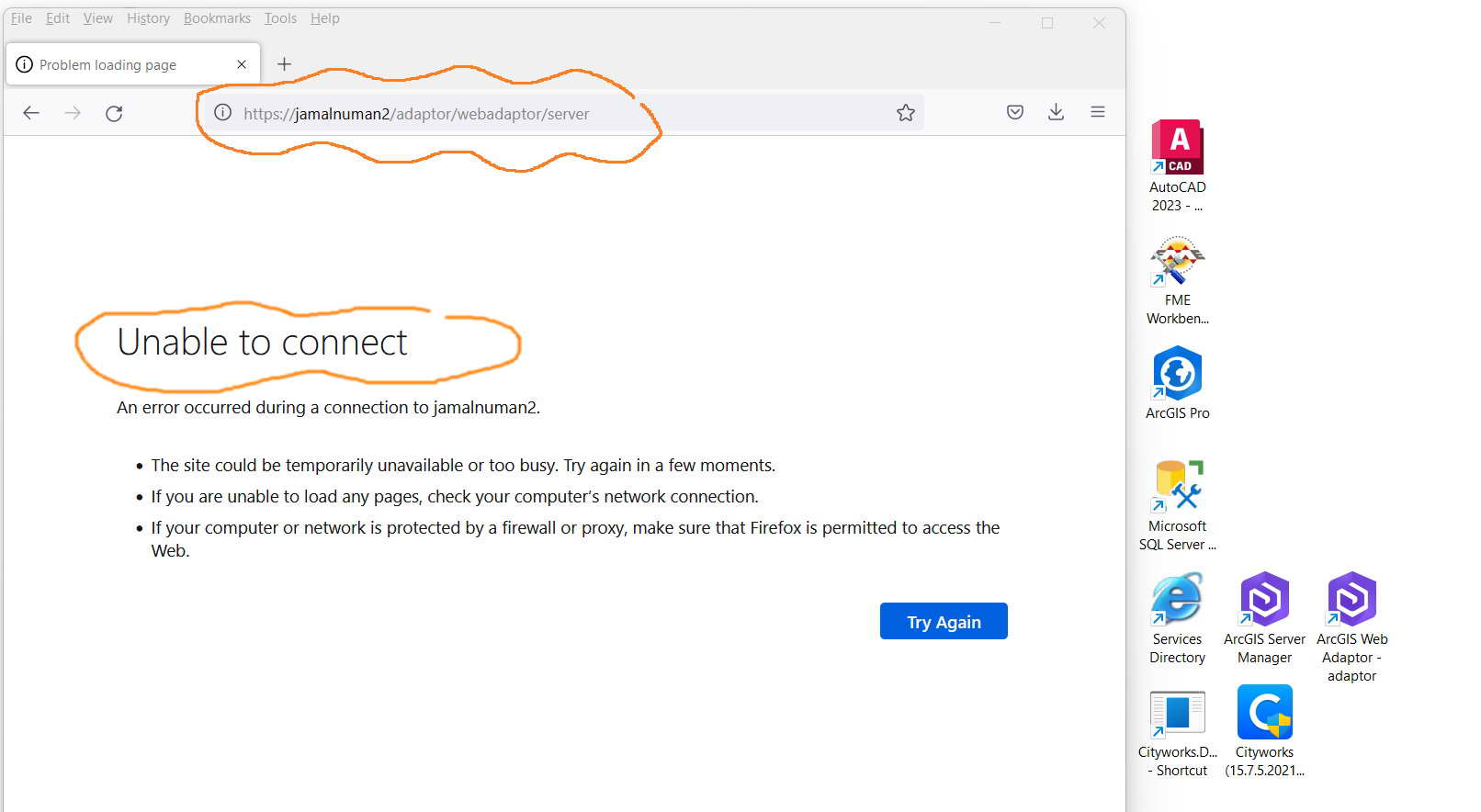
ArcGIS Web Adaptor 10.9.1: Configuring the Web Adaptor ends up with an “unable to connect” error,
I couldn’t figure out why configuring the Web Adaptor ends up with an “unable to connect” error as per the screenshot below.
What could be the issue here?
Clip_734.jpg
Clip_735.jpg
Clip_736.jpg
Solved! Go to Solution.
When installing the web Adaptor, make sure that you choose the 443 binding, this is the https port. In my experince, this is easy to miss especially if you let the Web Adaptor installer handle installation of IIS. My advice to you is to:
This should make it available to be hit over https.
This is a test machine. It’s used to work this way in the earlier versions of adaptors.
if your test machine is not on a domain, then the FQDN equivalent will be something along the lines of https://jamalnuman2.local always better to use the FQDN when making any form of configuration.
Does it connect if you just want the root? What did you call the web adaptor when you installed it? I haven't seen 'adaptor' used before for the context.
It looks like you have second level context in the URL: "machinename/adaptor/webadaptorname/server"
"If you do not use ArcGIS Web Adaptor in your deployment, ensure that the reverse proxy server's context name only goes one URL level deep. For example, you can have a reverse proxy URL such as https://proxy.domain.com/enterprise, but you cannot have a reverse proxy URL such as https://proxy.domain.com/myorg/enterprise."
My observation is:
As the ArcGIS Web Adaptor starts, the link is
http://localhost/adaptor/webadaptor
As the “GIS, Image, Workflow Manager, GeoAnalytics or Knowledge Server” option is selected and the “next” button is clicked, the link is redirected to:
https://jamalnuman2/adaptor/webadaptor/server
if the https is replaced by http, then it should work
http://jamalnuman2/adaptor/webadaptor/server
How can the adaptor be accessed with the https even if the https is not configured as this works for the services directory?
http://localhost:6080/arcgis/rest/services
https://localhost:6443/arcgis/rest/services
Clip_738.jpg
Clip_739.jpg
Clip_740.jpg
Clip_741.jpg
Clip_742.jpg
Clip_743.jpg
Clip_744.jpg
When installing the web Adaptor, make sure that you choose the 443 binding, this is the https port. In my experince, this is easy to miss especially if you let the Web Adaptor installer handle installation of IIS. My advice to you is to:
This should make it available to be hit over https.
Thank you JonEmch for the help. It works fine as per the screenshots below
Clip_754.jpg
Clip_755.jpg
Clip_756.jpg
Clip_757.jpg
Clip_758.jpg
Clip_759.jpg
Clip_760.jpg