Hello,
I am trying the new Collector for ArcGIS and the capibility to configure offline area directly in the webmap but I face an issue: every time I try to download the map from Collector, the download failed with the following error: "Download Failed".
I activated logging from Collector and saw the following error:
“Replica with GUID ({ac5c8afc-2aa3-4fb5-b767-b3231c2337c6}) does not exist on the server” – “Unable to complete operation”. I have the same error from Federated ArcGIS Server Manager interface.
I thought there was an issue with the service configuration or with the database but I can download the very same map when defining the offline area directly in Collector.
Using Fiddler, I was able to see that the “createReplica” operation was not made the same way as the old Collector:
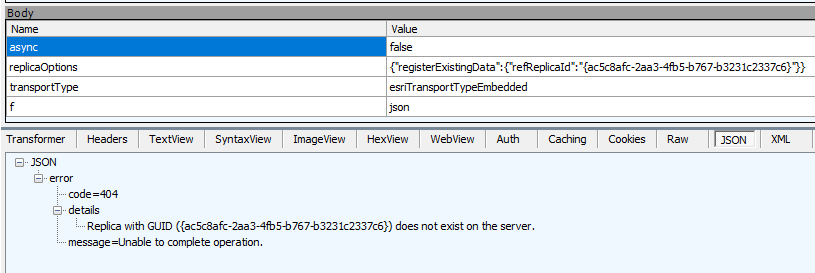
I understand that the new Collector is using the replica made while creating the offline area and does not find it but it does exist in our database:
select a.UUID, a.NAME, a.PHYSICALNAME, a.PATH, a.DATASETINFO1,a.DATASETINFO2,
b.NAME, (timestamp '1970-01-01 00:00:00 GMT' + numtodsinterval(SUBSTR(a.PATH,8,20)/1000, 'SECOND')) at time zone 'Europe/Paris' "REPLICA_DATE"
from GDB_ITEMS a join GDB_ITEMTYPES b
on a.TYPE = b.UUID
where datasetinfo1 is not null and b.name in ('Sync Replica', 'Replica') and a.UUID = '{AC5C8AFC-2AA3-4FB5-B767-B3231C2337C6}' order by REPLICA_DATE
Looking at the output from the database query, I noticed that Portal for ArcGIS is registering the replica with the private url (https://hostname.company.com:6443) and Collector is trying to download it from the public Url configured with the webadaptor (https://hostalias.company.com).
If I do the very same request to “createReplica” endpoint with the same parameters but this time to the private Url (https://hostname.company.com:6443), it works.
Is it a bug or is something misconfigured with our ArcGIS Enterprise ? Any idea maybe Jonathan Quinn ?
If I go to the Portal for ArcGIS sharing REST end points:
https://myportal.company.com/geoportal/sharing/rest/portals/0123456789ABCDEF/servers
I have the following output for the federated ArcGIS Server:
{
    "id": "anId",
    "name": "hostname.company.com:6443",
    "adminUrl": "https://hostname.company.com:6443/arcgis",
    "url": "https://hostalias.company.com/arcgis",
    "isHosted": false,
    "serverType": "ArcGIS",
    "serverRole": "FEDERATED_SERVER",
    "serverFunction": "GeneralPurposeServer"
}Thanks for your help,

