Select to view content in your preferred language

Locator with suggestions not happening

3294
16
03-05-2024 03:02 PM
TimHayes3
Frequent Contributor

I have created a Locator in ArcGIS Pro 2.9.12 and published it to Portal 10.9.1 as a geocoding service. In ArcGIS Server Manager 10.9.1 the suggestions box is checked. I am working in a Federated environment. 

In a web map I created in Portal, I modified the Search Widget to include my Locator. The Locator parameters are:

Role = Point Address

Reference Fields = House Number, Street Name, Subaddress, Subaddress Type, City, State, and Zip. 

When I type in an address. in the search window of the web map app for example: 3300 Capitol Ave, it only returns 3300 Capitol Ave; but 3300 Capitol Ave also includes 3 addresses with a subaddress as follows:

3300 Capitol Ave, Bldg A

3300 Capitol Ave, Bldg B

3300 Capitol Ave, Bldg C


How can I get the Locator or Search Widget to show a drop down of all the suggestions that would include:

3300 Capitol Ave

3300 Capitol Ave, Bldg A

3300 Capitol Ave, Bldg B

3300 Capitol Ave, Bldg C
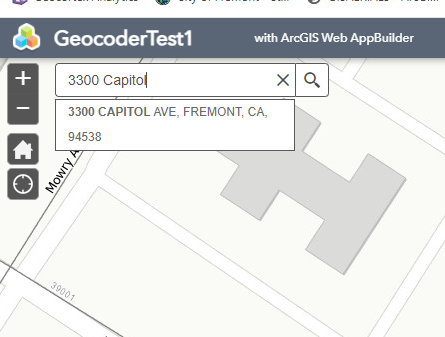
Capture.PNG

How can I have the Locator show the above list of 3300 Capitol Ave addresses in the drop down shown above?

 

16 Replies
ShanaBritt
Esri Regular Contributor

@TimHayes3 I believe we spoke about this, but wanted to post a response here in case someone else came across your post. In order to return the subaddress candidates as suggestions after typing the base address of "3300 Capital Ave" or "3300 Capitol", the locator must be created in ArcGIS Pro 3.0 and published to Enterprise 11.0. The only subaddress suggestions that would be available to you with a locator built in ArcGIS Pro 2.9.12 and published to Enterprise 10.9.1 is partial subaddress, which requires you to type the full base address, then part of the subaddress. The note in the share locator topic lists locator properties and the versions of ArcGIS Pro and Enterprise that they are supported in. https://pro.arcgis.com/en/pro-app/latest/help/data/geocoding/share-a-locator.htm

0 Kudos
SierraPelizza
Emerging Contributor

Hello Shana - I realize this post is from a few months ago now but I wanted to get your thoughts.

Is the above solution also relevant for partial house number suggestions? I have a custom geolocator built in ArcGIS Pro 3.1.5 and published to Enterprise 10.9.1 and it does not seem to give me house suggestions based off a partial number input once published, as it does when used within ArcGIS Pro. We have a past geolocator published from ArcGIS Pro 2.9.8 and also published to Enterprise 10.9.1 that works fine. 

Search results from 2.9.8 version:

SierraPelizza_0-1723811922712.png

  • Here I can type in just the number 12 and I will start to get suggestions based off this partial number
  • Additional note on the 2.9.8 version, it was originally created from within ArcMap (not sure which version) and then pulled into that version of Pro and republished

Search results from 3.1.5 version:

SierraPelizza_1-1723811984815.png

  • Here, unless I type in the start of a specific street name, I will not get any results in my search bar


Just curious if this is the same problem we would need to upgrade to 11.0 for this to be functional. Hoping for an easier solution/workaround!


ShanaBritt
Esri Regular Contributor

@SierraPelizza The issue in the original post is related to suggestions for subaddresses and from what you described your situation is not related to subaddress suggestions. There is a partial house number suggestion setting, but that only applies to countries where the house number comes after the street name and would only show in the locator properties dialog for locators built in countries with the address format of <street name> <house number>. The partial subaddress suggestion mentioned in the responses is for typing only part of the subaddress like "3375 E Mountain Ave #24" and there are subaddress numbers 2400-2480.

It looks like you have a classic locator and a new locator that have been published to Enterprise 10.9.1 and these two locators are based on different technology. The classic locator created in ArcMap and published from ArcGIS Pro 2.9.8 did not always provide valid suggestions after typing the house number, so you could click on one of the suggestions, but it may not take you to the correct location because the house numbers were not validated against the street name. The locator built in 3.1.5 with the Create Locator tool does validate the house number against the street name and you should start to get suggestions after typing the house number and a few characters of the street . I would not expect to see street names like "Alamonte Springs" as suggestions after only typing a house number, which is what is returned by the classic locator in the first screenshot and is not an expected result.

0 Kudos
hoogw
by
Frequent Contributor

ESRI must fix arc pro must fix this problem.

If old ArcMap can do it, now Arc Pro can not.

This is very important for us. 

0 Kudos
hoogw
by
Frequent Contributor

I have same problem as you, Did you figure out how to solve it ?

0 Kudos
WilliamBlake1
Emerging Contributor

I'm getting the same behavior as SierraPelizza. In our Production portal 10.9.1, we use PremiumStreet Map locators for USA. With the Map Viewer Classic in 10.9.1, I get suggestions as soon as I begin typing in the search bar. Our Development portal is 11.3 and I use overwrite locator with 2024 Q3 locator -and for sure I'm picking in Pro (3.3.0 pointing to dev portal) to provide suggestions when publishing it. Search in Pro is indeed giving suggestions when I pick show all candidates.     But, in Dev 11.3 new map viewer, search, pick locator that was overwritten, start typing and nothing happens. I enter house number and street -hit return and no results. Only if I add city in the search, does it finds the match. I pick show more results and I see the house street city in other states. Why didn't it provide that list to begin with, or all the cities with that same house street combo as we get in production?

0 Kudos
ShanaBritt
Esri Regular Contributor

@WilliamBlake1 The StreetMap Premium locators are created with city, state, zip and the default setting is to require city, state, or zip when you type in the address and press enter. You should get suggestion candidates as you type the address in the search box. Are you noticing a difference in the behavior between the classic map viewer and the new map viewer in 11.3 portal?

In ArcGIS Pro, if 'show all candidates' is not checked and you enter the address plus city or zip, do you get results?

0 Kudos