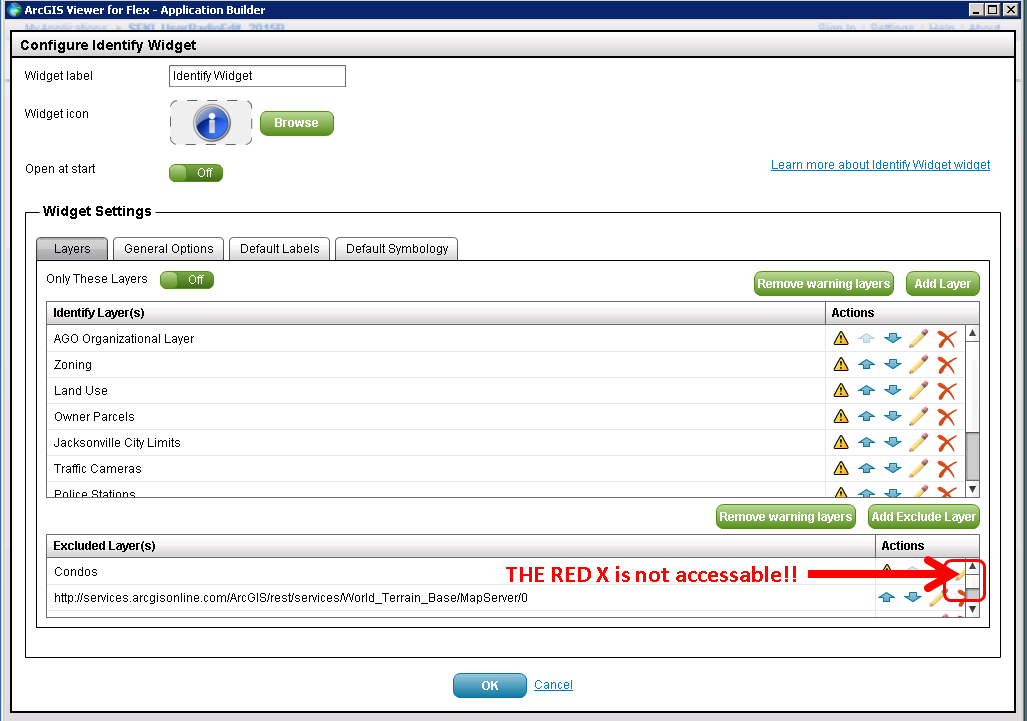
I have been experiencing subtle problems with Form Control items not scaling properly to allow the ability to select an feature in ArcMap and ArcGIS for Flex. The issue for ArcMap appears to be localized to my workstation, but the issue in ArcGIS for flex is observed on both of my external servers for which my co-workers have no problem. I feel that these issues may in fact be separate, but have not ruled out the possibility that a roaming profile may be introducing the behavior.
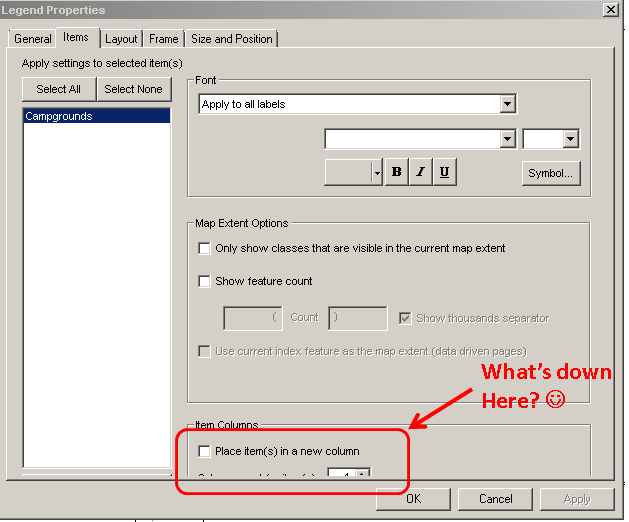
The issues with ArcMap occur for everyone that uses (logs) into my computer. This would appear to be a driver issue so the drivers were updated for the video card and monitors (dual monitor setup). No luck. To check and see if the problem is in my roaming profile I logged into two separate servers and ran ArcMap and created an legend and checked the properties and no problems were observed. My thoughts. Its a local problem. To make sure the ArcMap template was not responsible, I deleted the NORMAL template. No success.
Issue 2? In remote logins to both of my servers from serveral different workstations, I get a truncated "view" of the controls in the ArcGIS viewer for FLex where the delete function is not accessable. My coworkers do not have this problem. While I understand ArcGIS for Flex is being deprecated, we still have a number of maps that we publish and still like the ease of using this direct and easy tool.
SETUP: Dell PRECISION T7500, 24Gig ram, Intel Xenon CPU X5550, 64X Win 7 Enterprise, video Quadro FX 580, Monitors(2) DELL 2009W on DVI.
DRIVERS: NVIDIA 341.05,DELL 2009W video driver (stock driver also didn't work)
If anyone has some tips for me I'd be happy to hear from you.

