Trying to migrate from ArcMap to ArcGIS Pro, and to recreate a report that works in Map. I have the basics done, but the report prints a fresh page for each group in the report, and I want them to extend down the page as they did in the Map version. Didn't see this addressed on these pages: https://pro.arcgis.com/en/pro-app/latest/help/reports/tutorial-create-and-modify-a-report.htm,https://pro.arcgis.com/en/pro-app/latest/help/reports/templates-and-styles.htm#ESRI_SECTION1_DE2CD5807EAD4172AEADEBD7405CD4FE,https://pro.arcgis.com/en/pro-app/latest/help/reports/reports-in-arcgis-pro.htm. There was nothing in the group footer, and I removed everything from page and report footers based on answer in this question, https://community.esri.com/t5/arcgis-pro-questions/arcgis-pro-report-showing-field-column-labels-and/m-p/1028790#M37681. Still no joy.
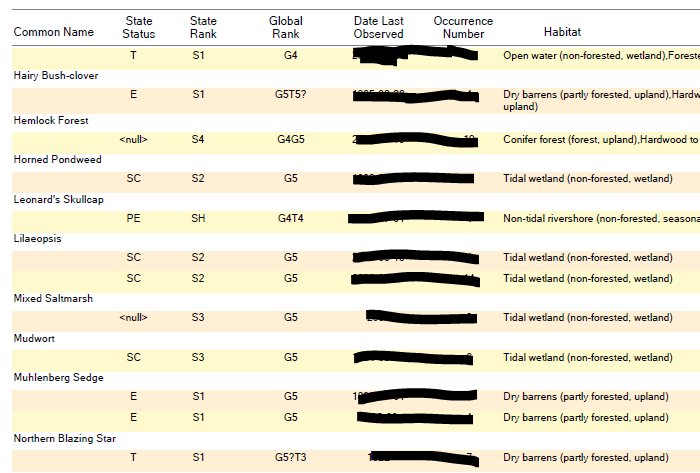
I want it to look something like this, where each plant species name is a group, because in some cases there may be multiple occurrences of said species:
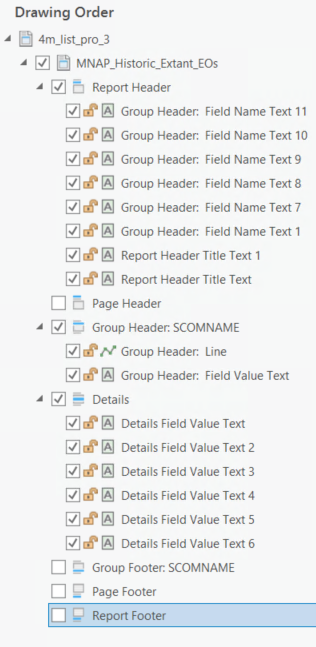
Pro report drawing order:
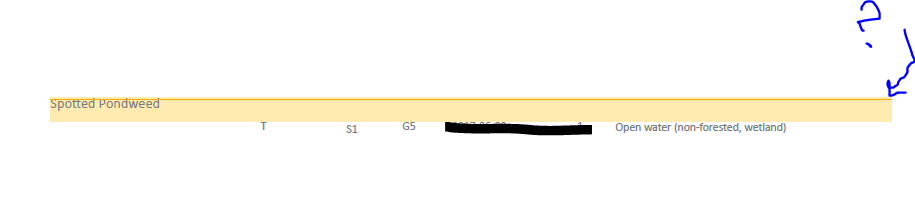
This results in the header on the first page, and each group on a separate page.
I'm new to this and I am likely missing something simple... is it the lines? I thought they'd just be for looks versus making the report doing something.
Thanks.


