The following Python function returns the extent of selected features as a string.
There may be other ways to do this, but I think this a nice example of using the arcpy geometry object!
<SPAN class="keyword token">import</SPAN> arcpy
<SPAN class="keyword token">def</SPAN> <SPAN class="token function">extent_of_selected</SPAN><SPAN class="punctuation token">(</SPAN>lyr<SPAN class="punctuation token">)</SPAN><SPAN class="punctuation token">:</SPAN>
<SPAN class="string token">"""Return the extent of all selected features in a feature layer (as text)"""</SPAN>
x0<SPAN class="punctuation token">,</SPAN> y0<SPAN class="punctuation token">,</SPAN> x1<SPAN class="punctuation token">,</SPAN> y1 <SPAN class="operator token">=</SPAN> <SPAN class="number token">1e99</SPAN><SPAN class="punctuation token">,</SPAN> <SPAN class="number token">1e99</SPAN><SPAN class="punctuation token">,</SPAN> <SPAN class="operator token">-</SPAN><SPAN class="number token">1e99</SPAN><SPAN class="punctuation token">,</SPAN> <SPAN class="operator token">-</SPAN><SPAN class="number token">1e99</SPAN>
ext <SPAN class="operator token">=</SPAN> None
<SPAN class="keyword token">with</SPAN> arcpy<SPAN class="punctuation token">.</SPAN>da<SPAN class="punctuation token">.</SPAN>SearchCursor<SPAN class="punctuation token">(</SPAN>lyr<SPAN class="punctuation token">,</SPAN> <SPAN class="string token">"SHAPE@"</SPAN><SPAN class="punctuation token">)</SPAN> <SPAN class="keyword token">as</SPAN> rows<SPAN class="punctuation token">:</SPAN>
<SPAN class="keyword token">for</SPAN> row <SPAN class="keyword token">in</SPAN> rows<SPAN class="punctuation token">:</SPAN>
ext <SPAN class="operator token">=</SPAN> row<SPAN class="punctuation token">[</SPAN><SPAN class="number token">0</SPAN><SPAN class="punctuation token">]</SPAN><SPAN class="punctuation token">.</SPAN>extent
x0 <SPAN class="operator token">=</SPAN> min<SPAN class="punctuation token">(</SPAN>x0<SPAN class="punctuation token">,</SPAN> ext<SPAN class="punctuation token">.</SPAN>XMin<SPAN class="punctuation token">)</SPAN>
y0 <SPAN class="operator token">=</SPAN> min<SPAN class="punctuation token">(</SPAN>y0<SPAN class="punctuation token">,</SPAN> ext<SPAN class="punctuation token">.</SPAN>YMin<SPAN class="punctuation token">)</SPAN>
x1 <SPAN class="operator token">=</SPAN> max<SPAN class="punctuation token">(</SPAN>x1<SPAN class="punctuation token">,</SPAN> ext<SPAN class="punctuation token">.</SPAN>XMax<SPAN class="punctuation token">)</SPAN>
y1 <SPAN class="operator token">=</SPAN> max<SPAN class="punctuation token">(</SPAN>y1<SPAN class="punctuation token">,</SPAN> ext<SPAN class="punctuation token">.</SPAN>YMax<SPAN class="punctuation token">)</SPAN>
<SPAN class="keyword token">if</SPAN> ext<SPAN class="punctuation token">:</SPAN>
ext <SPAN class="operator token">=</SPAN> <SPAN class="string token">"{} {} {} {}"</SPAN><SPAN class="punctuation token">.</SPAN>format<SPAN class="punctuation token">(</SPAN>x0<SPAN class="punctuation token">,</SPAN> y0<SPAN class="punctuation token">,</SPAN> x1<SPAN class="punctuation token">,</SPAN> y1<SPAN class="punctuation token">)</SPAN>
<SPAN class="keyword token">else</SPAN><SPAN class="punctuation token">:</SPAN>
ext <SPAN class="operator token">=</SPAN> arcpy<SPAN class="punctuation token">.</SPAN>Describe<SPAN class="punctuation token">(</SPAN>lyr<SPAN class="punctuation token">)</SPAN><SPAN class="punctuation token">.</SPAN>Extent
ext <SPAN class="operator token">=</SPAN> <SPAN class="string token">"{} {} {} {}"</SPAN><SPAN class="punctuation token">.</SPAN>format<SPAN class="punctuation token">(</SPAN>ext<SPAN class="punctuation token">.</SPAN>XMin<SPAN class="punctuation token">,</SPAN> ext<SPAN class="punctuation token">.</SPAN>YMin<SPAN class="punctuation token">,</SPAN> ext<SPAN class="punctuation token">.</SPAN>XMax<SPAN class="punctuation token">,</SPAN> ext<SPAN class="punctuation token">.</SPAN>YMax<SPAN class="punctuation token">)</SPAN>
<SPAN class="keyword token">return</SPAN> ext<SPAN class="line-numbers-rows"><SPAN></SPAN><SPAN></SPAN><SPAN></SPAN><SPAN></SPAN><SPAN></SPAN><SPAN></SPAN><SPAN></SPAN><SPAN></SPAN><SPAN></SPAN><SPAN></SPAN><SPAN></SPAN><SPAN></SPAN><SPAN></SPAN><SPAN></SPAN><SPAN></SPAN><SPAN></SPAN><SPAN></SPAN><SPAN></SPAN><SPAN></SPAN></SPAN>Python example
arcpy<SPAN class="punctuation token">.</SPAN>SelectLayerByAttribures<SPAN class="punctuation token">(</SPAN><SPAN class="string token">"wells"</SPAN><SPAN class="punctuation token">,</SPAN> <SPAN class="string token">""</SPAN><SPAN class="punctuation token">,</SPAN> <SPAN class="string token">"DEPTH > 100"</SPAN><SPAN class="punctuation token">)</SPAN>
arcpy<SPAN class="punctuation token">.</SPAN>env<SPAN class="punctuation token">.</SPAN>extent <SPAN class="operator token">=</SPAN> extent_of_selected<SPAN class="punctuation token">(</SPAN><SPAN class="string token">"wells"</SPAN><SPAN class="punctuation token">)</SPAN>
arcpy<SPAN class="punctuation token">.</SPAN>SelectLayerByAttribures<SPAN class="punctuation token">(</SPAN><SPAN class="string token">"wells"</SPAN><SPAN class="punctuation token">,</SPAN> <SPAN class="string token">"CLEAR_SELECTION"</SPAN><SPAN class="punctuation token">)</SPAN>
<SPAN class="comment token"># the following will copy all features in the extent of depth > 100 wells</SPAN>
arcpy<SPAN class="punctuation token">.</SPAN>CopyFeatures_management<SPAN class="punctuation token">(</SPAN><SPAN class="string token">"wells"</SPAN><SPAN class="punctuation token">,</SPAN> <SPAN class="string token">"wells1"</SPAN><SPAN class="punctuation token">)</SPAN><SPAN class="line-numbers-rows"><SPAN></SPAN><SPAN></SPAN><SPAN></SPAN><SPAN></SPAN><SPAN></SPAN></SPAN>
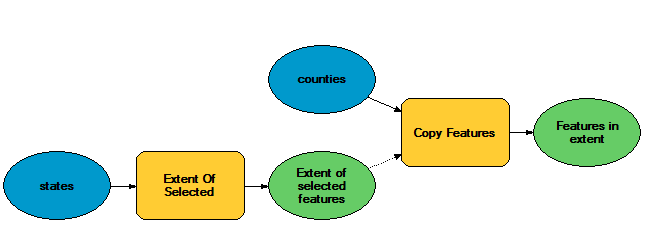
Model Builder example
The attached toolbox demonstrates how this function can be used in Model Builder. The model tool is called Extent Of Selected and takes a feature layer as input. (Model Builder is the main reason I set up the Python function to return a text representation of extent instead of an extent object -- the text rep is easily represented as a model element which can then be connected to a tool as in the example below.)