I've encountered a strange issue and I wonder if anyone else has had this problem. I'm using Visual Studio 2015 and ArcGIS Pro 2.5 (although I had the same problem in 2.4.3 and maybe earlier).
My code creates a map programmatically as follows:
await QueuedTask.Run(() =>
{
Map myMap = MapFactory.Instance.CreateMap("My Map");
});
and then opens the map in Pro like this:
await QueuedTask.Run(async () =>
{
await ProApp.Panes.CreateMapPaneAsync(myMap, myMapExtent);
});
All of this works fine. However if I'm running from VS, once the new map has been created, if I try to manually add a raster to the map, I get an error saying "Failed to add data, unsupported data type." In addition, if I then (while in the same debugging session) try to add a raster to ANY map, even if I create a new project and manually add a map, I get the same error. I've tried both .img and .tif rasters and gotten the same result. I have to close and reopen Pro to make adding rasters work correctly.
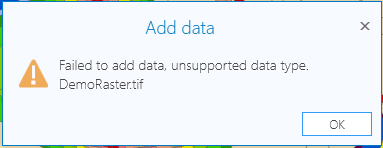
Also, if while running from VS I add a new map manually before having my code create a map programmatically, and manually add a raster to that map (again before my code creates a map), then I can add rasters with no problem to my programmatically created map!
However, if I rebuild my solution in VS and then open Pro separately (i.e., not from VS, so not debugging) I'm able to add rasters to my programmatically created maps with no problem.
I wonder if this is a problem with Pro or with VS or maybe something in my particular setup.



