I need to check for the presence of special characters in a given attribute field. If I find them, I need to flag them as an error. I've put all of them in a string but I can't seem to get them to work in a "Where" clause the way I'd like them to:
specialcharacters <SPAN class="operator token">=</SPAN> <SPAN class="punctuation token">(</SPAN><SPAN class="string token">"!"</SPAN><SPAN class="punctuation token">,</SPAN><SPAN class="string token">"@"</SPAN><SPAN class="punctuation token">,</SPAN>"<SPAN class="comment token">#","$","%","^","&","*","(",")","-","_","+","=","|","\\","}","]","{","[","\"","\'",":",";","?","/",">",".","<",",")</SPAN>
<SPAN class="keyword token">with</SPAN> arcpy<SPAN class="punctuation token">.</SPAN>da<SPAN class="punctuation token">.</SPAN>SearchCursor<SPAN class="punctuation token">(</SPAN><SPAN class="string token">"MasterStreetNameFC_Lite"</SPAN><SPAN class="punctuation token">,</SPAN><SPAN class="string token">"streetname"</SPAN><SPAN class="punctuation token">)</SPAN> <SPAN class="keyword token">as</SPAN> cursor<SPAN class="punctuation token">:</SPAN>
<SPAN class="keyword token">for</SPAN> row <SPAN class="keyword token">in</SPAN> cursor<SPAN class="punctuation token">:</SPAN>
string <SPAN class="operator token">=</SPAN> row<SPAN class="punctuation token">[</SPAN><SPAN class="number token">0</SPAN><SPAN class="punctuation token">]</SPAN>
<SPAN class="keyword token">for</SPAN> i <SPAN class="keyword token">in</SPAN> string<SPAN class="punctuation token">:</SPAN>
<SPAN class="keyword token">if</SPAN> i <SPAN class="keyword token">in</SPAN> specialcharacters<SPAN class="punctuation token">:</SPAN>
select <SPAN class="operator token">=</SPAN> <SPAN class="string token">"StreetName like '%{}'"</SPAN><SPAN class="punctuation token">.</SPAN>format<SPAN class="punctuation token">(</SPAN>i<SPAN class="punctuation token">)</SPAN>
arcpy<SPAN class="punctuation token">.</SPAN>SelectLayerByAttribute_management<SPAN class="punctuation token">(</SPAN><SPAN class="string token">"MasterStreetNameFC_Lite"</SPAN><SPAN class="punctuation token">,</SPAN><SPAN class="string token">"ADD_TO_SELECTION"</SPAN><SPAN class="punctuation token">,</SPAN>select<SPAN class="punctuation token">)</SPAN>
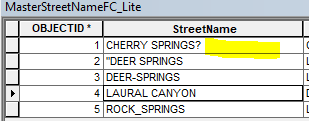
<SPAN class="line-numbers-rows"><SPAN></SPAN><SPAN></SPAN><SPAN></SPAN><SPAN></SPAN><SPAN></SPAN><SPAN></SPAN><SPAN></SPAN><SPAN></SPAN><SPAN></SPAN><SPAN></SPAN><SPAN></SPAN><SPAN></SPAN></SPAN>In this example, I'd like to select just those records where the attribute StreetName ends in a special character. Notice I have one record that meets that criteria:
However, when I run the cursor with the for loop, everything gets selected, even "LAURAL CANYON" which has no special characters.
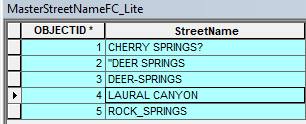
The same thing happens regardless of what I use for the select variable:
<SPAN class="punctuation token">{</SPAN><SPAN class="punctuation token">}</SPAN><SPAN class="operator token">%</SPAN>'<SPAN class="punctuation token">.</SPAN>format<SPAN class="punctuation token">(</SPAN>i<SPAN class="punctuation token">)</SPAN> <SPAN class="comment token"># (starts with special character)</SPAN>
<SPAN class="string token">'%{}%'</SPAN><SPAN class="punctuation token">.</SPAN>format<SPAN class="punctuation token">(</SPAN>i<SPAN class="punctuation token">)</SPAN> <SPAN class="comment token"># (contains special character)</SPAN>
<SPAN class="comment token">###etc</SPAN><SPAN class="line-numbers-rows"><SPAN></SPAN><SPAN></SPAN><SPAN></SPAN></SPAN>When I change the SelectByAttribute to a print, I get the results I'm looking for:
<SPAN class="operator token">>></SPAN><SPAN class="operator token">></SPAN> <SPAN class="keyword token">with</SPAN> arcpy<SPAN class="punctuation token">.</SPAN>da<SPAN class="punctuation token">.</SPAN>SearchCursor<SPAN class="punctuation token">(</SPAN><SPAN class="string token">"MasterStreetNameFC_Lite"</SPAN><SPAN class="punctuation token">,</SPAN><SPAN class="string token">"streetname"</SPAN><SPAN class="punctuation token">)</SPAN> <SPAN class="keyword token">as</SPAN> cursor<SPAN class="punctuation token">:</SPAN>
<SPAN class="keyword token">for</SPAN> row <SPAN class="keyword token">in</SPAN> cursor<SPAN class="punctuation token">:</SPAN>
string <SPAN class="operator token">=</SPAN> row<SPAN class="punctuation token">[</SPAN><SPAN class="number token">0</SPAN><SPAN class="punctuation token">]</SPAN>
<SPAN class="keyword token">for</SPAN> i <SPAN class="keyword token">in</SPAN> string<SPAN class="punctuation token">:</SPAN>
<SPAN class="keyword token">if</SPAN> i <SPAN class="keyword token">in</SPAN> specialcharacters<SPAN class="punctuation token">:</SPAN>
<SPAN class="keyword token">print</SPAN> <SPAN class="string token">'{} {}'</SPAN><SPAN class="punctuation token">.</SPAN>format<SPAN class="punctuation token">(</SPAN>row<SPAN class="punctuation token">[</SPAN><SPAN class="number token">0</SPAN><SPAN class="punctuation token">]</SPAN><SPAN class="punctuation token">,</SPAN>i<SPAN class="punctuation token">)</SPAN>
CHERRY SPRINGS? ?
<SPAN class="string token">"DEER SPRINGS "</SPAN>
DEER<SPAN class="operator token">-</SPAN>SPRINGS <SPAN class="operator token">-</SPAN>
ROCK_SPRINGS _
<SPAN class="line-numbers-rows"><SPAN></SPAN><SPAN></SPAN><SPAN></SPAN><SPAN></SPAN><SPAN></SPAN><SPAN></SPAN><SPAN></SPAN><SPAN></SPAN><SPAN></SPAN><SPAN></SPAN><SPAN></SPAN></SPAN>Where each of the 'misspelled' names are followed by thy offending special character. (The python highlighter is goofing on us with "DEER SPRINGS " showing it in green as a string: the reality is the " is just the special character that begins the name)
So I'm kind of stuck: can't make a selection so I can go in and fix them, but I can find them without a selection: how do I report the errors to the user?


