Hello
I created routes with the "Create Routes Tool" in ArcGIS 10.2.2. The route persists of rivers for quite a large area. The flow direction of the rivers are either "1" which means flow direction in digitized direction or "2" = flor direction against digitized direction. This seems to be correct for all routes.
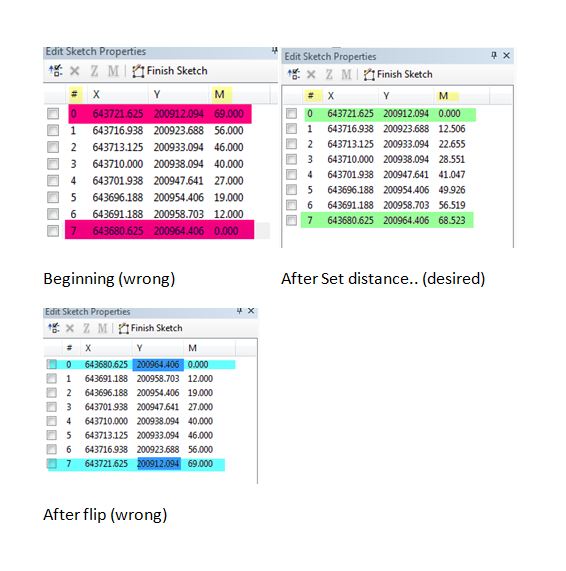
When I open the "Edit Sketch Properties" I see that the M-Value however is not correct for all routes with the value 1 = flow direction in digitized direction (pic with red highlighting).
I Need the M Value to be 0 at hashtag 0. The highest M Value should be at the highest hashtag hence the M Values should be switched (see pic with green higlighting).
When I flip the routes, I flip the whole direction which I dont want as the direction is correct (blue highlighting).
I only Need the M-Values to flip, not the #-values. I can do this with right click on the route --> route measure editing --> set distance. However, this is only possible for one route at a time and as I have many routes I am looking for a solution to do this automatically. Is there an update m values tool or anything like this in ArcGIS? I could not find anything.