CHAPTER 5: CAPACITY
Introduction
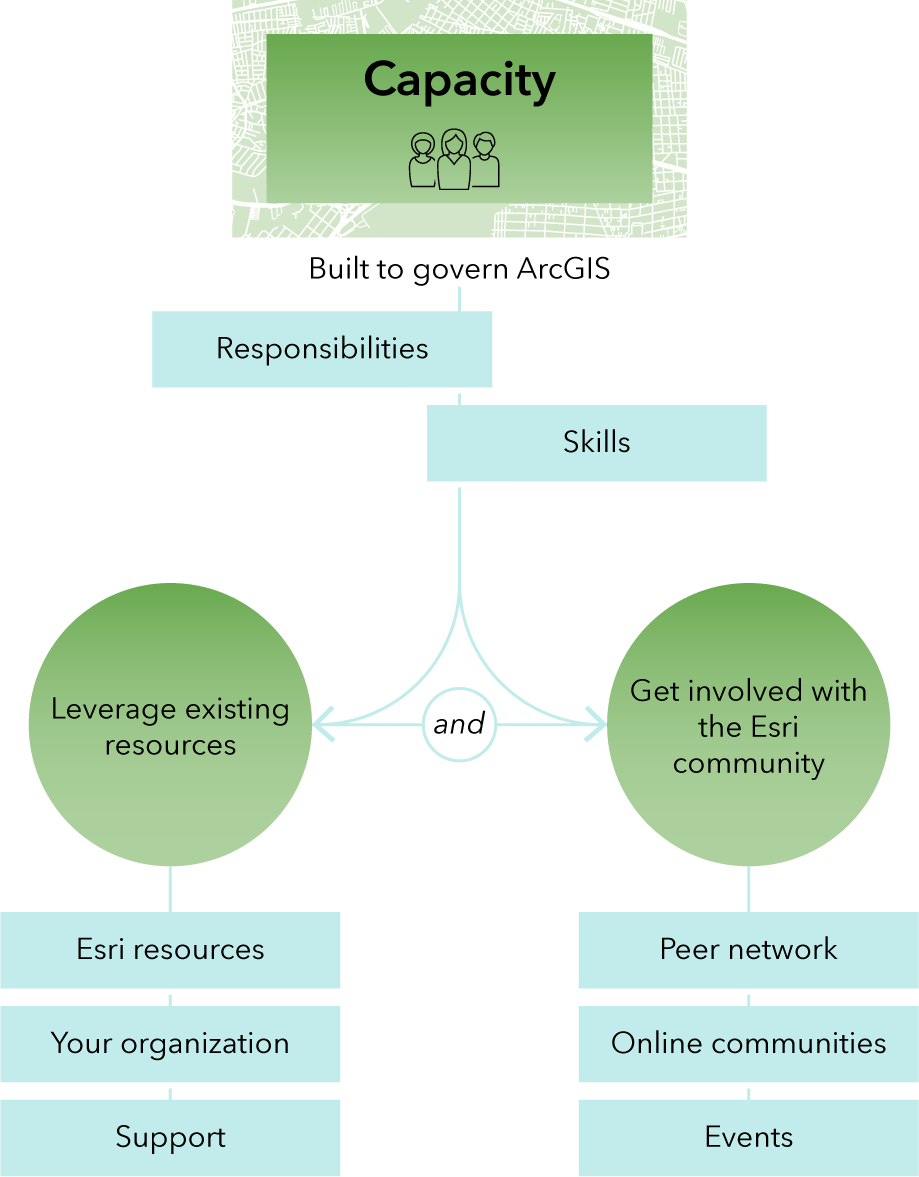
This chapter outlines options to equip GIS administrators and GIS support staff with knowledge, skills, and resources needed to administer ArcGIS. The main goal is to build capacity for administration, which can be accomplished with training, documentation, web courses, and technical support, as well as being involved with the user community and learning from peers.
Build capacity to administer ArcGIS
Administration is a continuous, involved process that requires various responsibilities and skills that might not be available currently in-house. You must get the right training to bring existing staff up to speed or hire team members or external consultants who have the right skills.
Some of the responsibilities and skills to manage daily operation of ArcGIS and enforce governance policies are below.
Administrators have the following key responsibilities:
- Administer users, groups, roles, and privileges
- Manage content lifecycle, sharing rules, and ownership
- Monitor performance and system health
- Manage data services, publishing standards, and metadata
ArcGIS administration requires the following knowledge and skills:
- Cloud systems
- ArcGIS as a system of software components (apps, desktop, mobile, server, developer, and database)
- ArcGIS licensing (Named User or stand-alone options)
- ArcGIS Online or ArcGIS Enterprise administration
- Web GIS publishing, sharing, and service optimization
- Scripting or automation (Python, ArcPy, REST API)
- Monitoring tools (dashboards and logging systems)
There are instances in which an institution may choose to build, or bring, such capacity within the organization. In other instances, an institution may choose to invest in professional services or additional capabilities to accomplish the desired outcome. An example of acquiring additional capability at cost is purchasing Premium Feature Data Store, in contrast to spending time managing content storage through archiving and deleting.
This guide provides recommendations for governing ArcGIS and is intended as a starting point. At times, other resources may be necessary to provide GIS administrators or GIS support staff with necessary skills to implement the recommendations in this guide or determine the best course of action.
Use existing resources
You can use professional development resources to learn and stay updated. These resources may include documentation, training, blogs, and industry websites.
Esri resources
Whether you need a quick tutorial or a deep-dive set of training materials, there are many resources available to you. The following collection of ArcGIS Online administration resources can help you acquire needed skills. Some of these resources are self-paced, stand-alone documents. Some provide a sequence of activities for in-depth learning.
Get started with the following introductory resources:
- Get started as an ArcGIS Online organization administrator documentation—Get started with ArcGIS Online, including activating the subscription, learning basic navigation and administration tasks, and using additional resources.
- Administer your organization tutorial series—A collection of videos, tutorials and articles focused on setting up ArcGIS Online, learning how to manage members, content and groups, and working with credits and reports.
- ArcGIS Online Fundamentals learning plan
- ArcGIS Online Basics web course—Learn about accessing web maps, apps, and other GIS resources that have been shared to an ArcGIS Online organizational site. Publish GIS data as services to an ArcGIS Online organizational site. Create, configure, and share web maps and apps. Manage ArcGIS Online user roles and privileges.
- ArcGIS Online: Administration Essentials instructor-led course—Find content on an ArcGIS Online organizational site that meets your project needs. Create and configure web maps and web apps. Share maps and other content on your ArcGIS Online organizational site.
- Creating and Sharing GIS Content Using ArcGIS Online—Publish hosted feature services and tiled map services. Create and configure a web map. Use a template to share a web map as a web app.
- ArcGIS Online implementation guide—PDF guide with essential tasks and best practices for setting up ArcGIS Online.
- Extend the reach of your GIS—PDF guide with additional ArcGIS Online tips and best practices.
- GIS in a minute video series—Short, focused video series on various ArcGIS Online uses, capabilities, and functions.
Go further with advanced resources:
Esri Support
Esri can provide support in various ways:
- Technical Support—If you have an Esri license agreement, you are entitled to several Esri authorized support callers (the number of authorized support callers varies depending on the type of agreement). As a GIS administrator or GIS support staff member, you should be one of those support callers. Contact Esri Technical Support about technical issues you may encounter.
- Professional Services—One option for developing capacity to help with ArcGIS governance is working with Esri Professional Services in a consulting engagement. The Esri experts can help if developing capacity within your organization is not a viable option or if your institution has a complex ArcGIS deployment.
- Account Management Support—Institutions with Education Institution Agreements have a dedicated education account manager. Contact your account manager for additional support or to ask any questions. If you do not know who your account manager is, use the Account Manager Assignments app. Alternatively, reach out to highered@esri.com. For customers outside of US, reach out to your local Esri Distributor office.
Your organizational resources
Your institution may have its own training resources. Seek out guidance from colleagues with similar roles who are managing analogous institutional systems.
If you do not have any current training resources or plan created specifically for your own organization, consider creating a workforce development plan for managing and governing ArcGIS.
Get involved with the community
There is a large network of GIS administrators or GIS support staff with similar needs. Ask your questions, join an online conversation, read the latest blogs, and connect with colleagues to help answer any additional questions.
Leverage peer network for learning and best practices
To communicate, collaborate, and learn from peers, join the Esri Community, particularly the Education Community and Education Blog.
- Subscribe to the Education Blog for news and posts, including automatic emails when a new blog article is posted. You can filter blogs for GIS administration or licensing-related topics, specifically by choosing the Administration and Licensing Best Practices labels. Being part of this community, you will learn information about product updates, education program changes, educational resources, events, and many other education-related matters. Discussions and contributions are welcome in this community.
- You can also subscribe to other Esri Community areas, which focus on specific products, industries, or capabilities.
- You can browse, search, and subscribe to the ArcGIS Blog to learn information about specific ArcGIS applications.
- For additional information, check the Higher Education community pages, along with the IT Support section of the Education Industry pages.
Join events
Regularly check the Higher Education Events website for upcoming events, including webinars, conferences, summits, and more. You can also sign up for the Esri education newsletter to receive timely updates and relevant content for administrators.
You can also browse past proceedings and event recordings for specific topics of interest. Some of these events are geared toward instructional resources and instructional materials, while others focus on GIS administration and governance best practices.
Conclusion
In this chapter, you learned about various resources you can use to get equipped with GIS administration skills. These resources include documentation, blogs, web courses, training, and various ways to engage with community and learn from peers. In addition, if building capacity within your institution is not possible, various Esri-provided services, such as consulting services, are available to help you implement ArcGIS governance standards.
Next Steps
Read the rest of the chapters:
E-book PDF will be available soon.
Contact your Account Manager or highered@esri.com with any questions.
