The following code works beautifully the first time the function is called. The second time the function is called, the new second parameter value, Forest_TmbrVol_Source, is ignored while the new first parameter value, Project_TmbrVol_Path, is correctly used.
The result is that in both function calls, the input layer is symbolized by the same Forest_SlopePrc_Source symbology, which in the second call, results in Timber Volume being symbolized with Slope Percentage symbology rather than Timber Volume symbology as coded.
This error is not a result of duplicate names or incorrectly called vars. I coded messages to return the values of what was passed and processed and there are no errors there. The problem appears to be the persistence of the same initial variable used in the ApplySymbologyFromLayer tool for the reference symbology raster.
Reversing the order of the two calls, does not change this behavior. The mismatch in the 2nd call continues, but reversed., such that the input layer is incorrectly symbolized by Forest_TimbVol_Source rather than Forest_SlopePrc_Source symbology as coded.
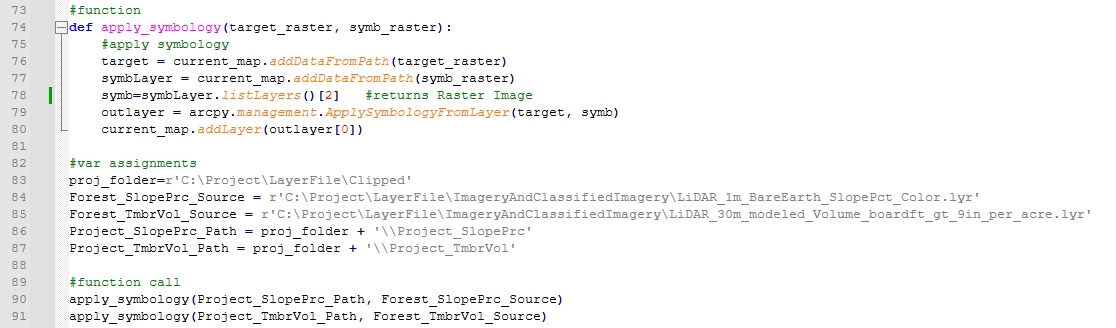
Image content:
#function
def apply_symbology(target_raster, symb_raster):
#apply symbology
target = current_map.addDataFromPath(target_raster)
symbLayer = current_map.addDataFromPath(symb_raster)
symb=symbLayer.listLayers()[2] #returns Raster Image
outlayer = arcpy.management.ApplySymbologyFromLayer(target, symb)
current_map.addLayer(outlayer[0])
#var assignments
proj_folder=r'C:\Project\LayerFile\Clipped'
Forest_SlopePrc_Source = r'C:\Project\LayerFile\ImageryAndClassifiedImagery\LiDAR_1m_BareEarth_SlopePct_Color.lyr'
Forest_TmbrVol_Source = r'C:\Project\LayerFile\ImageryAndClassifiedImagery\LiDAR_30m_modeled_Volume_boardft_gt_9in_per_acre.lyr'
Project_SlopePrc_Path = proj_folder + '\\Project_SlopePrc'
Project_TmbrVol_Path = proj_folder + '\\Project_TmbrVol'
#function call
apply_symbology(Project_SlopePrc_Path, Forest_SlopePrc_Source)
apply_symbology(Project_TmbrVol_Path, Forest_TmbrVol_Source)


