I am currently working off of the latest version of the Interactive Filter template. (GitHub - Esri/InteractiveFilter: Filter is a configurable application template that displays a map with an interactive f… )
And I need to replace the default drop down with a Dijit FilteringSelect from the Dojo Toolkit (dijit.form.FilteringSelect — The Dojo Toolkit - Reference Guide)
This will allow the user to provide input in addition to the drop down, with autocomplete functionality when typing. I prefer the FilteringSelect as it will give an error if their search field isn't found in the layer.
I have been trying to do this in a way that works with the overall template structure, as to not completely blow up the map filtering functionality. Currently, I have found a way to replace the drop down for layers with coded values, but the string type layers are not drawing the Dijit at all.
Here is the _createFilterField function, where filter fields are created based on the layer type (coded values, integer, string):
_createFilterField<SPAN class="punctuation token">:</SPAN> <SPAN class="keyword token">function</SPAN><SPAN class="punctuation token">(</SPAN>param<SPAN class="punctuation token">,</SPAN> filterLayer<SPAN class="punctuation token">,</SPAN> fields<SPAN class="punctuation token">)</SPAN> <SPAN class="punctuation token">{</SPAN>
<SPAN class="keyword token">var</SPAN> deferred <SPAN class="operator token">=</SPAN> <SPAN class="keyword token">new</SPAN> <SPAN class="token class-name">Deferred</SPAN><SPAN class="punctuation token">(</SPAN><SPAN class="punctuation token">)</SPAN><SPAN class="punctuation token">;</SPAN>
<SPAN class="keyword token">var</SPAN> field <SPAN class="operator token">=</SPAN> <SPAN class="keyword token">null</SPAN><SPAN class="punctuation token">,</SPAN>
paramInputs <SPAN class="operator token">=</SPAN> <SPAN class="keyword token">null</SPAN><SPAN class="punctuation token">;</SPAN>
param<SPAN class="punctuation token">.</SPAN>inputId <SPAN class="operator token">=</SPAN> filterLayer<SPAN class="punctuation token">.</SPAN>id <SPAN class="operator token">+</SPAN> <SPAN class="string token">"."</SPAN> <SPAN class="operator token">+</SPAN> param<SPAN class="punctuation token">.</SPAN>parameterId <SPAN class="operator token">+</SPAN> <SPAN class="string token">".value"</SPAN><SPAN class="punctuation token">;</SPAN>
array<SPAN class="punctuation token">.</SPAN><SPAN class="token function">some</SPAN><SPAN class="punctuation token">(</SPAN>fields<SPAN class="punctuation token">,</SPAN> <SPAN class="keyword token">function</SPAN><SPAN class="punctuation token">(</SPAN>f<SPAN class="punctuation token">)</SPAN> <SPAN class="punctuation token">{</SPAN>
<SPAN class="keyword token">if</SPAN> <SPAN class="punctuation token">(</SPAN>f<SPAN class="punctuation token">.</SPAN>name <SPAN class="operator token">===</SPAN> param<SPAN class="punctuation token">.</SPAN>fieldName<SPAN class="punctuation token">)</SPAN> <SPAN class="punctuation token">{</SPAN>
field <SPAN class="operator token">=</SPAN> f<SPAN class="punctuation token">;</SPAN>
<SPAN class="keyword token">return</SPAN> <SPAN class="keyword token">true</SPAN><SPAN class="punctuation token">;</SPAN>
<SPAN class="punctuation token">}</SPAN>
<SPAN class="punctuation token">}</SPAN><SPAN class="punctuation token">)</SPAN><SPAN class="punctuation token">;</SPAN>
<SPAN class="keyword token">if</SPAN> <SPAN class="punctuation token">(</SPAN>field <SPAN class="operator token">&&</SPAN> field<SPAN class="punctuation token">.</SPAN>domain <SPAN class="operator token">&&</SPAN> field<SPAN class="punctuation token">.</SPAN>domain<SPAN class="punctuation token">.</SPAN>codedValues<SPAN class="punctuation token">)</SPAN> <SPAN class="punctuation token">{</SPAN>
paramInputs <SPAN class="operator token">=</SPAN> <SPAN class="keyword token">this</SPAN><SPAN class="punctuation token">.</SPAN><SPAN class="token function">_createDropdownList</SPAN><SPAN class="punctuation token">(</SPAN>param<SPAN class="punctuation token">,</SPAN> field<SPAN class="punctuation token">.</SPAN>domain<SPAN class="punctuation token">.</SPAN>codedValues<SPAN class="punctuation token">)</SPAN><SPAN class="punctuation token">;</SPAN>
deferred<SPAN class="punctuation token">.</SPAN><SPAN class="token function">resolve</SPAN><SPAN class="punctuation token">(</SPAN>paramInputs<SPAN class="punctuation token">)</SPAN><SPAN class="punctuation token">;</SPAN>
<SPAN class="punctuation token">}</SPAN> <SPAN class="keyword token">else</SPAN> <SPAN class="keyword token">if</SPAN> <SPAN class="punctuation token">(</SPAN>field <SPAN class="operator token">&&</SPAN> field<SPAN class="punctuation token">.</SPAN>type <SPAN class="operator token">===</SPAN> <SPAN class="string token">"esriFieldTypeInteger"</SPAN><SPAN class="punctuation token">)</SPAN> <SPAN class="punctuation token">{</SPAN> <SPAN class="comment token">//the pattern forces the numeric keyboard on iOS. The numeric type works on webkit browsers only</SPAN>
paramInputs <SPAN class="operator token">=</SPAN> lang<SPAN class="punctuation token">.</SPAN><SPAN class="token function">replace</SPAN><SPAN class="punctuation token">(</SPAN><SPAN class="string token">"<input class='param_inputs' type='number' id='{inputId}' pattern='[0-9]*' value='{defaultValue}' />"</SPAN><SPAN class="punctuation token">,</SPAN> param<SPAN class="punctuation token">)</SPAN><SPAN class="punctuation token">;</SPAN>
deferred<SPAN class="punctuation token">.</SPAN><SPAN class="token function">resolve</SPAN><SPAN class="punctuation token">(</SPAN>paramInputs<SPAN class="punctuation token">)</SPAN><SPAN class="punctuation token">;</SPAN>
<SPAN class="punctuation token">}</SPAN> <SPAN class="keyword token">else</SPAN> <SPAN class="punctuation token">{</SPAN> <SPAN class="comment token">//string</SPAN>
<SPAN class="keyword token">var</SPAN> capabilities <SPAN class="operator token">=</SPAN> filterLayer<SPAN class="punctuation token">.</SPAN>advancedQueryCapabilities<SPAN class="punctuation token">;</SPAN>
<SPAN class="keyword token">if</SPAN> <SPAN class="punctuation token">(</SPAN>capabilities<SPAN class="punctuation token">.</SPAN>supportsDistinct <SPAN class="operator token">&&</SPAN> <SPAN class="keyword token">this</SPAN><SPAN class="punctuation token">.</SPAN>uniqueVals<SPAN class="punctuation token">)</SPAN> <SPAN class="punctuation token">{</SPAN>
<SPAN class="keyword token">var</SPAN> distinctQuery <SPAN class="operator token">=</SPAN> <SPAN class="keyword token">new</SPAN> <SPAN class="token class-name">Query</SPAN><SPAN class="punctuation token">(</SPAN><SPAN class="punctuation token">)</SPAN><SPAN class="punctuation token">;</SPAN>
distinctQuery<SPAN class="punctuation token">.</SPAN>where <SPAN class="operator token">=</SPAN> <SPAN class="string token">"1=1"</SPAN><SPAN class="punctuation token">;</SPAN>
distinctQuery<SPAN class="punctuation token">.</SPAN>orderByFields <SPAN class="operator token">=</SPAN> <SPAN class="punctuation token">[</SPAN>field<SPAN class="punctuation token">.</SPAN>name<SPAN class="punctuation token">]</SPAN><SPAN class="punctuation token">;</SPAN>
distinctQuery<SPAN class="punctuation token">.</SPAN>returnGeometry <SPAN class="operator token">=</SPAN> <SPAN class="keyword token">false</SPAN><SPAN class="punctuation token">;</SPAN>
distinctQuery<SPAN class="punctuation token">.</SPAN>outFields <SPAN class="operator token">=</SPAN> <SPAN class="punctuation token">[</SPAN>field<SPAN class="punctuation token">.</SPAN>name<SPAN class="punctuation token">]</SPAN><SPAN class="punctuation token">;</SPAN>
distinctQuery<SPAN class="punctuation token">.</SPAN>returnDistinctValues <SPAN class="operator token">=</SPAN> <SPAN class="keyword token">true</SPAN><SPAN class="punctuation token">;</SPAN>
<SPAN class="keyword token">var</SPAN> qt <SPAN class="operator token">=</SPAN> <SPAN class="keyword token">new</SPAN> <SPAN class="token class-name">QueryTask</SPAN><SPAN class="punctuation token">(</SPAN>filterLayer<SPAN class="punctuation token">.</SPAN>url<SPAN class="punctuation token">)</SPAN><SPAN class="punctuation token">;</SPAN>
qt<SPAN class="punctuation token">.</SPAN><SPAN class="token function">execute</SPAN><SPAN class="punctuation token">(</SPAN>distinctQuery<SPAN class="punctuation token">,</SPAN> lang<SPAN class="punctuation token">.</SPAN><SPAN class="token function">hitch</SPAN><SPAN class="punctuation token">(</SPAN><SPAN class="keyword token">this</SPAN><SPAN class="punctuation token">,</SPAN> <SPAN class="keyword token">function</SPAN><SPAN class="punctuation token">(</SPAN>results<SPAN class="punctuation token">)</SPAN> <SPAN class="punctuation token">{</SPAN>
<SPAN class="keyword token">var</SPAN> values <SPAN class="operator token">=</SPAN> results<SPAN class="punctuation token">.</SPAN>features<SPAN class="punctuation token">.</SPAN><SPAN class="token function">map</SPAN><SPAN class="punctuation token">(</SPAN><SPAN class="keyword token">function</SPAN><SPAN class="punctuation token">(</SPAN>f<SPAN class="punctuation token">,</SPAN> index<SPAN class="punctuation token">)</SPAN> <SPAN class="punctuation token">{</SPAN>
<SPAN class="keyword token">return</SPAN> <SPAN class="punctuation token">{</SPAN>
name<SPAN class="punctuation token">:</SPAN> f<SPAN class="punctuation token">.</SPAN>attributes<SPAN class="punctuation token">[</SPAN>field<SPAN class="punctuation token">.</SPAN>name<SPAN class="punctuation token">]</SPAN><SPAN class="punctuation token">,</SPAN>
code<SPAN class="punctuation token">:</SPAN> f<SPAN class="punctuation token">.</SPAN>attributes<SPAN class="punctuation token">[</SPAN>field<SPAN class="punctuation token">.</SPAN>name<SPAN class="punctuation token">]</SPAN>
<SPAN class="punctuation token">}</SPAN><SPAN class="punctuation token">;</SPAN>
<SPAN class="punctuation token">}</SPAN><SPAN class="punctuation token">)</SPAN><SPAN class="punctuation token">;</SPAN>
<SPAN class="keyword token">var</SPAN> container <SPAN class="operator token">=</SPAN> <SPAN class="keyword token">this</SPAN><SPAN class="punctuation token">.</SPAN><SPAN class="token function">_createDropdownList</SPAN><SPAN class="punctuation token">(</SPAN>param<SPAN class="punctuation token">,</SPAN> values<SPAN class="punctuation token">)</SPAN><SPAN class="punctuation token">;</SPAN>
deferred<SPAN class="punctuation token">.</SPAN><SPAN class="token function">resolve</SPAN><SPAN class="punctuation token">(</SPAN>container<SPAN class="punctuation token">)</SPAN><SPAN class="punctuation token">;</SPAN>
<SPAN class="punctuation token">}</SPAN><SPAN class="punctuation token">)</SPAN><SPAN class="punctuation token">,</SPAN> <SPAN class="keyword token">function</SPAN><SPAN class="punctuation token">(</SPAN>error<SPAN class="punctuation token">)</SPAN> <SPAN class="punctuation token">{</SPAN>
deferred<SPAN class="punctuation token">.</SPAN><SPAN class="token function">resolve</SPAN><SPAN class="punctuation token">(</SPAN>error<SPAN class="punctuation token">)</SPAN><SPAN class="punctuation token">;</SPAN>
<SPAN class="punctuation token">}</SPAN><SPAN class="punctuation token">)</SPAN><SPAN class="punctuation token">;</SPAN>
<SPAN class="punctuation token">}</SPAN> <SPAN class="keyword token">else</SPAN> <SPAN class="punctuation token">{</SPAN>
<SPAN class="comment token">// string</SPAN>
paramInputs <SPAN class="operator token">=</SPAN> lang<SPAN class="punctuation token">.</SPAN><SPAN class="token function">replace</SPAN><SPAN class="punctuation token">(</SPAN><SPAN class="string token">"<input class='param_inputs' type='text' id='{inputId}' value='{defaultValue}' />"</SPAN><SPAN class="punctuation token">,</SPAN> param<SPAN class="punctuation token">)</SPAN><SPAN class="punctuation token">;</SPAN>
deferred<SPAN class="punctuation token">.</SPAN><SPAN class="token function">resolve</SPAN><SPAN class="punctuation token">(</SPAN>paramInputs<SPAN class="punctuation token">)</SPAN><SPAN class="punctuation token">;</SPAN>
<SPAN class="punctuation token">}</SPAN>
<SPAN class="punctuation token">}</SPAN>
<SPAN class="keyword token">return</SPAN> deferred<SPAN class="punctuation token">.</SPAN>promise<SPAN class="punctuation token">;</SPAN>
<SPAN class="punctuation token">}</SPAN><SPAN class="punctuation token">,</SPAN><SPAN class="line-numbers-rows"><SPAN></SPAN><SPAN></SPAN><SPAN></SPAN><SPAN></SPAN><SPAN></SPAN><SPAN></SPAN><SPAN></SPAN><SPAN></SPAN><SPAN></SPAN><SPAN></SPAN><SPAN></SPAN><SPAN></SPAN><SPAN></SPAN><SPAN></SPAN><SPAN></SPAN><SPAN></SPAN><SPAN></SPAN><SPAN></SPAN><SPAN></SPAN><SPAN></SPAN><SPAN></SPAN><SPAN></SPAN><SPAN></SPAN><SPAN></SPAN><SPAN></SPAN><SPAN></SPAN><SPAN></SPAN><SPAN></SPAN><SPAN></SPAN><SPAN></SPAN><SPAN></SPAN><SPAN></SPAN><SPAN></SPAN><SPAN></SPAN><SPAN></SPAN><SPAN></SPAN><SPAN></SPAN><SPAN></SPAN><SPAN></SPAN><SPAN></SPAN><SPAN></SPAN><SPAN></SPAN><SPAN></SPAN><SPAN></SPAN><SPAN></SPAN><SPAN></SPAN><SPAN></SPAN><SPAN></SPAN><SPAN></SPAN><SPAN></SPAN></SPAN>And here is my version of _createDropdownlist function, which sets up the drop down.
_createDropdownList<SPAN class="punctuation token">:</SPAN> <SPAN class="keyword token">function</SPAN><SPAN class="punctuation token">(</SPAN>param<SPAN class="punctuation token">,</SPAN> values<SPAN class="punctuation token">)</SPAN> <SPAN class="punctuation token">{</SPAN>
<SPAN class="keyword token">var</SPAN> container <SPAN class="operator token">=</SPAN> domConstruct<SPAN class="punctuation token">.</SPAN><SPAN class="token function">create</SPAN><SPAN class="punctuation token">(</SPAN><SPAN class="string token">"div"</SPAN><SPAN class="punctuation token">,</SPAN> <SPAN class="punctuation token">{</SPAN>
className<SPAN class="punctuation token">:</SPAN> <SPAN class="string token">"styled-select small"</SPAN>
<SPAN class="punctuation token">}</SPAN><SPAN class="punctuation token">)</SPAN><SPAN class="punctuation token">;</SPAN>
<SPAN class="comment token">// Modify select to utilize Dojo - Dijit FilteringSelect Widget</SPAN>
<SPAN class="keyword token">var</SPAN> select <SPAN class="operator token">=</SPAN> domConstruct<SPAN class="punctuation token">.</SPAN><SPAN class="token function">create</SPAN><SPAN class="punctuation token">(</SPAN><SPAN class="string token">"select"</SPAN><SPAN class="punctuation token">,</SPAN> <SPAN class="punctuation token">{</SPAN>
dojotype<SPAN class="punctuation token">:</SPAN> <SPAN class="string token">"dijit/form/FilteringSelect"</SPAN><SPAN class="punctuation token">,</SPAN>
id<SPAN class="punctuation token">:</SPAN> param<SPAN class="punctuation token">.</SPAN>inputId
<SPAN class="punctuation token">}</SPAN><SPAN class="punctuation token">,</SPAN> container<SPAN class="punctuation token">)</SPAN><SPAN class="punctuation token">;</SPAN>
array<SPAN class="punctuation token">.</SPAN><SPAN class="token function">forEach</SPAN><SPAN class="punctuation token">(</SPAN>values<SPAN class="punctuation token">,</SPAN> <SPAN class="keyword token">function</SPAN><SPAN class="punctuation token">(</SPAN>val<SPAN class="punctuation token">,</SPAN> index<SPAN class="punctuation token">)</SPAN> <SPAN class="punctuation token">{</SPAN>
domConstruct<SPAN class="punctuation token">.</SPAN><SPAN class="token function">create</SPAN><SPAN class="punctuation token">(</SPAN><SPAN class="string token">"option"</SPAN><SPAN class="punctuation token">,</SPAN> <SPAN class="punctuation token">{</SPAN>
value<SPAN class="punctuation token">:</SPAN> val<SPAN class="punctuation token">.</SPAN>code<SPAN class="punctuation token">,</SPAN>
innerHTML<SPAN class="punctuation token">:</SPAN> val<SPAN class="punctuation token">.</SPAN>name<SPAN class="punctuation token">,</SPAN>
selected<SPAN class="punctuation token">:</SPAN> <SPAN class="punctuation token">(</SPAN>val<SPAN class="punctuation token">.</SPAN>name <SPAN class="operator token">===</SPAN> param<SPAN class="punctuation token">.</SPAN>defaultValue<SPAN class="punctuation token">)</SPAN> <SPAN class="operator token">?</SPAN> <SPAN class="keyword token">true</SPAN> <SPAN class="punctuation token">:</SPAN> <SPAN class="keyword token">false</SPAN>
<SPAN class="punctuation token">}</SPAN><SPAN class="punctuation token">,</SPAN> select<SPAN class="punctuation token">)</SPAN><SPAN class="punctuation token">;</SPAN>
<SPAN class="punctuation token">}</SPAN><SPAN class="punctuation token">)</SPAN><SPAN class="punctuation token">;</SPAN>
<SPAN class="keyword token">var</SPAN> node <SPAN class="operator token">=</SPAN> container<SPAN class="punctuation token">.</SPAN>outerHTML <SPAN class="operator token">?</SPAN> container<SPAN class="punctuation token">.</SPAN>outerHTML <SPAN class="punctuation token">:</SPAN> container<SPAN class="punctuation token">.</SPAN>innerHTML<SPAN class="punctuation token">;</SPAN>
console<SPAN class="punctuation token">.</SPAN><SPAN class="token function">log</SPAN><SPAN class="punctuation token">(</SPAN><SPAN class="string token">"node "</SPAN> <SPAN class="operator token">+</SPAN> node<SPAN class="punctuation token">)</SPAN><SPAN class="punctuation token">;</SPAN>
<SPAN class="keyword token">return</SPAN> node<SPAN class="punctuation token">;</SPAN>
<SPAN class="punctuation token">}</SPAN><SPAN class="punctuation token">,</SPAN><SPAN class="line-numbers-rows"><SPAN></SPAN><SPAN></SPAN><SPAN></SPAN><SPAN></SPAN><SPAN></SPAN><SPAN></SPAN><SPAN></SPAN><SPAN></SPAN><SPAN></SPAN><SPAN></SPAN><SPAN></SPAN><SPAN></SPAN><SPAN></SPAN><SPAN></SPAN><SPAN></SPAN><SPAN></SPAN><SPAN></SPAN><SPAN></SPAN><SPAN></SPAN><SPAN></SPAN><SPAN></SPAN><SPAN></SPAN><SPAN></SPAN><SPAN></SPAN></SPAN>I have added line 10 above to manipulate the select element to become a FliteringSelect.
dojotype<SPAN class="punctuation token">:</SPAN> <SPAN class="string token">"dijit/form/FilteringSelect"</SPAN><SPAN class="punctuation token">,</SPAN><SPAN class="line-numbers-rows"><SPAN></SPAN></SPAN>
To my surprise, this worked for the coded value layers. But not string type.
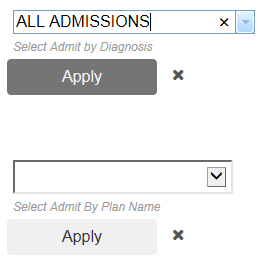
Here's a screenshot of the filterable layers:
The first (Admit by Diagnosis) is the Dijit with autocomplete.
The Second (Plan Name) is just a simple drop down.
Anyone familiar with this template - any ideas why this might be happening? And how I can leverage the existing template code for string types?

