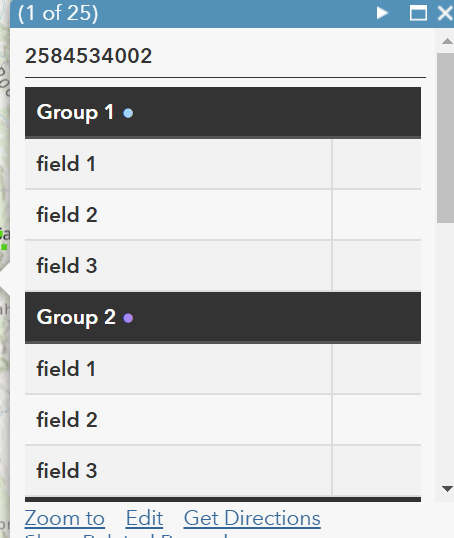
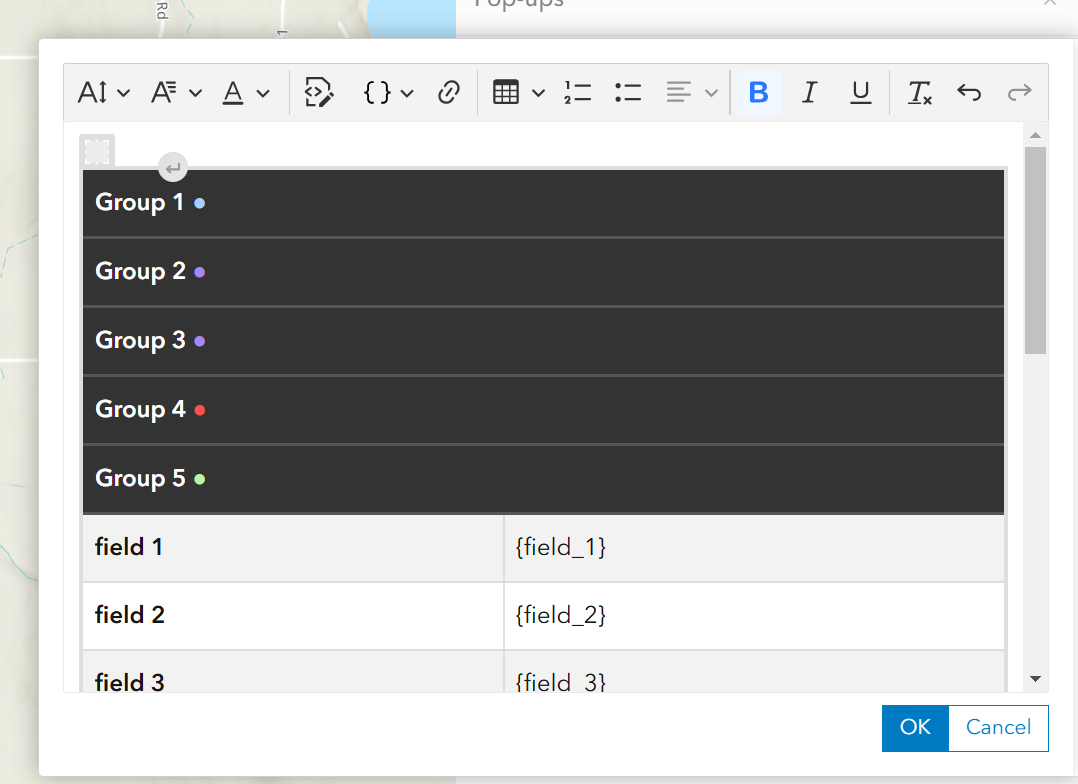
As tags HTML th não funcionam corretamente no novo Visualizador de Mapas, mas funcionam bem no visualizador antigo. Segue um exemplo de código. Todos os cabeçalhos ficam empilhados no topo do HTML, fazendo com que as tags td fiquem empilhadas abaixo de todas as tags th.
<table style="width: 99%; border-collapse: collapse;">
<tr>
<th colspan="2" style="padding: 8px; text-align: left; border-bottom: 2px solid #555; background-color: #333; color: white; font-weight: bold;">
Grupo 1 <span style="color: #a2d2ff;">●</span>
</th>
</tr>
<tr style="background-color: #f2f2f2;">
<td style="padding: 8px; text-align: left; border-bottom: 1.4px solid #ddd; border-right: 1.4px solid #ddd; font-weight: 550;">campo 1</td>
<td style="padding: 8px; text-align: left; border-bottom: 1.4px solid #ddd;">{field_1}</td>
</tr>
<tr>
<td style="padding: 8px; text-align: left; border-bottom: 1.4px solid #ddd; border-right: 1.4px solid #ddd; font-weight: 550;">campo 2</td>
<td style="padding: 8px; text-align: left; border-bottom: 1.4px solid #ddd;">{field_2}</td>
</tr>
<tr style="background-color: #f2f2f2;">
<td style="padding: 8px; text-align: left; border-bottom: 1.4px solid #ddd; border-right: 1.4px solid #ddd; font-weight: 550;">campo 3</td>
<td style="padding: 8px; text-align: left; border-bottom: 1.4px solid #ddd;">{field_3}</td>
</tr>
<th colspan="2" style="padding: 8px; text-align: left; border-bottom: 2px solid #555; background-color: #333; color: white; font-weight: bold;">
Grupo 2 <span style="color: #a689f5;">●</span>
</th>
</tr>
<tr style="background-color: #f2f2f2;">
<td style="padding: 8px; text-align: left; border-bottom: 1.4px solid #ddd; border-right: 1.4px solid #ddd; font-weight: 550;">campo 1</td>
<td style="padding: 8px; text-align: left; border-bottom: 1.4px solid #ddd;">{field_1}</td>
</tr>
<tr>
<td style="padding: 8px; text-align: left; border-bottom: 1.4px solid #ddd; border-right: 1.4px solid #ddd; font-weight: 550;">campo 2</td>
<td style="padding: 8px; text-align: left; border-bottom: 1.4px solid #ddd;">{field_2}</td>
</tr>
<tr style="background-color: #f2f2f2;">
<td style="padding: 8px; text-align: left; border-bottom: 1.4px solid #ddd; border-right: 1.4px solid #ddd; font-weight: 550;">campo 3</td>
<td style="padding: 8px; text-align: left; border-bottom: 1.4px solid #ddd;">{field_3}</td>
</tr>
<th colspan="2" style="padding: 8px; text-align: left; border-bottom: 2px solid #555; background-color: #333; color: white; font-weight: bold;">
Grupo 3 <span style="color: #a689f5;">●</span>
</th>
</tr>
<tr style="background-color: #f2f2f2;">
<td style="padding: 8px; text-align: left; border-bottom: 1.4px solid #ddd; border-right: 1.4px solid #ddd; font-weight: 550;">campo 1</td>
<td style="padding: 8px; text-align: left; border-bottom: 1.4px solid #ddd;">{field_1}</td>
</tr>
<tr>
<td style="padding: 8px; text-align: left; border-bottom: 1.4px solid #ddd; border-right: 1.4px solid #ddd; font-weight: 550;">campo 2</td>
<td style="padding: 8px; text-align: left; border-bottom: 1.4px solid #ddd;">{field_2}</td>
</tr>
<tr style="background-color: #f2f2f2;">
<td style="padding: 8px; text-align: left; border-bottom: 1.4px solid #ddd; border-right: 1.4px solid #ddd; font-weight: 550;">campo 3</td>
<td style="padding: 8px; text-align: left; border-bottom: 1.4px solid #ddd;">{field_3}</td>
</tr>
<tr>
<th colspan="2" style="padding: 8px; text-align: left; border-bottom: 2px solid #555; background-color: #333; color: white; font-weight: bold;">
Grupo 4 <span style="color: #fa5050;">●</span>
</th>
</tr>
<tr style="background-color: #f2f2f2;">
<td style="padding: 8px; text-align: left; border-bottom: 1.4px solid #ddd; border-right: 1.4px solid #ddd; font-weight: 550;">campo 1</td>
<td style="padding: 8px; text-align: left; border-bottom: 1.4px solid #ddd;">{field_1}</td>
</tr>
<tr>
<td style="padding: 8px; text-align: left; border-bottom: 1.4px solid #ddd; border-right: 1.4px solid #ddd; font-weight: 550;">campo 2</td>
<td style="padding: 8px; text-align: left; border-bottom: 1.4px solid #ddd;">{field_2}</td>
</tr>
<tr style="background-color: #f2f2f2;">
<td style="padding: 8px; text-align: left; border-bottom: 1.4px solid #ddd; border-right: 1.4px solid #ddd; font-weight: 550;">campo 3</td>
<td style="padding: 8px; text-align: left; border-bottom: 1.4px solid #ddd;">{field_3}</td>
</tr>
<tr>
<th colspan="2" style="padding: 8px; text-align: left; border-bottom: 2px solid #555; background-color: #333; color: white; font-weight: bold;">
Grupo 5 <span style="color: #b9f5a6;">●</span>
</th>
</tr>
<tr style="background-color: #f2f2f2;">
<td style="padding: 8px; text-align: left; border-bottom: 1.4px solid #ddd; border-right: 1.4px solid #ddd; font-weight: 550;">campo 1</td>
<td style="padding: 8px; text-align: left; border-bottom: 1.4px solid #ddd;">{field_1}</td>
</tr>
<tr>
<td style="padding: 8px; text-align: left; border-bottom: 1.4px solid #ddd; border-right: 1.4px solid #ddd; font-weight: 550;">campo 2</td>
<td style="padding: 8px; text-align: left; border-bottom: 1.4px solid #ddd;">{field_2}</td>
</tr>
<tr style="background-color: #f2f2f2;">
<td style="padding: 8px; text-align: left; border-bottom: 1.4px solid #ddd; border-right: 1.4px solid #ddd; font-weight: 550;">campo 3</td>
<td style="padding: 8px; text-align: left; border-bottom: 1.4px solid #ddd;">{field_3}</td>
</tr> Resultados:
Resultados no visualizador de mapas antigo: