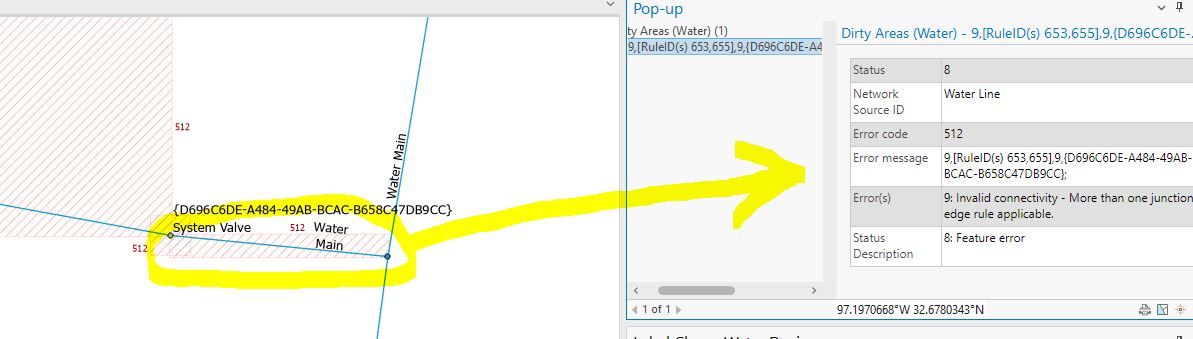
I need help to understand a pretty fundamental concept for designing a UN. I'm preparing to migrate our water GN to a UN, and in some first round attempts of applying our asset package to UN (FGDB) we have ~8,000 instances of the following network error indicating ambiguity.
9: Invalid connectivity – More than one junction edge rule applicable
While there is this ESRI tutorial on interactively fixing errors in Pro (under Network Topology, click Terminal Connections...etc.), that's not realistic when you have to resolve many thousands of cases at a time.
My question: Can someone walk me through, or point to a page with, the general steps for handling this in bulk? Is there no way to mass update our features beforehand, or refine the rules in the asset package, without losing critical connectivity logic to say "this line can connect to this device/junction"?
I used the rules that came out of the box with the Water Distribution UN Foundation. Here is one of dozens of examples of pairs of rules that seem to be causing ambiguous connectivity errors due to multiple water mains touching the same device or junction.
| Rule Type | From Table | From Asset Group | From Asset Type | From Terminal | To Table | To Asset Group | To Asset Type |
| Junction-edge connectivity | Water Device | Flow Valve | Air Gap | Port 1 | Water Line | Water Main | Distribution Main |
| Junction-edge connectivity | Water Device | Flow Valve | Air Gap | Port 2 | Water Line | Water Main | Distribution Main |
Even if I delete all rules in the asset package that meet the following criteria, it only reduced the number of errors by a couple hundred.
Where rule_type = 'Junction Edge Connectivity' And from_terminal = 'Port Two'
What does one do in this case?
Example from our data. There are two separate water main segments touching the System Valve that is labeled.