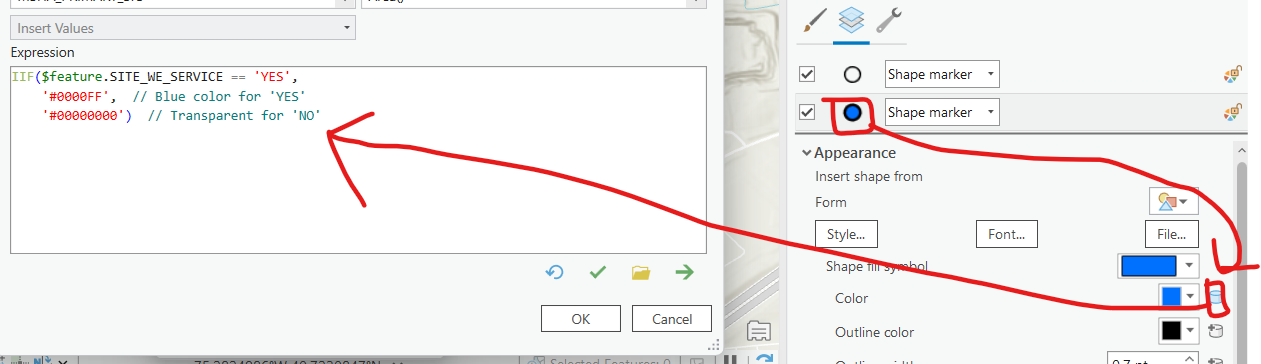
I'm trying to create a complex symbology in ArcGIS Pro and I'm stuck. Here's what I'm working with:
I have a layer with multiple fields, including:
MSHA_CURRENT_CONTROLLER_NAME
SITE_WE_SERVICE (values are YES or NO)
I've created a unique value symbology based on MSHA_CURRENT_CONTROLLER_NAME. For example:
"COMPANY A" is a hollow square
"COMPANY B" is a hollow circle
What I want to achieve:
If "SITE_WE_SERVICE" is YES, the hollow square symbol should be filled with blue
If it's NO, the symbol should remain hollow.
Any thoughts on how to do this?
I don't want to use two different layers. I need to keep everything in a single layer because I want to share it on ArcGIS Online. Having it split into two layers will cause confusion.
EDIT: I'm running late for dinner, but I figured it out and wanted to share in case anyone else runs into the same issue. I'll explain it better tomorrow, but this image is the solution.