I am attempting to modify this responsive web design sample and need to replace the information that was originally inserted to use our data instead. The code that I need to modify for the form named attributesModal is in the main.js file within the app folder and the HTML page that has the form is index.html. My project is here: csergent45/streetSigns · GitHub and you can run it here: Street Signs
What do I need to do to get this to work?
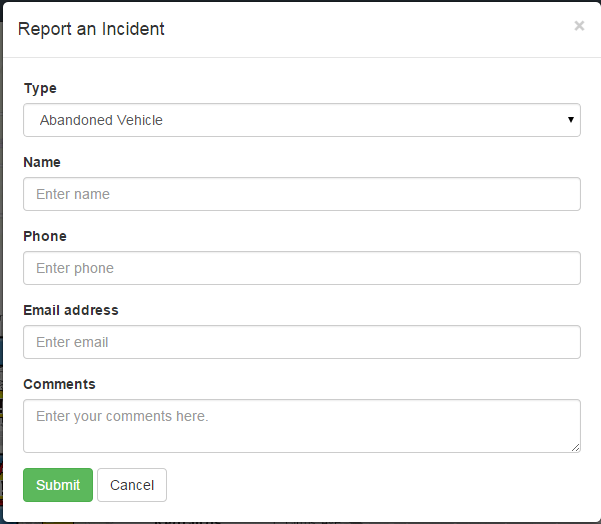
Here is the original form:
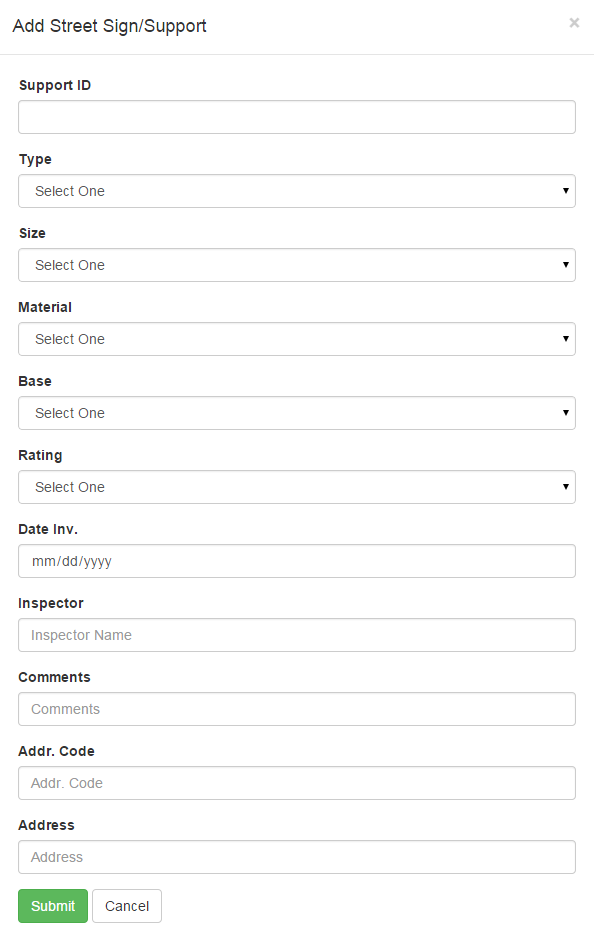
and here is my form:
No that error means there is a problem performing apply edits. If you see that error go to the Network tab of the developer tools and look for the applyEdits request. Once you find the request click on it and look at the form data section in the header tab and you can see details about the added features. If you are trying to add a feature you should see something like this. Looks like there are a few problems. First some of these fields don't exist in your service. Also looks like an empty field name and value is being sent it. So you'll want to look at your app code and find out where the attribute fields are being set and update that code to remove the fields that don't apply to your service.
adds: [{
"geometry": {
"x": 847423.4738888888,
"y": 1144384.5833333333,
"spatialReference": {
"wkid": 3435
}
},
"attributes": {
"requestreceived": null,
"severity": 0,
"supportId": "",
"type": "",
"size": "",
"material": "",
"base": "",
"rating": "",
"dateInv": "",
"": "",
"requestdate": 1428954294000
}]
Here's an example of what a successful add to your service should look like:
[
{
"geometry":{
"x":-9904632.380180769,
"y":4848982.336304281,
"spatialReference":{
"wkid":102100
"attributes":{
"ADDRESS":null,
"SUPPORTID":null,
"TYPE":null,
"SIZE_":null,
"MATERIAL":null,
"BASE":null,
"RATING":null,
"DATEINV":null,
"INSPECTOR":null,
"COMMENTS":null,
"ADDRCODE":null
]
The array did relate. I used Kelly's example and had to re-arrange my data as well as add the attribute "name" to my form fields.
It looked like line 263-264 would loop through all the fields and add the feature on line 270, stop the request on 271 and then apply the edits to display the graphic on on line 273, but it's not doing that; I would like to add the feature once the form is filled out.
It would be 251 in yours. But actually, I was totally off base in the first place so you can disregard that comment.
What kind of issue are you having?
No luck yet. Did you use my link? Line 173 is blank.
Did you have any luck with this yet?
Haven't worked much with bootstrap, but it looks like 173 in main.js. From the looks of it the form is pulling an array of all the attributes from the feature layer, rather than individually addressing them,like this example ArcGIS API for JavaScript Sandbox .
Membros conectados podem postar, seguir atualizações e mais. Novo aqui? Registre uma conta gratuita.
Find useful guides, FAQs, and documents to help you navigate and make the most of Esri Community.