Hi,
I have a ArcGIS Dashboard with a list widget that I would like to add two fields from the same layer to. And not just to add them but also when you see them listed their colors will change based on the attribute information.
- The first field I am using is Main_Sourc which has Electricity Grid, Generator, Solar and No data entered in the attribute table.
- The second field, Func_Toile has Yes, No and No data entered in the attribute table
I am able to style the first field Main_Sourc in the List but not Func_Toile.
My issue as you can see in the screeshot below is the second field "FuncToile" takes the color of the "Main_Sourc" when the list is displayed and not the color that was asigned to it in arcade.
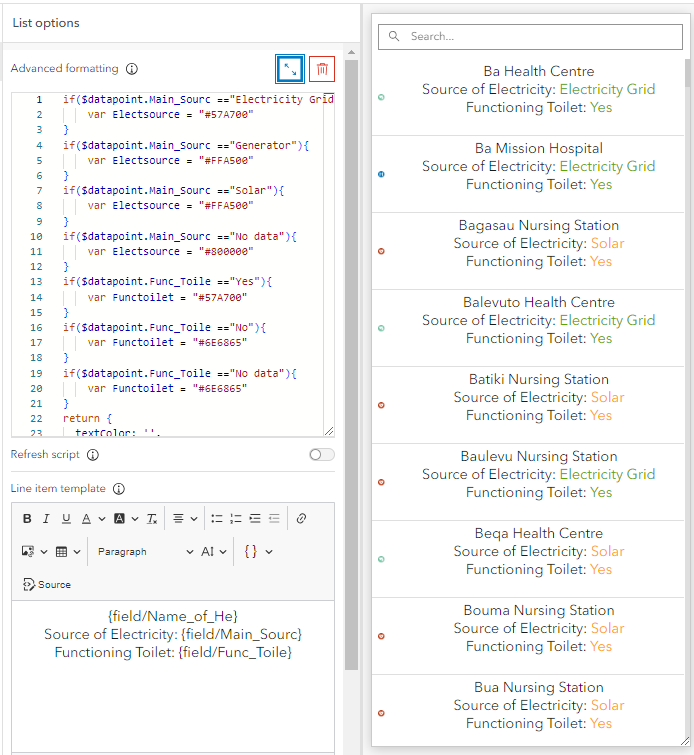
My arcade expression is below:
if($datapoint.Main_Sourc =="Electricity Grid"){
var Electsource = "#57A700"
}
if($datapoint.Main_Sourc =="Generator"){
var Electsource = "#FFA500"
}
if($datapoint.Main_Sourc =="Solar"){
var Electsource = "#FFA500"
}
if($datapoint.Main_Sourc =="No data"){
var Electsource = "#800000"
}
if($datapoint.Func_Toile =="Yes"){
var Functoilet = "#57A700"
}
if($datapoint.Func_Toile =="No"){
var Functoilet = "#6E6865"
}
if($datapoint.Func_Toile =="No data"){
var Functoilet = "#6E6865"
}
return {
textColor: '',
backgroundColor: '',
separatorColor:'',
selectionColor: '',
selectionTextColor: '',
attributes: {
Electsource: Electsource,
Functoilet: Functoilet,
}
}


