The Stealth Mouse and Soft Mouse are supported in ArcGIS Pro 3.2. These are great news! I really like the GUI to assign functions to the buttons of the 3D mice. It is more user friendly than in Stereo Analyst.
It must be possible to assign custom buttons to the 3D mice (examples see below). Otherwise, it doesn't make sense for us to use a 3D mouse.
Examples from the Swiss National Forest Inventory:
For one sample plot, the interpeters must digitize 25 points and assign the land cover to them:
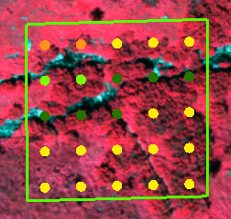
The workflow with a 3D mouse looks as follows:
- When the interpreter starts digitizing, the cursor automatically jumps to the x, y, and z location of the first point.
- The interpreter selects the land cover category in a combo box.
- She clicks on a 3D mouse button --> this is a custom button that assigns the attribute to the point and jumps to the x,y, and z location of the next point.
- Repeat these steps until all 25 points are digitized.
Or even better: points 2 and 3 could be combined to one button click --> for every land cover category, a different button or button combination could be clicked.
There is another example:
The interpreters must digitize the forest boundary line. Around the last vertex of the sketch, there is a circle with 25 m radius. The purpose of this circle is to indicate the area in which the next vertex has to be placed (the distance between vertices must be < 25 m):
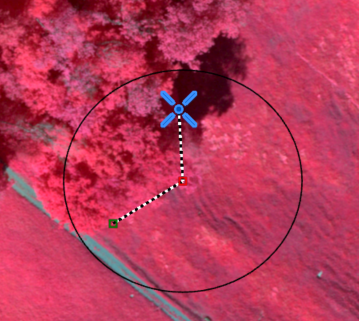
The workflow with a 3D mouse looks as follows:
- When the interpreter starts digitizing, she clicks on a 3D mouse button --> this is a custom button that digitizes the first vertex, and draws a circle around it (using SDK function MapView.Active.AddOverlay()).
- Repeat this step until forest boundary line is finished.


