I'm running the latest version of Pro (v.3.2.0) and I'm trying to run the Create Indoors Database geoprocessing tool against an empty geodatabase. I'm running the tool with the default values and have Create Attribute Rules selected as I'd like to use these once the data is loaded:
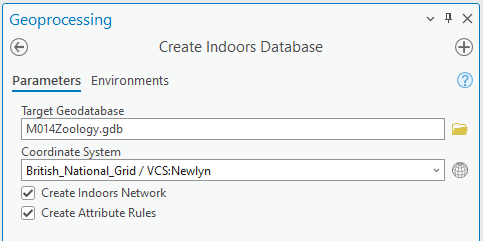
However, when the tool runs I get the following error:
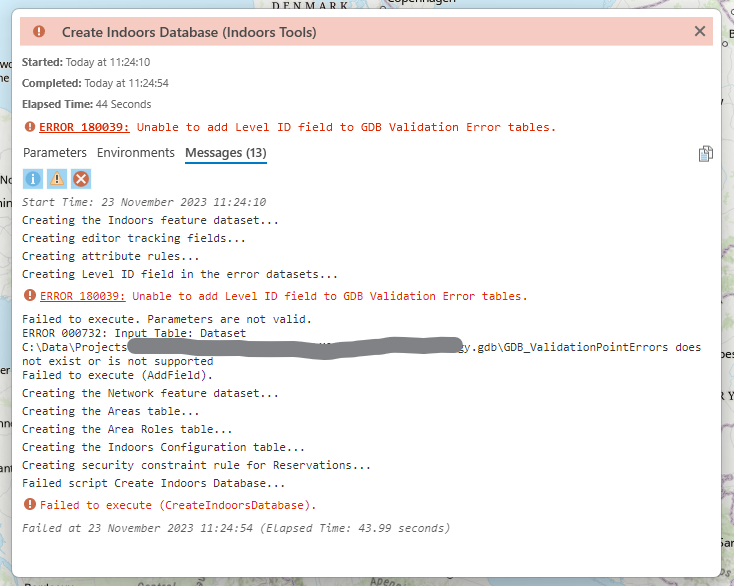
This links to the following page https://pro.arcgis.com/en/pro-app/latest/tool-reference/tool-errors-and-warnings/180001-190000/tool-errors-and-warnings-180026-180050-180039.htm which lists the solution to run the tool with Create Attribute Rules unchecked. But I want to use the Attribute Rules in the future so really need to add them to the geodatabase.
The error is specifically complaining about a table being missing or unsupported:
GDB_ValidationPointErrors does not exist or is not supported
Do I just need to create this table before running the Generate Indoors Database tool? I don't understand why this is failing on a new blank project with a new empty geodatabase. I have no spaces or special characters in my geodatabase name or the file path, I'm at a loss to know what else to try.



