I'm building an indicator in dashboard. What I would like to show is the current velocity & the velocity required to finish by year end in 'mi'.
I've got the current velocity working, sort of. In order to keep that working and get the the second velocity working I need DateDiff to work with manually entered dates. All the examples I see link it to date fields in the feature using $feature, but for this purpose those dates are irrelevant.
The 138 is my remaining working days and that is currently manually entered, thus I need the var age to generate this number instead. (var remainingDays = 138) You can see father down (age) is showing the NaN in topText:
I my project started 3-27-23 and times out 12-31-23. I'm wondering if the problem is the output format of the Date vs Day(Now()).
See screenshot for context.
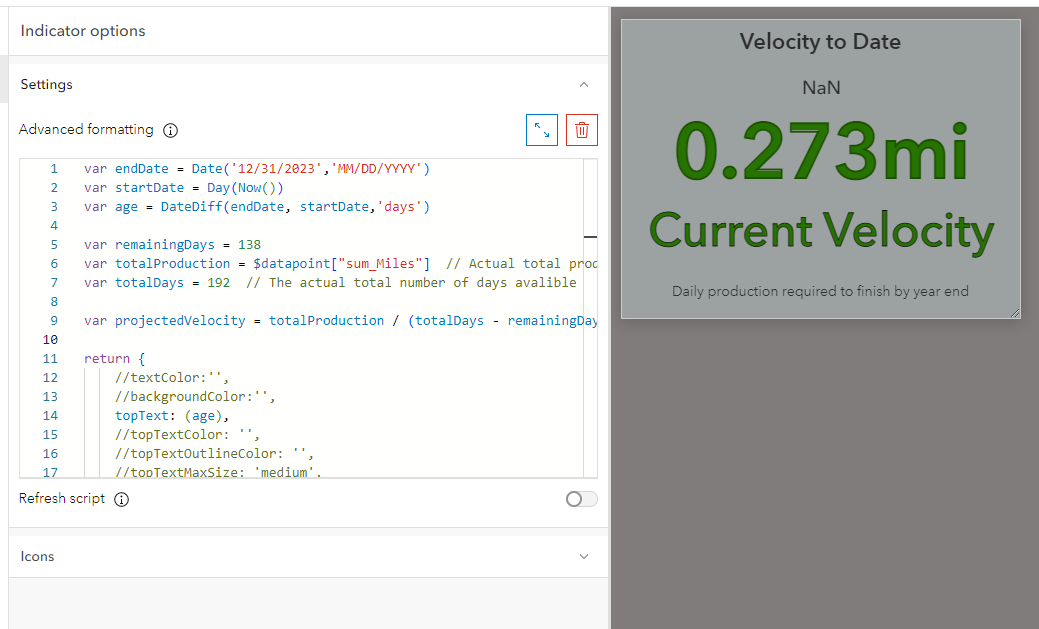
var endDate = Date('12/31/2023','MM/DD/YYYY')
var startDate = Day(Now())
var age = DateDiff(endDate, startDate,'days')

var remainingDays = 138
var totalProduction = $datapoint["sum_Miles"]  // Actual total production to date
var totalDays = 192  // The actual total number of days avalible

var projectedVelocity = totalProduction / (totalDays - remainingDays)

return {
    //textColor:'',
    //backgroundColor:'',
    topText: (age),
    //topTextColor: '',
    //topTextOutlineColor: '',
    //topTextMaxSize: 'medium',
    middleText: Round (projectedVelocity,3)+"mi",







