Hi,
I want to write python scripts in Visual Studio Code and use arcpy module. ArcGIS Pro 3.x and Anaconda 3 are installed.
First, I had a problem with “conda” message – “The term 'conda' is not recognized as the name of a cmdlet, function, script file, or operable program”. I solved the touble by this link:
https://stackoverflow.com/questions/56314710/the-term-conda-is-not-recognized-as-the-name-of-a-cmdlet
But now I'm solving another problem - when using conda-based python interpreters:
C:\Users\USER\AppData\Local\ESRI\conda\envs\arcgispro-py3-clone\python.exe
or C:\Program Files\ArcGIS\Pro\bin\Python\envs\arcgispro-py3\python.exe
files are not written to disk at all. For example:
f = open(r"C:\_work\Output.txt","a")
f.close()
import arcpy
arcpy.FeatureClassToFeatureClass_conversion(r"C:\_work\File_A.shp", r"C:\_work", "File_B.shp")
After running this realy simple code, I don’t get any errors or warnings. But neither file Output.txt nor file File_B.shp cannot be found in C:\_work folder
When I run this line of code again:
arcpy.FeatureClassToFeatureClass_conversion(r"C:\_work\File_A.shp", r"C:\_work", "File_B.shp")
I'm getting his message:
arcpy.FeatureClassToFeatureClass_conversion(r"C:\_work\File_A.shp", r"C:\_work", "File_B.shp") arcgisscripting.ExecuteError: ERROR 000258: Output C:\_work\File_B.shp already exists Failed to execute (FeatureClassToFeatureClass).
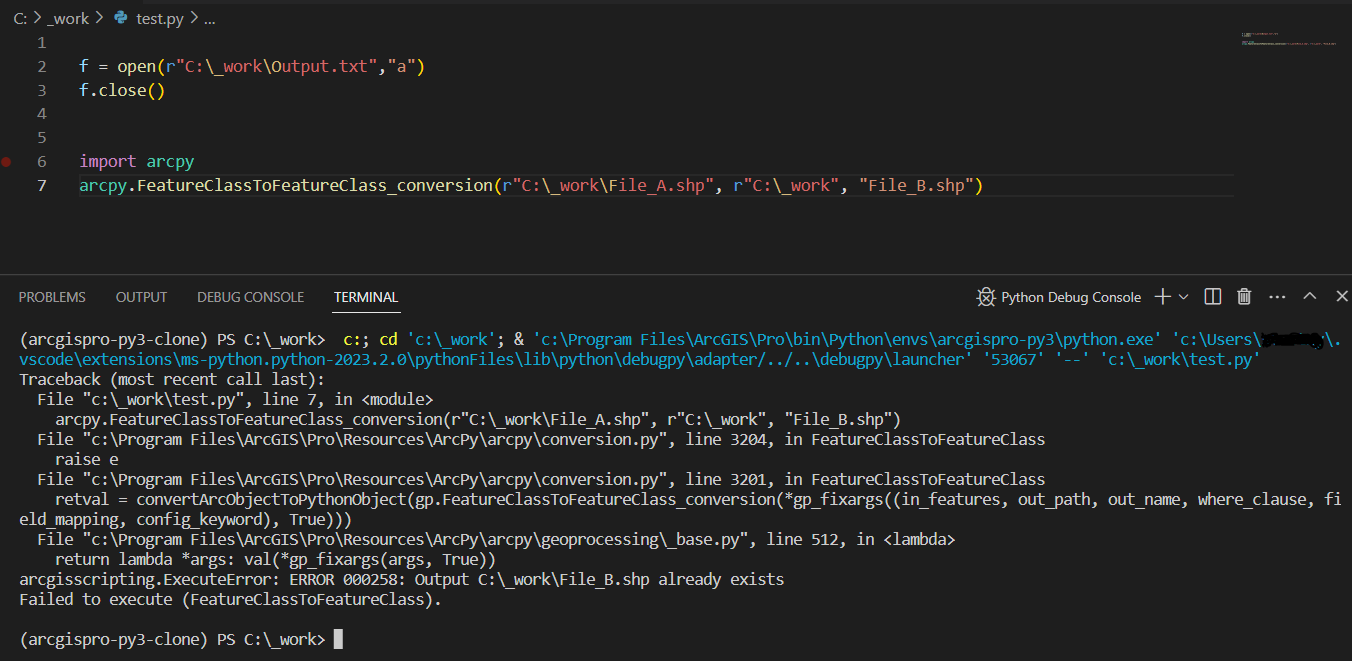
But there is no file File_B.shp in my folder C:\_work
When I run this piece of code with a different python interpreter in Visual Studio Code (e.g.: C:\Users\USER\AppData\Local\Microsoft\WindowsApps\python3.9.exe)
f = open(r"C:\_work\Output.txt","a")
f.close()
the file Output.txt is created without any problems
Does anybody know where the problem could be?
Best regards, Petr