Hi there,
I am working on ArcGIS enterprise 10.9.1 (HA set up) and Portal 10.9.1 and publishing branch versioned feature layers using ArcGIS Pro 3.0.
In the 'Share as web layer' pane on ArcGIS Pro, I set the layer's time zone to "UTC+8 Kuala Lumpur, Singapore" (my local time). This is reflected in the map service when viewed from the server manager. However, the editor tracking column in the feature layers were still showing the date-time in UTC. I noticed that this is because the preferred time zone setting is set to "none" by default (see provided picture below). After changing it once manually to match the layer's time zone I set during publishing, the editor tracking column date-time was finally presented in my local time.
2 questions:
1. Is there a way to set the preferred time zone when publishing the data from the ArcGIS Pro UI?
2. Is there a way to set the preferred time zone for all already published feature layer services as a one-time batch job, as opposed to setting them manually through the server manager? I have >50 layers so I was hoping that I can do it as a one-time job instead of manually changing it for each service through the server manager.
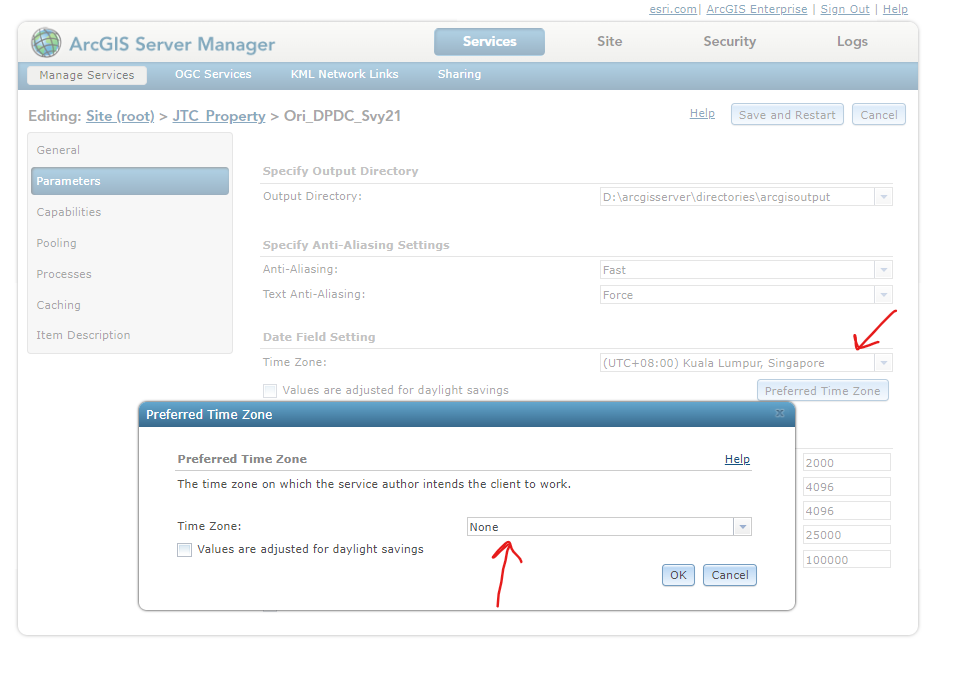
from the picture above, it would be ideal for the preferred time zone option to already be set to the same time zone that I initially chose during the publishing stage.
Thanks.



