I want to add my own button into the sketch widget toolbar.
This forum post will create the button in a new div outside of the Sketch Widget.
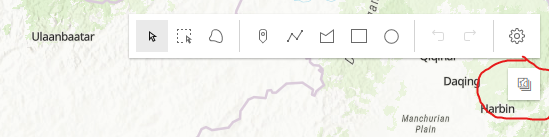
With the code:
view.when(() => {
    const sketch = new Sketch({
      layer: graphicsLayer,
      view: view,
      // graphic will be selected as soon as it is created
      creationMode: "update"
    });

    view.ui.add(sketch, "top-right");

    var element = document.createElement('div');
    element.className = "esri-icon-collection esri-widget--button esri-widget esri-interactive";
    element.addEventListener('click', function (evt) {
      console.log("clicked");
    })

    view.ui.add(element, "top-right");

});I'd really want to include that button alongside all of the other buttons - and still control what tools are available.
Is there a recommended ways to do this? Are there any articles?

