Not the most alluring of titles, but dang if this isn't a tough rollback/omission of functionality from v 2 to v 3. I upgraded from Pro 2.9 to 3.02 and I use Alt-Tab constantly switching from Notebook to Notebook in the Views Ribbon. It looks like that functionality functionally broke in multiple ways. Here is what I mean:
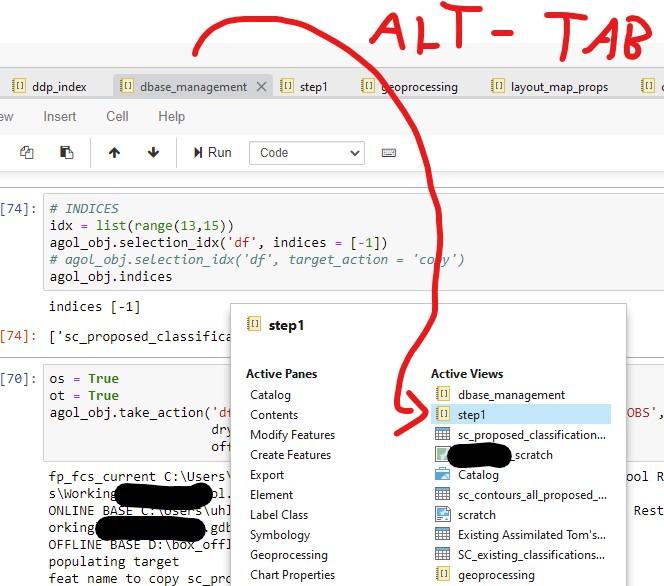
1) ALT - TAB from View 1 (dbase_management) to View 2 (step1).
In pre-3.0, Alt-Tab would take me directly to the Notebook I tabbed to (or map, or layout). So I could Alt-Tab-Tab-Tab as much as possible until arriving at my desired View. BUT now, it tabs through that intermediate visualization pane (see red arrow) highlighting Views as I tab BUT...when I stop Tabbing and release the Alt key, nothing switches. Still stuck in the same View or in this case Notebook. I then have to grab my mouse, and click on the View in that intermediate pane. In effect, I need to pick up my mouse regardless, so the Alt-Tab functionality is useless. Can anybody from ESRI address this?
Additionally, once I click on and activate a Notebook. I have to take my mouse and click in the cell to activate the cursor. Previously, I just hit ENTER to activate cursor and ESC to step back to traversing through cells. Pretty detrimental to my workflow.
Anybody else notice this?
Thanks,
Zach
Even this simple functionality is problematic. It sometimes engages and other times does nothing - i.e. I can't switch from View to View. Second problem, typing ENTER no longer activates the cell and my cursor in the Active View. In this case, "step1".

