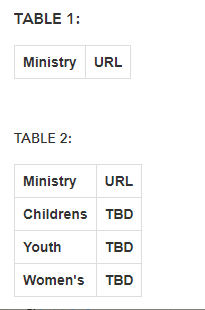
I am having trouble creating a table within a popup that has the following features:
- Selectively shows rows if a custom expression is not null
- Has consistent column width formatting.
How can I get Table 1 to look like Table 2?
Here is my code:
<p>
<span style="font-size:medium;"><font><strong>TABLE 1:</strong></font></span>
</p>
<figure class="table">
<table style="border-collapse:collapse;font-family:arial, sans-serif;text-align:left;">
<tbody>
<tr>
<th style="border:1px solid #ddd;padding:8px;">
Ministry
</th>
<th style="border:1px solid #ddd;padding:8px;">
URL
</th>
</tr>
<tr style="display:{expression/expr23};">
<th style="border:1px solid #ddd;padding:8px;">
Children's Ministry
</th>
<th style="border:1px solid #ddd;padding:8px;">
<a href="{Childrens_Link}"><strong>Link</strong></a>
</th>
</tr>
<tr style="display:{expression/expr23};">
<th style="border:1px solid #ddd;padding:8px;">
Youth Ministry
</th>
<th style="border:1px solid #ddd;padding:8px;">
<a href="{Youth_Link}"><strong>Link</strong></a>
</th>
</tr>
<tr style="display:{expression/expr23};">
<th style="border:1px solid #ddd;padding:8px;">
Women's Ministry
</th>
<th style="border:1px solid #ddd;padding:8px;">
<a href="{Womens_Link}"><strong>Link</strong></a>
</th>
</tr>
</tbody>
</table>
</figure>
<p>
<br>
</p>
<p>
<strong>TABLE 2:</strong>
</p>
<figure class="table">
<table style="border-collapse:collapse;font-family:arial, sans-serif;text-align:left;">
<tbody>
<tr>
<th style="border:1px solid #ddd;padding:8px;">
Ministry
</th>
<th style="border:1px solid #ddd;padding:8px;">
URL
</th>
</tr>
<tr>
<th style="border:1px solid #ddd;padding:8px;">
Childrens
</th>
<th style="border:1px solid #ddd;padding:8px;">
TBD
</th>
</tr>
<tr>
<th style="border:1px solid #ddd;padding:8px;">
Youth
</th>
<th style="border:1px solid #ddd;padding:8px;">
TBD
</th>
</tr>
<tr>
<th style="border:1px solid #ddd;padding:8px;">
Women's
</th>
<th style="border:1px solid #ddd;padding:8px;">
TBD
</th>
</tr>
</tbody>
</table>
</figure>
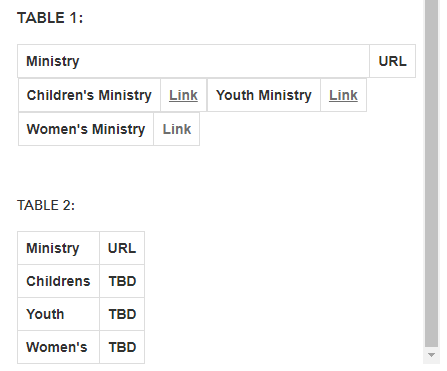
Here is what I get:
Table 2 is formatted well, Table 1 is not; however, it does selectively exclude rows appropriately.
With Row inclusion:
With row exclusion: