I'm not a GIS professional and just have a free ArcGIS Online subscription, which I've used for a few very basic maps and story maps over the last few years. So I'm a very, very basic user of the system.
I just made a new map and added this layer from the U.S. Department of Housing and Urban Development:
https://www.arcgis.com/home/item.html?id=c930d736b1764c259371fc7111e02740
I want to add some data about each of the geographic areas shown on that map. I created an Excel file (then converted it to .csv) that has five columns, two of which (COCNAME, COCNUM) match fields on that HUD layer. So if I can get the data into the map, it should line up with the Continuum of Care geographic areas. But I can't figure out how to do that. I found references to the "join" command in ArcGIS Online that sounded promising, but the instructions on this page:
https://support.esri.com/en/technical-article/000012168
don't correspond to what I'm seeing in Map Viewer (Classic). The Details > Content tab on my map page just shows me the existing layers; there's no "Analysis" button.
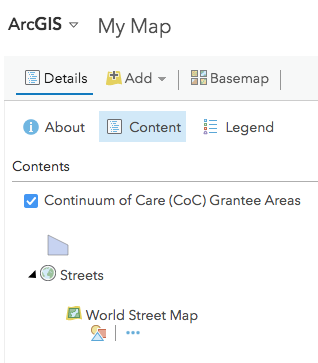
I can add the csv file using the Add command, but then it just sits there as a separate layer; I can't click on the map and see the data about that geographic area.
Am I in the wrong mode on ArcGIS Online, or does my low-level subscription not support the Analysis features? Is this something I can do with the ArcGIS features I have access to?
Thanks!

