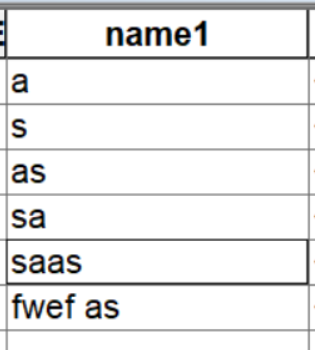
here's my script:
-----------------------------------------------------------------------------------------------------------------------------
###script for arabic
fc = r"C:/New File Geodatabase.gdb/an3"
cursor = arcpy.da.UpdateCursor(fc, ["name1"])
for row in cursor:
      if "a" in row[0]:
            row[0] = row[0].encode('utf8').replace("a", "ض")
      if "s" in row[0]:
            row[0] = row[0].encode('utf8').replace("s", "س")
cursor.updateRow(row)dears i'm trying to replace text in field, i want to rematch English alphabet to Arabic alphabet like (a = ش, d = ي, s = س, etc...). I wrote a test script for 2 characters and run it in ArcMap 10.8 python window, it doesn't works well as it is work with English alphabet: here's my script: my data enter image description here
###script for arabic
fc = r"C:/New File Geodatabase.gdb/an3"
cursor = arcpy.da.UpdateCursor(fc, ["name1"])
for row in cursor:
      if "a" in row[0]:
            row[0] = row[0].encode('utf8').replace("a", "ض")
      if "s" in row[0]:
            row[0] = row[0].encode('utf8').replace("s", "س")
cursor.updateRow(row)Output/result

-----------------------------------------------------------------------------------------------------------------------------
test script with English alphabet instead of Arabic on the same data:
fc = r"C:/New File Geodatabase.gdb/an3"
cursor = arcpy.da.UpdateCursor(fc, ["name1"])
for row in cursor:
      if "a" in row[0]:
         row[0] = row[0].encode('utf').replace("a", "Q")
      if "s" in row[0]:
         row[0] = row[0].encode('utf').replace("s", "H")
cursor.updateRow(row) Output:
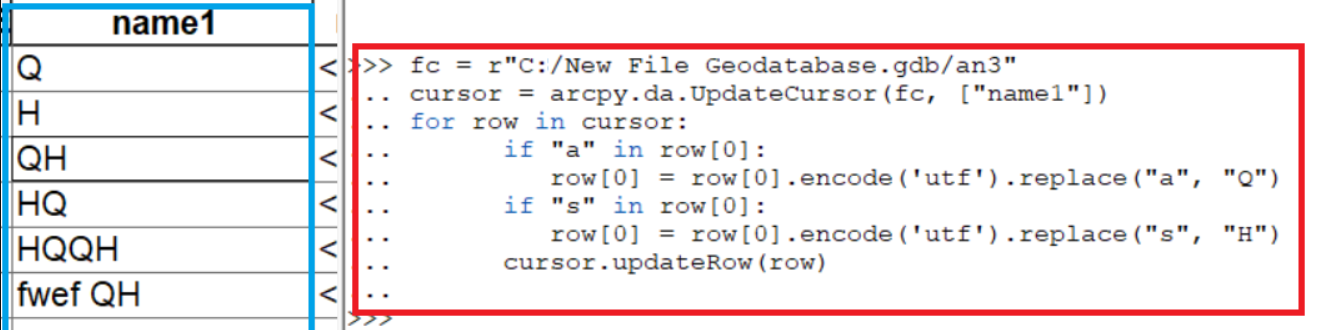
it works fine with all characters in all cells.
-----------------------------------------------------------------------------------------------------------------------------



