I'm getting into Arcade this week and have a few questions. I'm reading up on Arcade articles and learning a lot, but I'm still not sure how to apply this to my situation. These questions should be easy wins for those already versed in Arcade.
1. How do I merge the below symbology for Complete into 1?
$feature.ConsentFormStatus
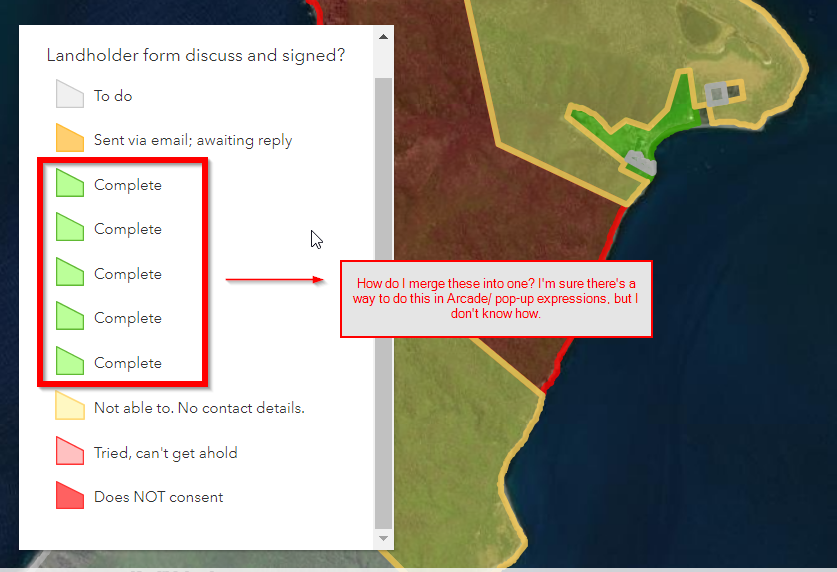
| Code | Desired text output |
Desired fill colour @ 50% transparency | Desired outline colour. no transparency. width- 1 |
| To do | To do | n/a | Grey |
| Not able to. No contact details. | Not able to. No contact details. | Orange | Orange |
In progress | In progress | Yellow | Yellow |
| Complete - Docusign | Complete | Green | Green |
| Complete - Pen and paper | Complete | Green | Green |
| Complete - S123 | Complete | Green | Green |
| Tried | Tried. Can't get ahold. | Orange | Orange |
| DoesNOTConsent | Does NOT Consent | Red | Red |
var ConsentFormStatusSymbology = When(
$feature.ConsentFormStatus=='To do', 'gray',
$feature.ConsentFormStatus=='Not able to. No contact details.','yellow',
$feature.ConsentFormStatus=='Pending', 'orange',
$feature.ConsentFormStatus=='Complete - Eversign', 'green',
$feature.ConsentFormStatus=='Complete - Manual', 'green',
$feature.ConsentFormStatus=='Complete - Survey123','green',
$feature.ConsentFormStatus=='Tried', 'yellow',
$feature.ConsentFormStatus=='DoesNOTConsent','red','white')
or
var color = 'white';

if ($datapoint.ConsentFormStatus == 'To do'){
            color = '#d9d9d9';
if ($datapoint.ConsentFormStatus == 'Not able to. No contact details.')
            color = '#ffee65';
if ($datapoint.ConsentFormStatus == 'Pending.')
            color = '#ffee65';
if ($datapoint.ConsentFormStatus == 'Complete - Eversign')
            color = '#55ff00';
if ($datapoint.ConsentFormStatus == 'Complete - Manual')
            color = '#55ff00';
if ($datapoint.ConsentFormStatus == 'Complete - Survey123')
            color = '#55ff00';
if ($datapoint.ConsentFormStatus == 'Tried')
            color = '#ffee65';
if ($datapoint.ConsentFormStatus == 'DoesNOTConsent')
            color = '#ff0000';
2. Show fields in pop-up based off of Client. There are 3 different clients. Each require different data to be collected. I only want relevant data to show in the pop-ups. I believe you can do this through the filter function. Filter is used and mentioned in this article, but it is too complex for me to be able to replicate.
function filterValidFields(fieldName){
  // skip some system fields and some other fields that are not needed
  var skipNames = [
  "objectid",
  "fid",
  "shape__area",
  "shape__length"];
  return !includes(skipNames, lower(fieldName)) && !IsEmpty($feature[fieldName]) && !IsNan($feature[fieldName]);
}

var validFields = Filter(Map(fields, getNames), filterValidFields);
var attributes = {};
var fieldInfos = [];
var fieldMetaInfo = getFieldsMetaData();
for (var f in validFields){
  var fieldName = validFields[f];
  var fieldMeta = fieldMetaInfo[Lower(fieldName)]
  var fieldAlias = fieldMeta.alias
  Push(fieldInfos, { fieldName: fieldAlias})
attributes[fieldAlias] = formatField(fieldMeta)If polygon falls under Client A, show the following fields Field1, Field2, Field3.
If polygon falls under Client B, show the following fields Field4, Field5, Field6.
Also if this isn't the right place to be posting this question, I shouldn't be posting these kinds of questions or you have any recommended resources, please let me know.
The end goal is to use this in Map Viewer, but also in the dynamic content/text widget in Experience Builder.




