My aprx I created with the intent of saving as a Project Template somehow has more maps than are listed in the catalog pane. These four phantom maps cause an error when I save as a Project Template, so I would like to remove them (and find out where they came from if possible).
When I run a script to list maps I get the following results:
Code:
aprx = arcpy.mp.ArcGISProject("CURRENT")
maps = aprx.listMaps()
for m in maps:
print(m.name)Results:
2 Sale Map1
2 Sale Map2
1 Location Map
2 Sale Map
Title Block Driver
Title Block Driver1
Title Block Driver2
However, the catalog pane only shows three maps (1 Location Map, 2 Sale Map, Title Block Driver):
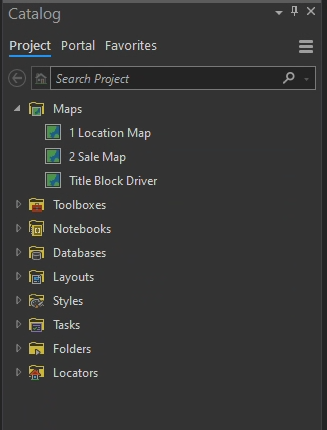
I was able to get the Project Template to save by removing all layers from the four phantom maps through a python script, then adding a blank layer back to all four. But, the maps still persist and may cause future issues.
Any ideas on removing these maps, where they are being stored, or where they came from?

