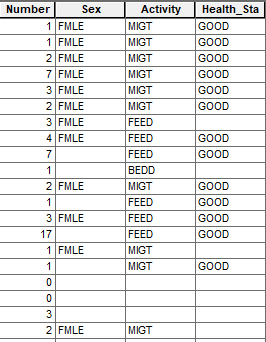
I wish to export a selection (date range from January 1 2019 to January 1 2020) from a AGOL feature layer but am having issue with the end results - the attribute table does not match what I would get otherwise if exporting the same feature layer without the selection (as either a Shapefile and a File Geodatabase). Any ideas?
Here's what I've been trying so far:
from arcgis.gis import GIS
gis = GIS(url, user_name, password)
sql = "CreationDate > date'2019-01-01 00:00:00 AM' AND CreationDate < date'2020-01-01 00:00:00 AM'"
gis.content.get(itemid).layers[0].query(sql).save(folder_path, filename, encoding='utf-8')
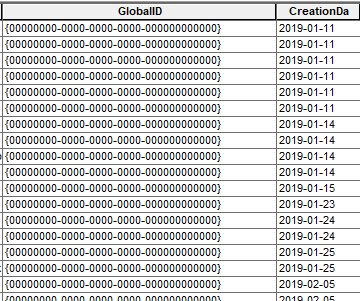
#output is desired range but attributes get twisted (many strings abbreviated, GlobalID as '0's, dates as yyyy-mm-dd format).
I've also tried this but have had similar results:
from arcgis.gis import GIS
gis = GIS(url, user_name, password)
sql = "CreationDate > date'2019-01-01 00:00:00 AM' AND CreationDate < date'2020-01-01 00:00:00 AM'"
gis.content.get(itemid).layers[0].query(sql).features.sdf.spatial.to_featurelayer(output)
#output is similar to previous though GlobalIDs are presereved - however another step would be required to download (export?) the data (gis.content.get(itemid).export(title, export_format).download(folder_path)?) though this will download the entire dataset and not the selection.
Part of this solution is based on what was found on https://community.esri.com/t5/arcgis-api-for-python-questions/how-can-i-export-a-feature-layer-in-agol-to/td-p/781687. (Though this did not ultimately help me with my issue - mostly from the final line of 'features.sdf.spatial.to_featureclass('./output.shp')' where the output is a string and not an object, so nothing gets saved out.
Some screenshots:
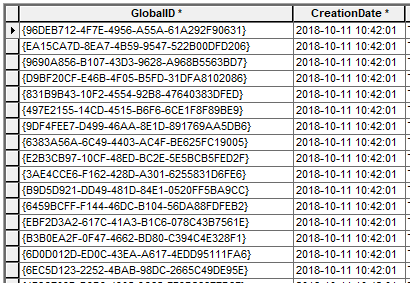
Export as File Geodatabase:
Export from script (notice 'GlobalID'):
Export as File Geodatabase:
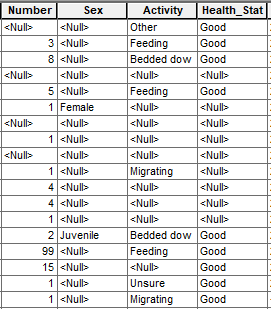
Export from script (notice abbreviations and capitalizations):