I am on Pro version 2.8.1, Parcel Fabric version 4.
I imported the included PF attribute rules, and the "CURRENT MUST NOT OVERLAP" rule does not seem to properly recognize that a parcel is retired.
"// Setting needed
var parcelsFS = FeatureSetByName($datastore, ""Tax"",['RetiredByRecord'], true); // Set the geodatabase parcel table name

var sql = ""RetiredByRecord IS NULL"";
var currentParcels = Filter(parcelsFS, sql);
 if (IsEmpty($feature.RetiredByRecord)){
    return (Count(Overlaps(currentParcels, $feature))<1);
}
return true;"
The rule will highlight parcels that do not have any overlaps as far as I can tell. Checking geometry vertices does not show duplicate or overlapping vertices. Also, only one parcel in that area is highlighted. Neighboring parcels are not selected to indicate where the overlap might be.
In the below screenshot, I used Select Features in the Error Inspector to select the features associated with the error. You can see that the selected Tax parcel does not have a retired record, however, it is listed under the Historic Tax layer. The current and "retired" parcel even have the same GlobalID.
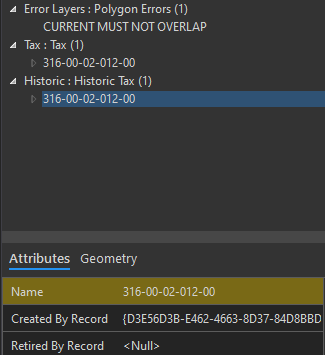
The Display Definition Query for current and retired Tax parcels are correct
Current - "RetiredByRecord IS NULL"
Historic - "RetiredByRecord IS NOT NULL"
**Side Note: I notice the same occurs when I use Select Parcel Features in the Records tab. Tax Lines are selected and treated as both current and retired in the attribute pane even though no historical lines exist or are selected.



