I have a user control like this (simplified):
<UserControl>
    <Grid>
        <StackPanel Grid.Row="0" Orientation="Horizontal">
            <TextBlock
                Grid.Row="0"
                VerticalAlignment="Center"
                FontSize="12"
                Style="{DynamicResource Esri_TextBlockH4}"
                Text="{Binding Title}" />
            </TextBlock>
        </StackPanel>
    </Grid>
</UserControl>
This control is constructed in code behind and assigned to the Header property of an Expander:
<Expander Header="{Binding Header}"
           Style="{DynamicResource Esri_ExpanderBorderless}">
    ...
</Expander>
The problem is that the textblocks inside the expander (and on the header) do not get the correct brushes for dark mode:
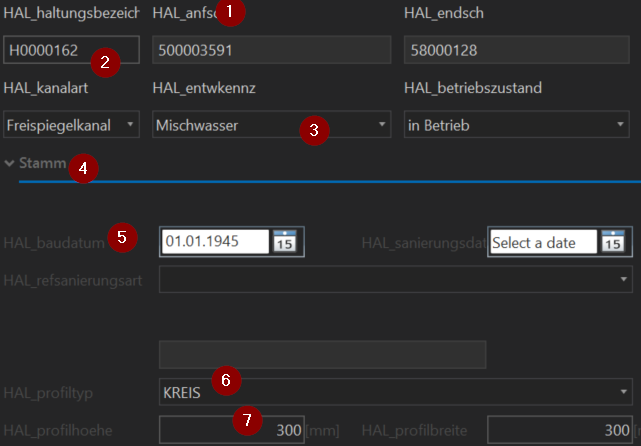
As you can see, the controls above the expander behave as expected: The text blocks (1), text boxes (2) and comboboxes (3) all change appearance accordingly to the theme. But the text blocks in the expander do not (4, 5). Other controls inside the expander do work correctly (6, 7).
Apart from the user control everything else is not styled explicitly but supposed to pick up the default Esri styles.
The views above the expander and inside the expander are constructed dynamically in code behind - but both exactly the same way. Is there something I'm missing here?



