Hi everyone.
I have 2 GPUs on my system: #0, configured for display, and #1 which is a high-end NVidia Titan RTX for AI processing.
I am running ArcGIS Pro 2.6 with the Deep Learning frameworks installed using the installer provided by Esri here: https://github.com/Esri/deep-learning-frameworks/
I can train a model and detect objects using the GPU #0, so with the windows default GPU it works.That being said, when I ask Pro to detect objects using GPU #1 it says:
ERROR 999999: Something unexpected caused the tool to fail. Contact Esri Technical Support (http://esriurl.com/support) to Report a Bug, and refer to the error help for potential solutions or workarounds.
Parallel processing job timed out [Failed to generate table]
Failed to execute (DetectObjectsUsingDeepLearning).
I have my GPUs configured as follows:
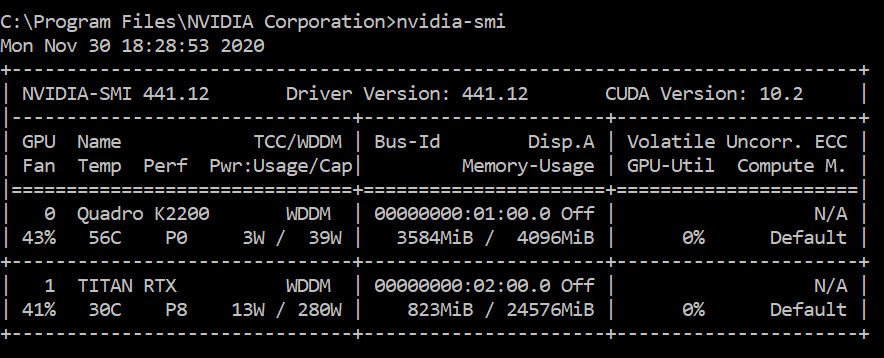
As you can see, both in WDDM mode and both with ECC mode disabled. I have also tried setting the #1 Titan RTX to TCC mode, instead of WDDM:
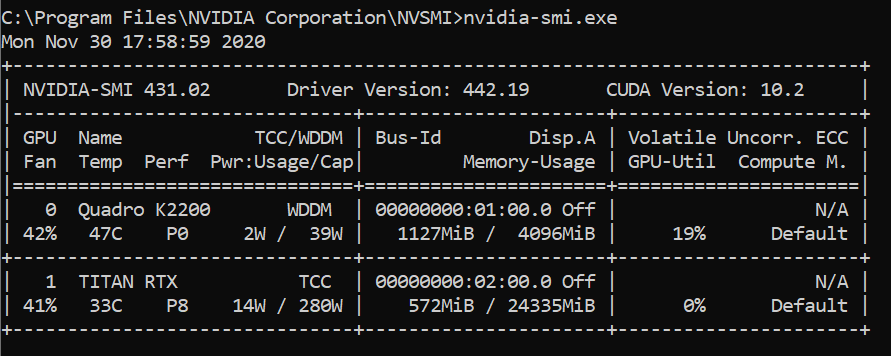
With this last configuration, same error.
Any ideas about what should I check about the configuration of the second GPU? Is there any limitation right now in the software to process on GPU instance #1 or above??
Can any confirm that are no limitations to run processes on others GPU? Or do I have a misconfiguration on my side?
Any help will be appreciated.
Best regards.
