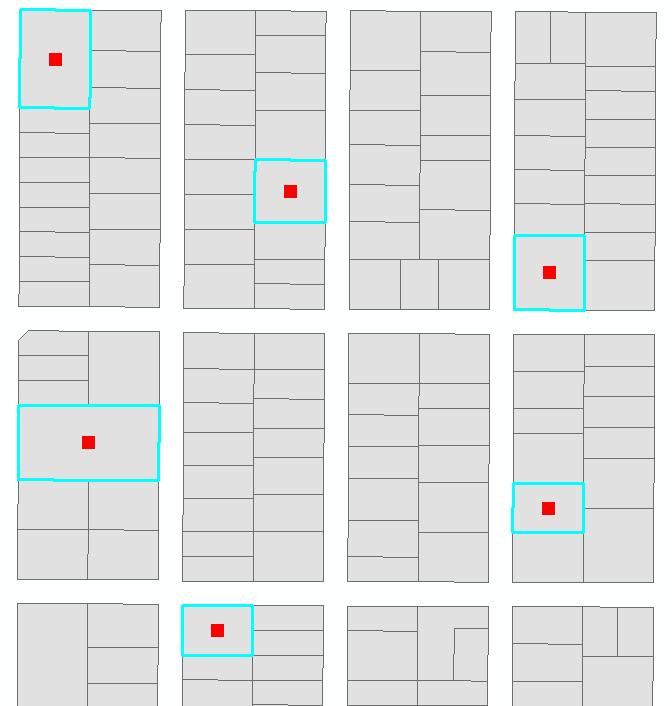
I see what you mean!In that case, let's take Alexander's advice and use the LabelPoint of the pArea. Change this: pPoint = pArea.Centroid To this: pPoint = pArea.LabelPoint
pPoint = pArea.Centroid
pPoint = pArea.LabelPoint
Sorry, forgot to show you where the point is appearing. See attached.
Option Explicit

Sub CreateCentroid()
''provides access to members that control the MXD
Dim pDoc As IMxDocument
''Provides access to members that control the map.
Dim pMap As IMap

''Set the MXD to this mxd file
Set pDoc = Application.Document
''Set the focus to the current map
Set pMap = pDoc.FocusMap

''Provides access to members that hand out enumerated features,
''field collections and allows for the updating, deleting and inserting of features.
Dim pFCursor As IFeatureCursor
''Provides access to members that manage a set of selected table rows or features.
Dim pSelectionSet As ISelectionSet2
''Provides access to members that control feature selection.
Dim pFSelection As IFeatureSelection
''Set the first layer as the active layer
Set pFSelection = pMap.Layer(0)
''Set the selected features
Set pSelectionSet = pFSelection.SelectionSet
''set the pfeaturecursor
Set pFCursor = Nothing
''Get a cursor from the selected features
pSelectionSet.Search Nothing, False, pFCursor
''Provides access to members that identify a polygon and permit controlled access to its inner and outer rings.
Dim pPoly As IPolygon4
''Provides access to members that return properties common to rings and polygons.
Dim pArea As IArea
''Provides access to members that define two dimensional points.
Dim pPoint As IPoint
''Variable to hold the X coordinate
Dim lat As Long
''Variable to hold the Y coordinate
Dim lon As Long
''Provides access to members that return and set properties of a feature.
Dim pFeat As IFeature
Set pFeat = pFCursor.NextFeature
Do Until pFeat Is Nothing
    Set pPoly = pFeat.ShapeCopy
    Set pArea = pPoly
    Set pPoint = pArea.Centroid
    lat = pPoint.X
    lon = pPoint.Y
    Set pFeat = pFCursor.NextFeature
Loop

MsgBox "The Eastings:" & lat & " The Northings:" & lon

End Sub
            Dim pGraphics As IGraphicsContainer
            pGraphics = pMap
            Dim pMarkerElem As IMarkerElement
            pMarkerElem = New MarkerElement
            Dim pElement As IElement
            pElement = pMarkerElem


            Dim pFCursor As IFeatureCursor
            Dim pSelectionSet As ISelectionSet
            Dim pFSelection As IFeatureSelection
            pFSelection = pMap.Layer(0)

            pSelectionSet = pFSelection.SelectionSet
            ''set the pfeaturecursor
            pFCursor = Nothing
            ''Get a cursor from the selected features
            pSelectionSet.Search(Nothing, False, pFCursor)

            Dim pPoly As IPolygon
            Dim pArea As IArea
            Dim pPoint As IPoint

            Dim pFeat As IFeature
            pFeat = pFCursor.NextFeature
            Do Until pFeat Is Nothing
                pPoly = pFeat.ShapeCopy
                pArea = pPoly
                pPoint = pArea.Centroid

                pElement = New MarkerElement
                pElement.Geometry = pPoint
                pGraphics.AddElement(pElement, 0)

                pFeat = pFCursor.NextFeature
            Loop

            pDoc.ActiveView.PartialRefresh(esriViewDrawPhase.esriViewGeography, Nothing, Nothing)
            pDoc.ActiveView.Refresh()
Also, am I getting eastings and northings or latitude and longitude here?Thanks again for your generous help.
Option Explicit

Sub CreateCentroid()

Dim pDoc As IMxDocument
Dim pMap As IMap

Set pDoc = Application.Document
Set pMap = pDoc.FocusMap

Dim pFCursor As IFeatureCursor
Dim pSelectionSet As ISelectionSet
Dim pFSelection As IFeatureSelection
Set pFSelection = pMap.Layer(0)

Set pSelectionSet = pFSelection.SelectionSet
''set the pfeaturecursor
Set pFCursor = Nothing
''Get a cursor from the selected features
pSelectionSet.Search Nothing, False, pFCursor
Dim pPoly As IPolygon
Dim pArea As IArea
Dim pPoint As IPoint
Dim lat As Long
Dim lon As Long

Dim pFeat As IFeature
Set pFeat = pFCursor.NextFeature
Do Until pFeat Is Nothing
    Set pPoly = pFeat.ShapeCopy
    Set pArea = pPoly
    Set pPoint = pArea.Centroid
    lat = pPoint.X
    lon = pPoint.Y
    Set pFeat = pFCursor.NextFeature
Loop

MsgBox "The Eastings:" & lat & " The Northings:" & lon

End Sub
Set pDoc = Application.Document
Set pDoc = ThisDocument
Dim pFCursor as IFeatureCursor
pFCursor = nothing
pSelectionSet.Search Nothing, False, pFCursor
Also, you have specified the lat and lon variables as LONG data type. Why? This would produce a whole number, which I don't know of any Latitude/Longitude coordinate that is a whole number. Is that what you want?
The pSelectionSet.Search(Nothing, False, pFCursor) is appearing in red. I am guessing it should be: pFCursor = Nothing pFCursor = pSelectionSet.Search(Nothing, False, pFCursor)
pFCursor = Nothing
pFCursor = pSelectionSet.Search(Nothing, False, pFCursor)
But now I am getting a run-time error:Run-time error:91 Object Variable or With Block Variable not setWhen I click on debug, it takes me to the following line in code:Set pFeat = pFCursor.NextFeatureThanks again.
Set pFeat = pFCursor.NextFeature
Sub CreateCentroid()

Dim pDoc As IMxDocument
Dim pMap As IMap

Set pDoc = Application.Document
Set pMap = pDoc.FocusMap

Dim pFCursor As IFeatureCursor
Dim pSelectionSet As ISelectionSet
Dim pFSelection As IFeatureSelection
Set pFSelection = pMap.Layer(0)

pSelectionSet = pFSelection.SelectionSet
''set the pfeaturecursor
pFCursor = Nothing
''Get a cursor from the selected features
pSelectionSet.Search(Nothing, False, pFCursor)
Dim pPoly As IPolygon
Dim pArea As IArea
Dim pPoint As IPoint
Dim lat As Long
Dim lon As Long

Dim pFeat As IFeature
Set pFeat = pFCursor.NextFeature
Do Until pFeat Is Nothing
    Set pPoly = pFeat.ShapeCopy
    Set pArea = pPoly
    Set pPoint = pArea.Centroid
    lat = pPoint.X
    lon = pPoint.Y
    Set pFeat = pFCursor.NextFeature
Loop

End Sub
Option Explicit

Sub CreateCentroid()

Dim pDoc As IMxDocument
Dim pMap As IMap

Set pDoc = Application.Document
Set pMap = pDoc.FocusMap

Dim pFCursor As IFeatureCursor
Dim pSelectionSet As ISelectionSet
Dim pFSelection As IFeatureSelection
Set pFSelection = pMap.Layer(0)

Dim pPoly As IPolygon
Dim pArea As IArea
Dim pPoint As IPoint
Dim lat As Long
Dim lon As Long

Dim pFeat As IFeature
Set pFeat = pFCursor.NextFeature
Do Until pFeat Is Nothing
    Set pPoly = pFeat.ShapeCopy
    Set pArea = pPoly
    Set pPoint = pArea.Centroid
    lat = pPoint.X
    lon = pPoint.Y
    Set pFeat = pFCursor.NextFeature
Loop

End Sub
set pFSelection = pMap.Layer(0)
Dim pDoc As IMxDocument
Dim pMap As IMap
pDoc = m_pApp.Document
Dim pDoc As IMxDocument
pDoc = Application.Document
Sub CreateCentroid()

pDoc = m_pApp.Document
pMap = pDoc.FocusMap

Dim pFCursor As IFeatureCursor
Dim pSelectionSet As ISelectionSet
Dim pFSelection As IFeatureSelection
pFSelection = pMap.Layer(0)

Dim pPoly As IPolygon
Dim pArea As IArea
Dim pPoint As IPoint
Dim lat As Long
Dim lon As Long

Dim pFeat As IFeature
IFeature = pFCursor.NextFeature
Do Until pFeat Is Nothing
    pPoly = pFeat.ShapeCopy
    pArea = pPoly
    pPoint = pArea.Centroid
    lat = pPoint.X
    lon = pPoint.Y
    pFeat = pFCursor.NextFeature
Loop

End Sub
pFSelection = pMap.Layer(0)
So, I am not certain if the VS IDE Framework is what you need. I do believe that the reason why no ArcGIS Project templates show up is because you simply do not have the ArcGIS .NET SDK installed.
I think I need ArcGIS Visual Studio Integration Framework!Is there any other way I can acheive this? i.e. build a custom tool based on a model?
I *think* this is because you do not have the ArcGIS .NET SDK ("Developer Kit") installed. Can someone else confirm this?
James, I am trying to create an Add-In following this link:http://help.arcgis.com/en/sdk/10.0/arcobjects_net/conceptualhelp/index.html#//0001000001ms000000But I cannot find ArcGIS node under project type. What do I need to do in order to get that in Visual Studio?I apologise for these questions as I am a bit of a beginner in Arc.I will be adding this to ArcMap and hopefully, once it is up and running, my colleagues will be using it too.Thanks.
Aangemelde leden kunnen berichten plaatsen, updates volgen en meer. Nieuw hier? Registreer een gratis account.
Find useful guides, FAQs, and documents to help you navigate and make the most of Esri Community.