Howdy,
I downloaded and installed the Web AppBuilder Developer Edition 2.0 on my computer. Everything went fine and I was able to create some maps and modify them with no problems. I exported a map and modified it on my desktop computer (modified the code). I have it "hosted" on a Public Google Drive folder that acts as a server and works just fine.
I want to import it back into the WAB Developer page so that I can make more modifications, but when I go to Import and choose Import from my computer, I navigate to the Zip file, and it gives me the error of Invalid App:
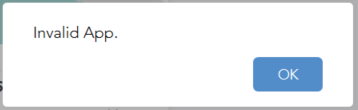
I am not sure what to do differently. I looked through this documentation but it is not clear how I am supposed to proceed.
https://developers.arcgis.com/web-appbuilder/guide/create-import-app.htm#ESRI_SECTION1_CD827E29515941F490AF21F6F2404E35
Am I going about this all wrong? This is my first time using WAB Developer so it's possible I'm not thinking clearly. I am using Firefox on my organizational AGOL account. It also gives me the same error on Chrome (version 50).
When I look at the logs in ...WebAppBuilderForArcGIS\server\logs\appbuilder.log, it just says:
[ERROR] app - Invalid App.
Before that I see:
[INFO] server - Set isXT = true;
Thanks in advance!


