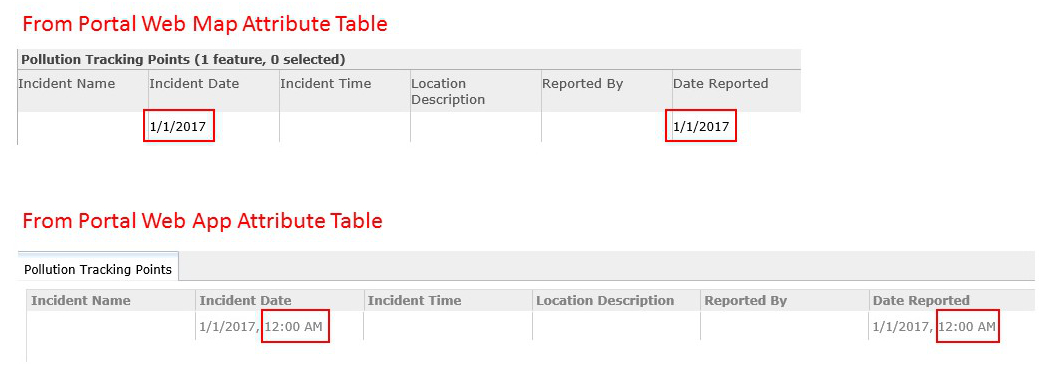
I have created a Portal Web Map that will be used to track pollution incidents. This map will require user input (add and delete points, plus updating attributes etc.). I have about 95% of it working, however, I'm running into issues with the date field. It works perfectly in ArcMap...I have the default date showing up as 1/1/2017. It works perfectly in Portal's Web Map...the default dates will show up correctly in both the popup as well as the attribute table. However, when I launch the Web Mapping Application it behaves differently (and it's the web app that we want users to use).
In the web app the popup will show the correct default date, but when one view's the attribute table it will show the correct date, but for some reason Portal adds a totally useless time stamp, and of course one cannot edit the attribute table in the Web App (and this only occurs in the Web Mapping Application...not the Web Map).
We're asking the users to manually add both an incident reporting time stamp as well as a time stamp for when the tracker was updated (editor tracking doesn't allow them to override and update the times the way they're needed). Having a system generated time stamp as a part of a date field is only going to confuse the users and the readers of the reports. Each table is typically exported to a CSV file to be shared with external agencies and that system generated date-time stamp carries over to that file, and we would prefer not to have to manually edit fields in the spreadsheet every time we need to send out reports.
Is there a way to force Portal to stop creating this annoying time stamp in the Web Mapping Application? I always thought that the Web Mapping Application referred to the Web Map for data and configuration...perhaps I'm misunderstanding this?
Thanks


