The great thing about Web AppBuilder to me is that you get this general layout for your app out of the box. Whether you like the available themes or not, at least you have something resembling a frame and toolbar to house your map. But that's the only thing I like about WAB, and that's why I keep coming back to working with the API.
What I'm missing there is an easy way to build something like a toolbar. View UI is clean and simple enough. But with top-right, bottom-right, top-left, and bottom-left at my disposal, I'm left with few options. Now, I'm not trying to clutter up my apps. I'm a big champion of targeted or focused maps rather than those mother-of-all-web-app type.
I've looked at Bootstrap or Calcite-Bootstrap, and they look great. But for what I'm right now, that's more than I need. I tried a few things with the DOM, and can't seem to get them to work. For example, why doesn't this work...?
<SPAN class="keyword token">const</SPAN> toolbarTable <SPAN class="operator token">=</SPAN> document<SPAN class="punctuation token">.</SPAN><SPAN class="token function">createElement</SPAN><SPAN class="punctuation token">(</SPAN><SPAN class="string token">"table"</SPAN><SPAN class="punctuation token">)</SPAN><SPAN class="punctuation token">;</SPAN>
toolbarTable<SPAN class="punctuation token">.</SPAN>style<SPAN class="punctuation token">.</SPAN>opacity <SPAN class="operator token">=</SPAN> <SPAN class="string token">"1"</SPAN><SPAN class="punctuation token">;</SPAN>
toolbarTable<SPAN class="punctuation token">.</SPAN>style<SPAN class="punctuation token">.</SPAN>width <SPAN class="operator token">=</SPAN> <SPAN class="string token">"200px"</SPAN><SPAN class="punctuation token">;</SPAN>
tollbarTable<SPAN class="punctuation token">.</SPAN>style<SPAN class="punctuation token">.</SPAN>backgroundColor <SPAN class="operator token">=</SPAN> <SPAN class="string token">"#ffffff"</SPAN><SPAN class="punctuation token">;</SPAN>
view<SPAN class="punctuation token">.</SPAN>ui<SPAN class="punctuation token">.</SPAN><SPAN class="token function">add</SPAN><SPAN class="punctuation token">(</SPAN>toolbar<SPAN class="punctuation token">,</SPAN><SPAN class="punctuation token">{</SPAN>
position<SPAN class="punctuation token">:</SPAN> <SPAN class="string token">"top-left"</SPAN>
<SPAN class="punctuation token">}</SPAN><SPAN class="punctuation token">)</SPAN><SPAN class="punctuation token">;</SPAN>
<SPAN class="keyword token">const</SPAN> row <SPAN class="operator token">=</SPAN> table<SPAN class="punctuation token">.</SPAN><SPAN class="token function">insertRow</SPAN><SPAN class="punctuation token">(</SPAN><SPAN class="number token">0</SPAN><SPAN class="punctuation token">)</SPAN><SPAN class="punctuation token">;</SPAN>
<SPAN class="keyword token">const</SPAN> cell1 <SPAN class="operator token">=</SPAN> row<SPAN class="punctuation token">.</SPAN><SPAN class="token function">insertCell</SPAN><SPAN class="punctuation token">(</SPAN><SPAN class="number token">0</SPAN><SPAN class="punctuation token">)</SPAN><SPAN class="punctuation token">;</SPAN>
<SPAN class="keyword token">const</SPAN> cell2 <SPAN class="operator token">=</SPAN> row<SPAN class="punctuation token">.</SPAN><SPAN class="token function">insertCell</SPAN><SPAN class="punctuation token">(</SPAN><SPAN class="number token">1</SPAN><SPAN class="punctuation token">)</SPAN><SPAN class="punctuation token">;</SPAN>
<SPAN class="keyword token">const</SPAN> cell3 <SPAN class="operator token">=</SPAN> row<SPAN class="punctuation token">.</SPAN><SPAN class="token function">insertCell</SPAN><SPAN class="punctuation token">(</SPAN><SPAN class="number token">2</SPAN><SPAN class="punctuation token">)</SPAN><SPAN class="punctuation token">;</SPAN>
<SPAN class="comment token">//Note: I'm not planning to add three Home buttons</SPAN>
<SPAN class="comment token">// just used this for testing widget behavior</SPAN>
<SPAN class="keyword token">const</SPAN> homeBtn1 <SPAN class="operator token">=</SPAN> <SPAN class="keyword token">new</SPAN> <SPAN class="token class-name">Home</SPAN><SPAN class="punctuation token">(</SPAN><SPAN class="punctuation token">{</SPAN>
view <SPAN class="punctuation token">:</SPAN> view<SPAN class="punctuation token">,</SPAN>
container<SPAN class="punctuation token">:</SPAN> cell1
<SPAN class="punctuation token">}</SPAN><SPAN class="punctuation token">)</SPAN><SPAN class="punctuation token">;</SPAN>
<SPAN class="keyword token">const</SPAN> homeBtn2 <SPAN class="operator token">=</SPAN> <SPAN class="keyword token">new</SPAN> <SPAN class="token class-name">Home</SPAN><SPAN class="punctuation token">(</SPAN><SPAN class="punctuation token">{</SPAN>
view <SPAN class="punctuation token">:</SPAN> view<SPAN class="punctuation token">,</SPAN>
container<SPAN class="punctuation token">:</SPAN> cell2
<SPAN class="punctuation token">}</SPAN><SPAN class="punctuation token">)</SPAN><SPAN class="punctuation token">;</SPAN>
<SPAN class="keyword token">const</SPAN> homeBtn3 <SPAN class="operator token">=</SPAN> <SPAN class="keyword token">new</SPAN> <SPAN class="token class-name">Home</SPAN><SPAN class="punctuation token">(</SPAN><SPAN class="punctuation token">{</SPAN>
view <SPAN class="punctuation token">:</SPAN> view<SPAN class="punctuation token">,</SPAN>
container<SPAN class="punctuation token">:</SPAN> cell3
<SPAN class="punctuation token">}</SPAN><SPAN class="punctuation token">)</SPAN><SPAN class="punctuation token">;</SPAN><SPAN class="line-numbers-rows"><SPAN></SPAN><SPAN></SPAN><SPAN></SPAN><SPAN></SPAN><SPAN></SPAN><SPAN></SPAN><SPAN></SPAN><SPAN></SPAN><SPAN></SPAN><SPAN></SPAN><SPAN></SPAN><SPAN></SPAN><SPAN></SPAN><SPAN></SPAN><SPAN></SPAN><SPAN></SPAN><SPAN></SPAN><SPAN></SPAN><SPAN></SPAN><SPAN></SPAN><SPAN></SPAN><SPAN></SPAN><SPAN></SPAN><SPAN></SPAN><SPAN></SPAN><SPAN></SPAN><SPAN></SPAN><SPAN></SPAN><SPAN></SPAN><SPAN></SPAN><SPAN></SPAN><SPAN></SPAN></SPAN>What this does against my expectations create a table with three rows, each with one cell, i.e. the three widgets are stacked one upon the other.
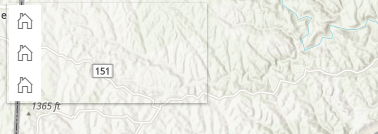
How, if I try just putting some text in the cells - either using .innerHTML or as below, that works fine.
cell1<SPAN class="punctuation token">.</SPAN><SPAN class="token function">append</SPAN><SPAN class="punctuation token">(</SPAN><SPAN class="string token">"Cell 1"</SPAN><SPAN class="punctuation token">)</SPAN><SPAN class="punctuation token">;</SPAN>
cell2<SPAN class="punctuation token">.</SPAN><SPAN class="token function">append</SPAN><SPAN class="punctuation token">(</SPAN><SPAN class="string token">"Cell 2"</SPAN><SPAN class="punctuation token">)</SPAN><SPAN class="punctuation token">;</SPAN>
cell3<SPAN class="punctuation token">.</SPAN><SPAN class="token function">append</SPAN><SPAN class="punctuation token">(</SPAN><SPAN class="string token">"Cell 3"</SPAN><SPAN class="punctuation token">)</SPAN><SPAN class="punctuation token">;</SPAN><SPAN class="line-numbers-rows"><SPAN></SPAN><SPAN></SPAN><SPAN></SPAN></SPAN>
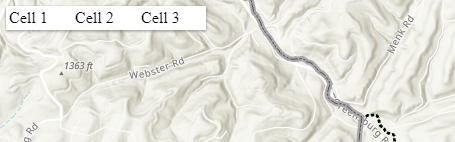
Any idea how to make this work, or other suggestions for creating a horizontal strip or toolbar to hold a number of widgets?

