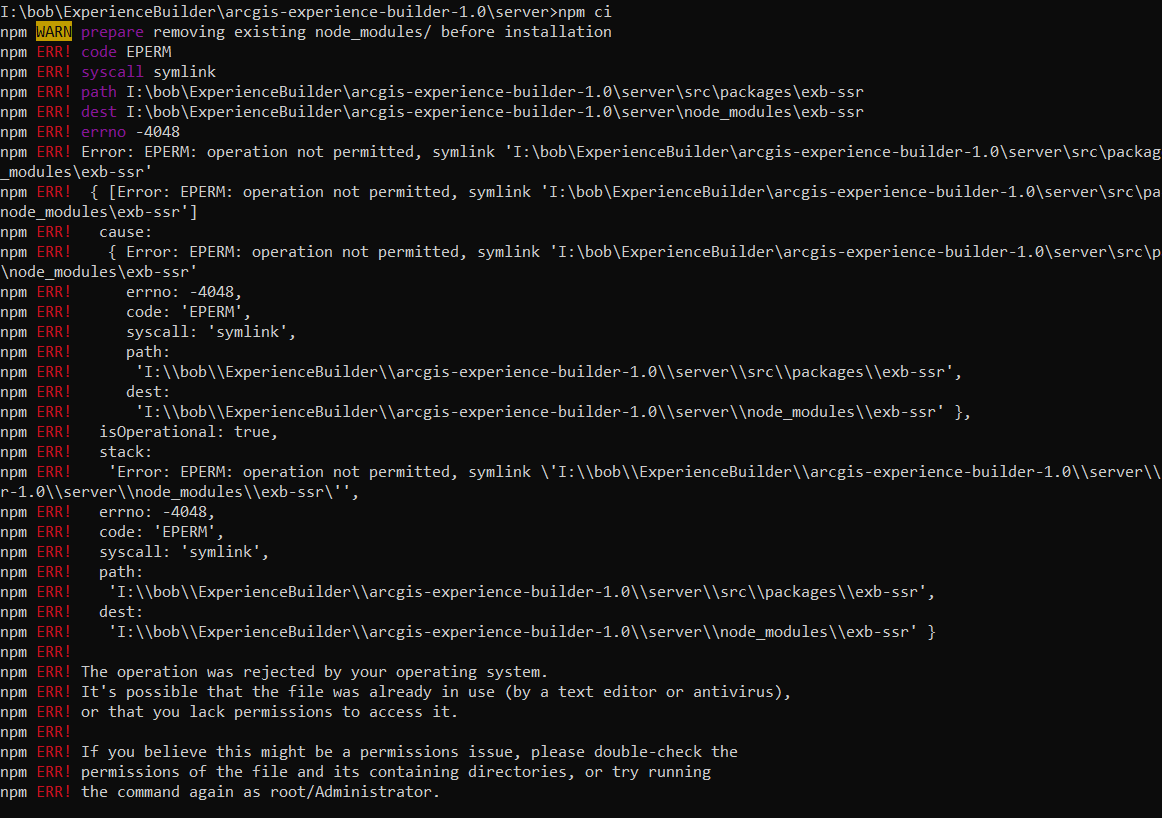
In the process of trying to install the new Experience Builder Developer edition v1.0, I have run into a snag. I followed these instructions: ArcGIS Experience Builder install | ArcGIS Experience Builder up to step 8 for the Server install section. When putting in the command npm ci to install the modules, an error is thrown:
I am running windows 10 and have Node.js 10.19 64 bit installed. Any ides? Thanks!
Try running the command from a command prompt with administrative privileges (in start right click Command Prompt and click "Run as Administrator")
James, thanks for your quick response! I tried your suggestion but unfortunately it didn't work...same error message. Any other suggestions?Sent from my T-Mobile 4G LTE Device
Hi Bob, what rights do you have to your machine? Can you install software etc.?
Thanks,
David
Yes...I have admin rights to load software.Sent from my T-Mobile 4G LTE Device
I figured it out.... I was trying to install on a network drive. I moved it to the c:\ drive and everything install with no problem.
This is good news.
Aangemelde leden kunnen berichten plaatsen, updates volgen en meer. Nieuw hier? Registreer een gratis account.
Find useful guides, FAQs, and documents to help you navigate and make the most of Esri Community.


.png)