Hello,
In ArcGIS Pro I have been trying to utilize the Vary symbology by attribute functionality to drive the size of my symbols from an attribute field. This works great as far as I can tell when it comes to symbols from the Esri style files. However, I have generated some custom symbols in my own library (via importing SVG files) and they are getting cut off when I vary their size via attribute (yet their size can be adjusted without issue when I do it manually/without attribute driven symbol size).
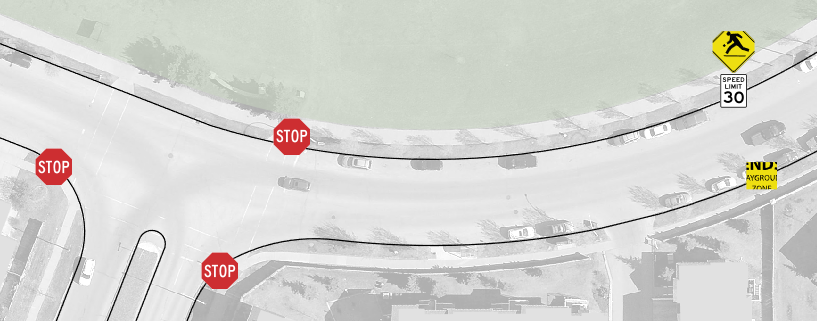
Example below where the stop signs and playground signs are driven by attribute with a value of 25 pts. You can see the playground signs, which are custom graphic symbols, are getting cut off. The stop signs are from the Transportation style file.
As I set the table values to 80 pts, you can see the stop signs scale properly, while the playground signs get further cut off:
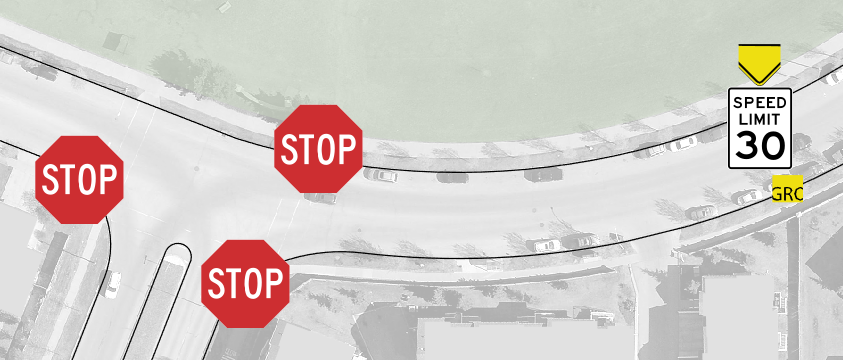
Note that the 30km speed limit symbol layer was added to my custom symbol but it was added from the Transportation style set, which explains its problem-free scaling as shown.
I have tried manipulating a few options within the symbology layers pane, such as the check boxes for "scale proportionally" to no avail.
Just wondering if anyone else has had the issue and knows of a way around it or if this is an indefinite limitation of being able to bring in one's own custom symbols to style libraries.
Thank you for reading.
