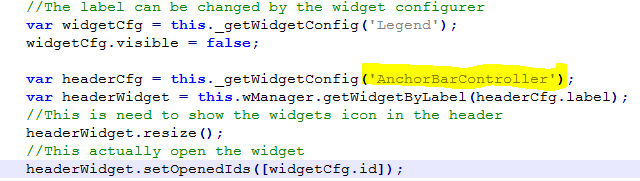
Hello, I have a need to show or hide our widgets based on logged users. I found Robert's post here - https://community.esri.com/thread/174605#comment-598708 . Since we use Launchpad theme, so i simply change "HeaderController" to "AnchorBarController" in the codes, but the Legend Icon didn't appear on the Anchor Bar and didn't open either. Does anybody make the codes work for Lauchpad theme?
Alex.
The Launchpad theme is pretty different.
<SPAN class="keyword token">var</SPAN> widgetCfg <SPAN class="operator token">=</SPAN> <SPAN class="keyword token">this</SPAN><SPAN class="punctuation token">.</SPAN><SPAN class="token function">_getWidgetConfig</SPAN><SPAN class="punctuation token">(</SPAN><SPAN class="string token">'Draw'</SPAN><SPAN class="punctuation token">)</SPAN><SPAN class="punctuation token">;</SPAN> widgetCfg<SPAN class="punctuation token">.</SPAN>visible <SPAN class="operator token">=</SPAN> <SPAN class="keyword token">true</SPAN><SPAN class="punctuation token">;</SPAN> <SPAN class="keyword token">var</SPAN> anchorCfg <SPAN class="operator token">=</SPAN> <SPAN class="keyword token">this</SPAN><SPAN class="punctuation token">.</SPAN><SPAN class="token function">_getWidgetConfig</SPAN><SPAN class="punctuation token">(</SPAN><SPAN class="string token">'AnchorBarController'</SPAN><SPAN class="punctuation token">)</SPAN><SPAN class="punctuation token">;</SPAN> <SPAN class="keyword token">var</SPAN> anchorWidget <SPAN class="operator token">=</SPAN> <SPAN class="keyword token">this</SPAN><SPAN class="punctuation token">.</SPAN>wManager<SPAN class="punctuation token">.</SPAN><SPAN class="token function">getWidgetByLabel</SPAN><SPAN class="punctuation token">(</SPAN>anchorCfg<SPAN class="punctuation token">.</SPAN>label<SPAN class="punctuation token">)</SPAN><SPAN class="punctuation token">;</SPAN> <SPAN class="comment token">//This actually open the widget</SPAN> anchorWidget<SPAN class="punctuation token">.</SPAN><SPAN class="token function">_createItem</SPAN><SPAN class="punctuation token">(</SPAN>widgetCfg<SPAN class="punctuation token">,</SPAN> anchorWidget<SPAN class="punctuation token">.</SPAN>iconList<SPAN class="punctuation token">.</SPAN>length <SPAN class="operator token">+</SPAN> <SPAN class="number token">1</SPAN><SPAN class="punctuation token">)</SPAN><SPAN class="punctuation token">;</SPAN> anchorWidget<SPAN class="punctuation token">.</SPAN><SPAN class="token function">setOpenedIds</SPAN><SPAN class="punctuation token">(</SPAN><SPAN class="punctuation token">[</SPAN>widgetCfg<SPAN class="punctuation token">.</SPAN>id<SPAN class="punctuation token">]</SPAN><SPAN class="punctuation token">)</SPAN><SPAN class="punctuation token">;</SPAN> <SPAN class="comment token">//This is need to show the widgets icon in the header</SPAN> anchorWidget<SPAN class="punctuation token">.</SPAN><SPAN class="token function">resize</SPAN><SPAN class="punctuation token">(</SPAN><SPAN class="punctuation token">)</SPAN><SPAN class="punctuation token">;</SPAN> anchorWidget<SPAN class="punctuation token">.</SPAN><SPAN class="token function">_makeIconVisible</SPAN><SPAN class="punctuation token">(</SPAN>anchorWidget<SPAN class="punctuation token">.</SPAN>iconList<SPAN class="punctuation token">.</SPAN>length<SPAN class="punctuation token">)</SPAN><SPAN class="punctuation token">;</SPAN><SPAN class="line-numbers-rows"><SPAN></SPAN><SPAN></SPAN><SPAN></SPAN><SPAN></SPAN><SPAN></SPAN><SPAN></SPAN><SPAN></SPAN><SPAN></SPAN><SPAN></SPAN><SPAN></SPAN><SPAN></SPAN></SPAN>
Alex,
Sorry, I don't have any insight on off panel widgets like the AT widget.
Thanks again Robert. I tested that the codes didn't work for on-screen widgets such as Attribute Table Widget. Can you please shed some light one more time?
WOW!!! worked perfectly. Thank you so much for your help! I'll never be able to figure it out by myself.
This will keep the widget index correct:
<SPAN class="keyword token">var</SPAN> widgetCfg <SPAN class="operator token">=</SPAN> <SPAN class="keyword token">this</SPAN><SPAN class="punctuation token">.</SPAN><SPAN class="token function">_getWidgetConfig</SPAN><SPAN class="punctuation token">(</SPAN><SPAN class="string token">'Draw'</SPAN><SPAN class="punctuation token">)</SPAN><SPAN class="punctuation token">;</SPAN> widgetCfg<SPAN class="punctuation token">.</SPAN>visible <SPAN class="operator token">=</SPAN> <SPAN class="keyword token">true</SPAN><SPAN class="punctuation token">;</SPAN> <SPAN class="keyword token">var</SPAN> anchorCfg <SPAN class="operator token">=</SPAN> <SPAN class="keyword token">this</SPAN><SPAN class="punctuation token">.</SPAN><SPAN class="token function">_getWidgetConfig</SPAN><SPAN class="punctuation token">(</SPAN><SPAN class="string token">'AnchorBarController'</SPAN><SPAN class="punctuation token">)</SPAN><SPAN class="punctuation token">;</SPAN> <SPAN class="keyword token">var</SPAN> anchorWidget <SPAN class="operator token">=</SPAN> <SPAN class="keyword token">this</SPAN><SPAN class="punctuation token">.</SPAN>wManager<SPAN class="punctuation token">.</SPAN><SPAN class="token function">getWidgetByLabel</SPAN><SPAN class="punctuation token">(</SPAN>anchorCfg<SPAN class="punctuation token">.</SPAN>label<SPAN class="punctuation token">)</SPAN><SPAN class="punctuation token">;</SPAN> <SPAN class="comment token">//Save the ids of any opened widgets</SPAN> <SPAN class="keyword token">var</SPAN> oids <SPAN class="operator token">=</SPAN> anchorWidget<SPAN class="punctuation token">.</SPAN><SPAN class="token function">getOpenedIds</SPAN><SPAN class="punctuation token">(</SPAN><SPAN class="punctuation token">)</SPAN><SPAN class="punctuation token">;</SPAN> oids<SPAN class="punctuation token">.</SPAN><SPAN class="token function">push</SPAN><SPAN class="punctuation token">(</SPAN>widgetCfg<SPAN class="punctuation token">.</SPAN>id<SPAN class="punctuation token">)</SPAN><SPAN class="punctuation token">;</SPAN> <SPAN class="comment token">//This removes all the existing icons</SPAN> anchorWidget<SPAN class="punctuation token">.</SPAN><SPAN class="token function">clearIconGroupNode</SPAN><SPAN class="punctuation token">(</SPAN><SPAN class="punctuation token">)</SPAN><SPAN class="punctuation token">;</SPAN> <SPAN class="comment token">//This will recreate all the icons now that one of more visible property has changed</SPAN> anchorWidget<SPAN class="punctuation token">.</SPAN><SPAN class="token function">postCreate</SPAN><SPAN class="punctuation token">(</SPAN><SPAN class="punctuation token">)</SPAN><SPAN class="punctuation token">;</SPAN> anchorWidget<SPAN class="punctuation token">.</SPAN><SPAN class="token function">setOpenedIds</SPAN><SPAN class="punctuation token">(</SPAN>oids<SPAN class="punctuation token">)</SPAN><SPAN class="punctuation token">;</SPAN> <SPAN class="comment token">//This is need to show the widgets icon in the header</SPAN> anchorWidget<SPAN class="punctuation token">.</SPAN><SPAN class="token function">resize</SPAN><SPAN class="punctuation token">(</SPAN><SPAN class="punctuation token">)</SPAN><SPAN class="punctuation token">;</SPAN><SPAN class="line-numbers-rows"><SPAN></SPAN><SPAN></SPAN><SPAN></SPAN><SPAN></SPAN><SPAN></SPAN><SPAN></SPAN><SPAN></SPAN><SPAN></SPAN><SPAN></SPAN><SPAN></SPAN><SPAN></SPAN><SPAN></SPAN><SPAN></SPAN><SPAN></SPAN><SPAN></SPAN></SPAN>
OK, thanks Roberts. Can you do it in an opposite way - to set the Draw widget visible at startup, then hide it later?
No not that I am aware of as the anchor bar controller creates all visible widgets at startup and invisible ones are ignored.
Appreciate it, Robert. Your codes worked. The only thing was that the widget was added at the end of the Anchor bar. I tried to set the index to its original index (widgetCfg.index = 2; ), but it was still added at the end. is there a way to add it as the first one instead of the last one?
Aangemelde leden kunnen berichten plaatsen, updates volgen en meer. Nieuw hier? Registreer een gratis account.
Find useful guides, FAQs, and documents to help you navigate and make the most of Esri Community.