Good morning. I have added a splash window to my application as shown below.
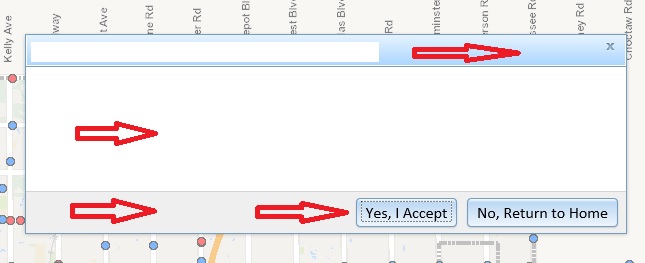
I am looking to change the colors of the title banner, main text space, bottom banner, button color, and dialog border (see red arrows). I am using the DIV ID's and trying to specify the properties in .css, but I am not getting what I need.
Here is a sample of my HTML code:
<!-- Application Splash Screen -->
<div data-dojo-type="dijit/Dialog" data-dojo-id="dialogWelcome" id="dialogWelcomeTitle" title="City of Edmond, Oklahoma - Survey Monuments" style="width: 600px;">
<table class="dijitDialogPaneContentArea">
<tr>
<td>
<div id="splashScreenDialogMessage">
This is where the main test goes.
<br>
</div>
</td>
</tr>
</table>
<div class="dijitDialogPaneActionBar">
<div dojotype="dijit.form.Button" id="buttonClose" data-dojo-type="dijit/form/Button" type="button" style="align-content: center" onclick="dialogWelcome.onCancel();">Yes, I Accept</div>
<div dojotype="dijit.form.Button" id="buttonExit" data-dojo-type="dijit/form/Button" type="button" style="align-content: center">No, Return to Home</div>
</div>
</div>
I have looked at the dijit guide online for assistance, but have not found what I am looking for. For those who have customized some splash screen windows, can you provide some guidance? Thank you.


