I'm using the Search widget to allow users to search for parcel addresses. The Search process is working properly except it places a blue graphic on the map even though I'm specifying that I don't want a graphic. I'm assigning my own symbology to the selected feature (the orange border in the below image), and I don't want the additional blue graphic that is being forced on the selected feature.
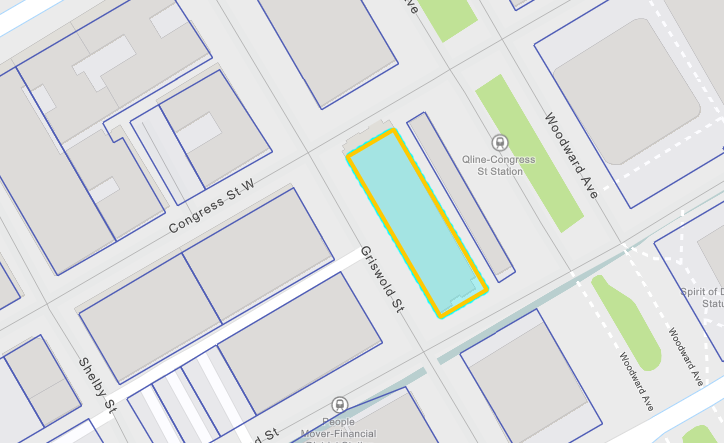
Here is my code for the search process:
<SPAN class="comment token">//Create search tool to search addresses</SPAN>
<SPAN class="keyword token">const</SPAN> searchTool <SPAN class="operator token">=</SPAN> <SPAN class="keyword token">new</SPAN> <SPAN class="token class-name">Search</SPAN><SPAN class="punctuation token">(</SPAN><SPAN class="punctuation token">{</SPAN>
view<SPAN class="punctuation token">:</SPAN> myView<SPAN class="punctuation token">,</SPAN>
sources<SPAN class="punctuation token">:</SPAN> <SPAN class="punctuation token">[</SPAN>
<SPAN class="punctuation token">{</SPAN>
layer<SPAN class="punctuation token">:</SPAN> parcelLyr<SPAN class="punctuation token">,</SPAN>
searchFields<SPAN class="punctuation token">:</SPAN> <SPAN class="punctuation token">[</SPAN><SPAN class="string token">"propstreet"</SPAN><SPAN class="punctuation token">]</SPAN><SPAN class="punctuation token">,</SPAN>
displayField<SPAN class="punctuation token">:</SPAN> <SPAN class="string token">"propstreet"</SPAN><SPAN class="punctuation token">,</SPAN>
name<SPAN class="punctuation token">:</SPAN> <SPAN class="string token">"LayerSearchSource"</SPAN><SPAN class="punctuation token">,</SPAN>
placeholder<SPAN class="punctuation token">:</SPAN> <SPAN class="string token">"example: 500 Griswold"</SPAN><SPAN class="punctuation token">,</SPAN>
suggestionsEnabled<SPAN class="punctuation token">:</SPAN> <SPAN class="keyword token">true</SPAN><SPAN class="punctuation token">,</SPAN>
<SPAN class="comment token">//autoNavigate: true,</SPAN>
resultGraphicEnabled<SPAN class="punctuation token">:</SPAN> <SPAN class="keyword token">false</SPAN>
<SPAN class="punctuation token">}</SPAN>
<SPAN class="punctuation token">]</SPAN><SPAN class="punctuation token">,</SPAN>
container<SPAN class="punctuation token">:</SPAN> addressSearchBar<SPAN class="punctuation token">,</SPAN>
includeDefaultSources<SPAN class="punctuation token">:</SPAN> <SPAN class="keyword token">false</SPAN><SPAN class="punctuation token">,</SPAN>
resultGraphicEnabled<SPAN class="punctuation token">:</SPAN> <SPAN class="keyword token">false</SPAN>
<SPAN class="punctuation token">}</SPAN><SPAN class="punctuation token">)</SPAN>
searchTool<SPAN class="punctuation token">.</SPAN><SPAN class="token function">on</SPAN><SPAN class="punctuation token">(</SPAN><SPAN class="string token">"select-result"</SPAN><SPAN class="punctuation token">,</SPAN> <SPAN class="keyword token">function</SPAN><SPAN class="punctuation token">(</SPAN>event<SPAN class="punctuation token">)</SPAN><SPAN class="punctuation token">{</SPAN>
console<SPAN class="punctuation token">.</SPAN><SPAN class="token function">log</SPAN><SPAN class="punctuation token">(</SPAN><SPAN class="string token">"location was chosen "</SPAN><SPAN class="punctuation token">,</SPAN> event<SPAN class="punctuation token">)</SPAN>
long <SPAN class="operator token">=</SPAN> event<SPAN class="punctuation token">.</SPAN>result<SPAN class="punctuation token">.</SPAN>feature<SPAN class="punctuation token">.</SPAN>geometry<SPAN class="punctuation token">.</SPAN>centroid<SPAN class="punctuation token">.</SPAN>longitude <SPAN class="operator token">+</SPAN> <SPAN class="number token">0.003</SPAN>
lat <SPAN class="operator token">=</SPAN> event<SPAN class="punctuation token">.</SPAN>result<SPAN class="punctuation token">.</SPAN>feature<SPAN class="punctuation token">.</SPAN>geometry<SPAN class="punctuation token">.</SPAN>centroid<SPAN class="punctuation token">.</SPAN>latitude
myView<SPAN class="punctuation token">.</SPAN>center <SPAN class="operator token">=</SPAN> <SPAN class="punctuation token">[</SPAN>long<SPAN class="punctuation token">,</SPAN> lat<SPAN class="punctuation token">]</SPAN><SPAN class="punctuation token">;</SPAN>
myView<SPAN class="punctuation token">.</SPAN>zoom <SPAN class="operator token">=</SPAN> <SPAN class="number token">16</SPAN>
console<SPAN class="punctuation token">.</SPAN><SPAN class="token function">log</SPAN><SPAN class="punctuation token">(</SPAN><SPAN class="string token">"geometry: "</SPAN><SPAN class="punctuation token">,</SPAN> event<SPAN class="punctuation token">.</SPAN>result<SPAN class="punctuation token">.</SPAN>feature<SPAN class="punctuation token">.</SPAN>geometry<SPAN class="punctuation token">)</SPAN>
selectedParcel <SPAN class="operator token">=</SPAN> event<SPAN class="punctuation token">.</SPAN>result<SPAN class="punctuation token">.</SPAN>feature
<SPAN class="token function">createHighlightedParcel</SPAN><SPAN class="punctuation token">(</SPAN><SPAN class="punctuation token">)</SPAN><SPAN class="punctuation token">;</SPAN>
<SPAN class="punctuation token">}</SPAN><SPAN class="punctuation token">)</SPAN><SPAN class="line-numbers-rows"><SPAN></SPAN><SPAN></SPAN><SPAN></SPAN><SPAN></SPAN><SPAN></SPAN><SPAN></SPAN><SPAN></SPAN><SPAN></SPAN><SPAN></SPAN><SPAN></SPAN><SPAN></SPAN><SPAN></SPAN><SPAN></SPAN><SPAN></SPAN><SPAN></SPAN><SPAN></SPAN><SPAN></SPAN><SPAN></SPAN><SPAN></SPAN><SPAN></SPAN><SPAN></SPAN><SPAN></SPAN><SPAN></SPAN><SPAN></SPAN><SPAN></SPAN><SPAN></SPAN><SPAN></SPAN><SPAN></SPAN><SPAN></SPAN><SPAN></SPAN><SPAN></SPAN></SPAN>I create my own symbology in the createHighlightedParcel() function at the end. My understanding is that setting resultGraphicEnabled to false should remove the result graphic. Am I wrong about this? Is there another way to prevent the result graphic?
Thank you


