In an editor widget in Experience Builder:
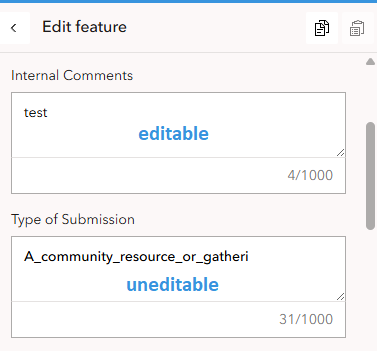
I have fields that are editable and fields that are uneditable. The uneditable fields are defined that way in the web map form configuration.
The editable and the uneditable fields look the same in Experience Builder. There's no way to tell what fields are uneditable except to click on the field to see if I get a cursor or not. From a colleague: "The field border even changes to blue when you click a read-only field, just like the editable fields, making it seem like you can edit the read-only field, which is misleading."
Could that functionality be changed so that it's more obvious that the fields are read-only? Such as greying the fields out, but still allowing the text to be selectable.



